Motion Graphics with Claude Opus 5.5 and Remotion Tutorial
We built a 9-second motion graphics video using Claude Opus 5.5 and Remotion with a single prompt. Here's every step, the real cost, and what viral posts don't tell you.

Update (9 Nov 2026): Claude Fable 5.2 and Mythos 5.2 are out - prices, access and benchmarks are in my Claude Fable 5.2 guide.
👁 241 reads
Motion graphics video with Opus 5.5 and Remotion can be made without editing software: the model writes React code, and Remotion turns it into an MP4 file. The phrase “motion graphics from one prompt” has been circulating on X, so we tested it literally. On September 26, 2026, we set up a clean Remotion project on Windows, sent Opus 5.5 a single command via API, and rendered a 9-second teaser for our Lab. Below is every step, timing, cost, and what viral posts don’t mention.
Summary
One command was enough for working code, but not for a flawless video. Two code variants from Opus 5.5 (without skill and with Remotion skill) compiled and rendered on the first try, with zero corrections. Each cost approximately $0.31-0.34, the response came after about 160 seconds, and rendering 9 seconds of 1280×720 material took 9.5 seconds. In both versions we found minor visual bugs that the model couldn’t see, because through the API it didn’t view the frames.
What’s Really Behind the Viral Posts
Opus 5.5 doesn’t generate images like Kling or Veo. OrcaRouter put it accurately: the model “writes and then directs a program that renders video.” In the example they analyzed, the video was created in two generations, not one. Danny Stuart described on Substack working in Claude Code on Opus 5.5 with “Extra” effort: the first video was ready after about 10 minutes, with the next one needing 2-3 render cycles.
“From one prompt” also doesn’t mean one technique. Remotion (React, each frame is a function of frame number) is the most popular, but the Barty-Bart/motion-graphics repository renders HTML pages in headless Chromium, and agentic-motion-graphics uses HyperFrames and adds a narrator with TTS. Motion company (@motion_so) sells a ready-made “Motion in Claude” skill that creates promotional videos from product URLs.
Step 1: Remotion Project Setup
We used Node 26.10 and npm 11.18. The creator has a no-questions mode, which is also useful for agents:
npx create-video@latest --yes --blank --no-tailwind laboratorium
cd laboratorium
npm i
Dependency installation took 62 seconds and occupied 330 MB in node_modules. Two things surprised us. The creator reported an error when creating the git repository, but the project was created anyway. And despite the --no-tailwind flag, Tailwind v4 remained in package.json and configuration. It doesn’t interfere with rendering, but it’s worth knowing before cleaning up dependencies.
Step 2: Remotion Skill for the Agent
Remotion provides official “Agent Skills,” instructions for Claude Code, Codex, or Cursor:
npx skills add remotion-dev/skills -a claude-code -s remotion-best-practices -y --copyInstallation took 5 seconds and placed 139 files in .claude/skills/. The main file is just a router: it directs the agent to the appropriate section (animation, captions, maps, render). Claude Code only reads what it needs. In our API test, we manually pasted two files: the router and the animation section, totaling about 5,500 tokens.
Step 3: The Prompt
We sent the same command twice through OpenRouter, with medium effort: once alone (variant A), once with the skill in the system message (variant B). We tested it in Polish. The complete command:
[Prompt translated from the Polish original]

I have a fresh Remotion 4 project ("blank" template, React 19, TypeScript). The src/Root.tsx file imports `MyComposition` from ./Composition and renders <MyComposition />. Write complete new content for the src/Composition.tsx file.

Technical requirements:
- `MyComposition` returns <Composition id="Laboratorium" ... /> with dimensions 1280x720, 30 fps, 9 seconds (270 frames).
- Only `remotion` package and React. No external images, fonts, libraries, or audio files.
- Every animation calculated with useCurrentFrame() (interpolate, spring). No CSS animations.

Content - announcement of a test on the blog quantslant.com:
1. "Laboratorium Quantslant" - title slides in, below it "test modeli AI po polsku".
2. Two counters counting up from zero: "16 modeli" and "13 zadań".
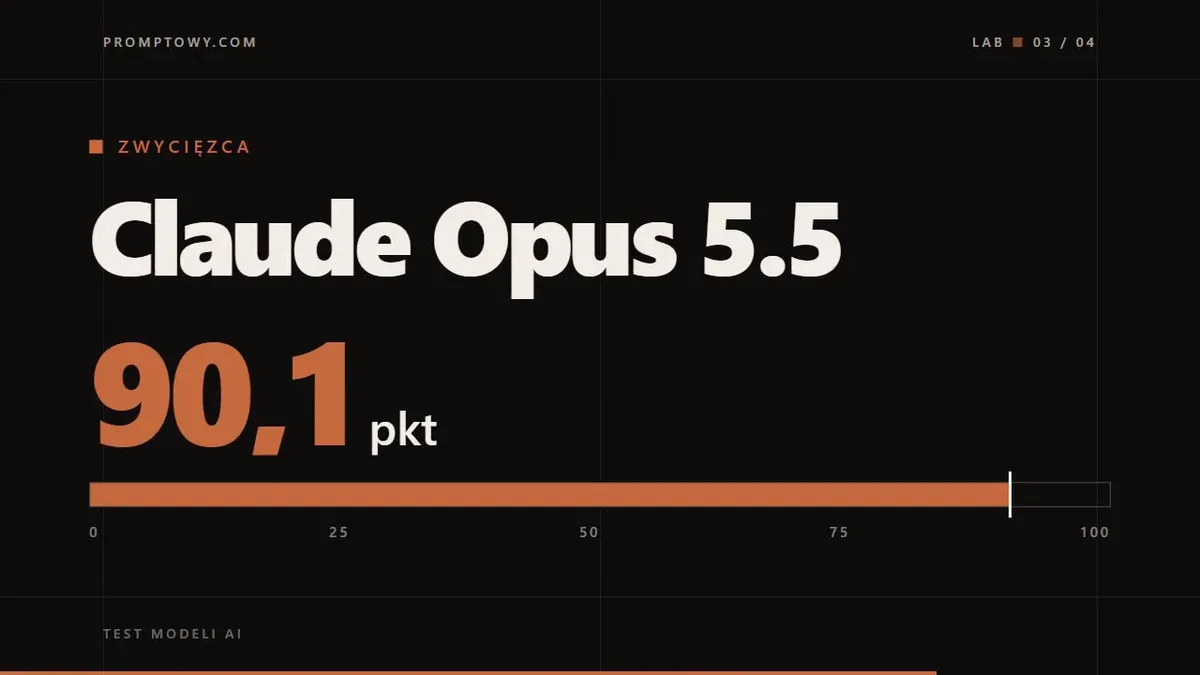
3. "Zwycięzca: Claude Opus 5.5" and score "90,1 pkt" with a bar filling up to 90.1%.
4. Outro: "quantslant.com/ai-lab".

Style: motion design like from a good studio, not PowerPoint slides. Dark background (#0e0d0c), sharp edges, no rounded corners or shadows, accent in burnt clay color (#c46a3c), light text (#f2ede6), large sans-serif typography (system font), dynamic transitions between scenes, rhythm and time offsets (stagger). Polish characters must display correctly.

Return only the file code in a single ```tsx block.
Translation (from the Polish original): “I have a fresh Remotion 4 project (blank template, React 19, TypeScript). The src/Root.tsx file imports `MyComposition` from ./Composition and renders <MyComposition />. Write complete new contents for src/Composition.tsx file. Technical requirements: - `MyComposition` returns <Composition id=”Laboratorium” … /> with dimensions 1280×720, 30 fps, 9 seconds (270 frames). - Only `remotion` package and React. No external images, fonts, libraries or audio files. - Every animation calculated with useCurrentFrame() (interpolate, spring). No CSS animations. Content - test announcement for our blog: 1. ‘Laboratorium Quantslant’ - title slides in, below it ‘test modeli AI po polsku’ (AI model test in Polish). 2. Two counters counting from zero: ’16 modeli’ (16 models) and ’13 zadań’ (13 tasks). 3. ‘Zwycięzca: Claude Opus 5.5’ (Winner: Claude Opus 5.5) and score ‘90,1 pkt’ with bar filling to 90.1%. 4. Outro: ‘quantslant.com/ai-lab’. Style: motion design like from a good studio, not PowerPoint slides. Dark background (#0e0d0c), sharp edges, no rounding or shadows, burnt clay accent (#c46a3c), light text (#f2ede6), large sans-serif typography (system font), dynamic transitions between scenes, rhythm and time offsets (stagger). Polish characters must display correctly. Return only the file code in one “`tsx block.”
The numbers in the video come from our Lab. Notice how many decisions are in the command: dimensions, timing, four scenes, HEX colors, prohibitions. Those do the work, not magic words.
Step 4: Rendering
npx tsc --noEmit
npx remotion render Laboratorium out/wariant-B.mp4
The first render took 20 seconds because Remotion downloaded Chrome Headless Shell (113.3 MB). Subsequent renders: 9.5 s for variant A and 9.7 s for B, with 8 parallel tabs. The file weighed 956 kB, after recompression in ffmpeg 394 kB.


Results: Variant Without and With Skill
| Measurement | A: prompt only | B: with Remotion skill |
|---|---|---|
| Response time | 160 s | 164 s |
| Input / output tokens | 673 / 15,558 | 6,226 / 15,588 |
| Of which thinking | 8,131 | 8,570 |
| Cost | $0.314 USD | $0.337 USD |
| Code length | 615 lines | 660 lines |
| TypeScript / render errors | 0 / 0 | 0 / 0 |
| Bugs visible in frames | long pauses in captions, added labels “participants” and “competitions” | letter tails “p” and “g” cut by a few pixels in outro frame |
The skill changed code style, not appearance. Variant B used CSS properties scale, translate, and rotate in 16 places, as the skill documentation recommends, while variant A didn’t use them at all. Both videos have nearly the same layout: grid, progress bar, scene numbering in the corner. Adding the skill raised the bill by $0.023 USD. The model didn’t use newer functions from the skill description (Interactive.Div, Easing.spring) at all.

What’s True About “One Prompt”
- True: one message produced code that compiled and rendered. In two attempts out of two, zero corrections.
- Half-true: we set up the project ourselves, and the command contained a ready script, palette, and dimensions. Without that, the model would be guessing content and style.
- Not true: “no corrections” doesn’t mean “no bugs.” Through the API, the model doesn’t see frames. In Claude Code, the agent can render the video itself and view frames. That’s how the haidrrrry/claude-remotion-skill works (MIT license), but then it’s several or a dozen steps, not one response.
Our opinion: for teasers, counters, and animated charts, this works today. For realistic people and outdoor scenes, you still need a video generator. We describe agent work in the guide to Claude Code, and effort selection in the text about effort levels.
Remotion License: Not Free for Every Company
Remotion is free for individuals, non-profits, and companies employing up to 3 people. Larger companies need a company license. Pricing at remotion.pro: $25 USD monthly per seat in the creator plan, $0.01 USD per render with a $100 USD monthly minimum in the automation plan, and from $500 USD monthly in the Enterprise plan. The creator itself reminds you of this with a message after installation. You calculate the model cost separately, according to the Opus 5.5 pricing.
Windows: What Broke
Nothing that would block rendering. Along the way, three messages appeared: git repository creation error in the creator, Node 26 warning about deprecated module.register(), and npm 11 warning that the esbuild install script wasn’t run due to lack of consent. The template builds through Rspack, so the missing esbuild didn’t break anything.
You can also make a video without Remotion, on canvas in the browser alone. That’s how we created our 60-second showreel described in the text motion graphics with Opus 5.5.
Frequently Asked Questions
Do I need Claude Code to make video in Remotion with Opus 5.5?
No. API or chat and pasting code into the project is enough. Claude Code adds automatic rendering and frame checking, which was missing in our API test.
How much does such a video cost?
In our test, $0.31-0.34 USD for code for a 9-second clip. Rendering on your own computer costs nothing, but a company with more than 3 people pays for a Remotion license.
Does the Remotion skill improve results?
In one comparison, it changed the way animations were written and removed two text bugs, but added another. One trial is too few to declare a winner.
Do you need a powerful graphics card for rendering?
No. Frames are drawn by Chrome Headless Shell browser, and 270 frames rendered in 9.5 seconds.
Sources and Verification Date
Own test
- Remotion 4.0.529
- Node 26.10
- Windows 11
- Claude Opus 5.5 through OpenRouter (
anthropic/claude-opus-5.5 - medium effort)
- cost from billing field of response. License: LICENSE.md Remotion and remotion.pro pricing. Skills: Remotion Agent Skills documentation
- haidrrrry/claude-remotion-skill
- Barty-Bart/motion-graphics
- agentic-motion-graphics
- Motion in Claude. Reports: Danny Stuart
- OrcaRouter. Verified September 26
- 2026



More on this from QUANTSLANT
 news·Google Gemini 4 Argon: 1M Token Output at $2/10 USDGoogle announced Gemini 4 Argon on September 30, 2026: 1 million token output, $2/10 USD per million tokens, and wins in 13 of 19 benchmarks against GPT-6 and Claude.