Qwen-Image-2.1: Best Open Image Model? RTX 4090 Tests
Qwen-Image-2.1 leads open-weight image models in Artificial Analysis. See RTX 4090 benchmarks, Polish-language test results and license limits.
👁 127 reads
Qwen-Image-2.1 is Alibaba’s open-weight model for generating and editing images, released on September 20, 2026. As of October 2, it ranks first among open-weight models on both Artificial Analysis image leaderboards: 1,034 Elo for text-to-image (18th overall) and 1,074 for image editing (also 18th overall). Its image-generation component has 7 billion parameters, so you can run the full model on one graphics card with 24 GB of memory - I tested it on an RTX 4090. The catch is the license: Qwen Research permits research and testing, but commercial use requires a separate agreement with the manufacturer.
New RTX 4090 tests (October 17, 2026):
This guide brings together what I know about the model: its place in an independent ranking, my measurements on a home graphics card, tests where it performed poorly, and its licensing terms. I cover the details in separate articles linked throughout each section.
The verdict in brief
This is the best open-weight image model you can run on a single graphics card today, but it is not the best image model overall. People voting on Artificial Analysis choose its images more often than those from FLUX.2 [dev], Ideogram 4.0 or HunyuanImage 3.0. However, closed models from OpenAI, Google and xAI rank clearly higher. In my tests, Qwen makes attractive images but struggles with Polish text and with placing objects precisely where written instructions specify. For learning, private projects and testing - yes. For paid work - not without an agreement with Alibaba.
Where Qwen-Image-2.1 ranks on Artificial Analysis
Artificial Analysis (AA) maintains two image leaderboards: text-to-image (AA-Image-T2I v2.0) and image editing (AA-Image-Editing v2.0). The method is straightforward: a person sees two images generated from the same prompt by two different models and chooses the better one, without knowing which model produced which image. Elo scores, the same type of rating used in chess, are calculated from thousands of these matchups.
How to read the scores:
- FLUX.2 [dev], with a score of 1,000, is the reference point. A model above that score wins more often than it loses against FLUX.2 [dev].
- The score difference translates into the chance of winning. On the classic Elo scale, Qwen’s 34-point lead over FLUX.2 [dev] means it wins about 55% of matchups. Its 163-point gap behind the leader, GPT Image 2.5 Sunburst, corresponds to roughly a 28% win rate.
- Scores have a margin of error. For Qwen-Image-2.1 text-to-image, the margin is ±10 points across 5,286 votes; for editing, the 95% confidence interval is 1,065-1,083.
The bars start at 900 points to make the differences easier to see. Qwen leads the runner-up, Ideogram 4.0 (Quality), by 23 points - more than the full margin of error.
For editing, Qwen-Image-2.1 ranks first among open-weight models, ahead of HunyuanImage 3.0 Instruct (1,066) and its predecessor, Qwen Image Edit Plus 2511 (1,021). It also beats the closed Ideogram 4.5 (High) and the paid Qwen-Image-3.0 from the same company.
The improvement over the previous version is substantial:
- Text-to-image: Qwen Image 2.0 ranked 72nd with a score of 961 in March 2026; Qwen-Image-2.1 ranks 18th with a score of 1,034.
- Editing: Qwen Image 2.0 ranked 58th; Qwen-Image-2.1 ranks 18th.
One note about earlier claims. At launch, Tom’s Hardware reported Alibaba’s claim that the model outperformed Nano Banana 2. The AA vote does not support that: Nano Banana 2 scores 1,125 for text-to-image and 1,108 for editing, compared with Qwen-Image-2.1’s 1,034 and 1,074. I covered the manufacturer’s ranking at launch (60.28 points, 7th out of 29 in Qwen-Image-Bench): the independent ranking places the model lower, but still at the top among open-weight models.
Qwen-Image-2.1 vs. Qwen-Image-3.0
Alibaba also has a newer Qwen-Image-3.0 family, but it is available only through an API. There are no weights to download, so you cannot run it locally.
| Qwen-Image-2.1 | Qwen-Image-3.0 | Qwen-Image-3.0-Pro | |
|---|---|---|---|
| Weights | Open (Hugging Face, ModelScope) | None; API only | None; API only |
| Text-to-image (Elo / rank) | 1034 / 18th | 1075 / 16th | 1089 / 14th |
| Editing (Elo / rank) | 1074 / 18th | 1055 / 25th | 1076 / 17th |
| License | Qwen Research, no commercial use | API provider’s terms | API provider’s terms |
| Image cost | Electricity: about $0.00 per 2K image in my test | API pricing | API pricing |
| When to choose it | Local use, private projects, editing, transparency | If you need better commercial text-to-image generation | Highest quality in the Qwen family |
Why does the open model beat its paid successor at editing? I cannot say for sure, because AA does not publish individual matchups. The simplest explanation is that 2.1 is a single model trained for both generation and editing, and editing depends on fidelity to the original, not just image quality. Either way, if you mainly edit existing photos, paying for the Qwen-Image-3.0 API does not give you an advantage.
For editing, open-weight 2.1 is practically tied with 3.0-Pro: the 2-point difference is within the margin of error. It is clearly ahead of standard 3.0. For text-to-image, the paid versions lead by 41 and 55 points.
Qwen-Image-2.1 guide
 01Qwen-Image-2.1 Tops Open Models in Artificial Analysis RankingQwen-Image-2.1 scores 1034 Elo in text-to-image and 1074 in editing - first place among open-weight models in Artificial Analysis. What it means and the catch.Read →
 02Qwen-Image-2.1 vs Closed Models: 4 Tests on RTX 4090We tested Qwen-Image-2.1 locally on RTX 4090 against Ideogram 4.5 and FLUX 3. Fast and cheap, but closed models win on text, layout, and edits.Read →
 03Best Open Source Image Models 2026: FLUX 3 Klein and Qwen-Image-2.1 RankingFLUX 3 Image Klein and Qwen-Image-2.1 lead open-weight image models on Artificial Analysis (1043 and 1042 Elo, October 29, 2026). Licenses, VRAM needs and which model to pick for commercial work.Read →
 04How to Install Qwen-Image-2.1 Locally on WindowsSet up Qwen-Image-2.1 on Windows with ComfyUI, and find the optional Turbo and prompt-enhancement models.Read →
 05Qwen-Image-2.1 VRAM Requirements: All Variants TestedFrom 31.7 GB in full precision to 7.9 GB with text encoder on CPU. What fits on 24, 16 and 12 GB cards - measured file by file.Read →
 06Qwen-Image-2.1 License: Why You Can’t Use It CommerciallyQwen-Image-2.1 is open and free to download. But you can't use it commercially without permission. Here's what the license actually says.Read →
 07Qwen-Image-2.1 Alpha Channel: Native Transparent PNG TestWe measured alpha channel output in Qwen-Image-2.1: 22.7% fully transparent pixels and full 0-255 range. How to prompt for transparency and what to watch for.Read →
 08Qwen-Image-2.1 Cost: $0.002 Per Image Local vs API PricingWe measured electricity costs for running Qwen-Image-2.1 locally and compared them to API providers - the difference is 10x to 100x.Read →
 09Qwen-Image-2.1 Benchmark: Full Rankings of 29 Image ModelsThe maker published a chart comparing 29 image models. We extracted the numbers and matched them with model sizes - a 7B model beats an 80B one by over nine points.Read →
 10Qwen-Image-2.1 Rebrands Coca-Cola, IKEA & 8 More BrandsWe asked Qwen-Image-2.1 to rebrand ten well-known brands with perfect spelling. Ten out of ten names came out flawless - the sharpest typography test yet.Read →
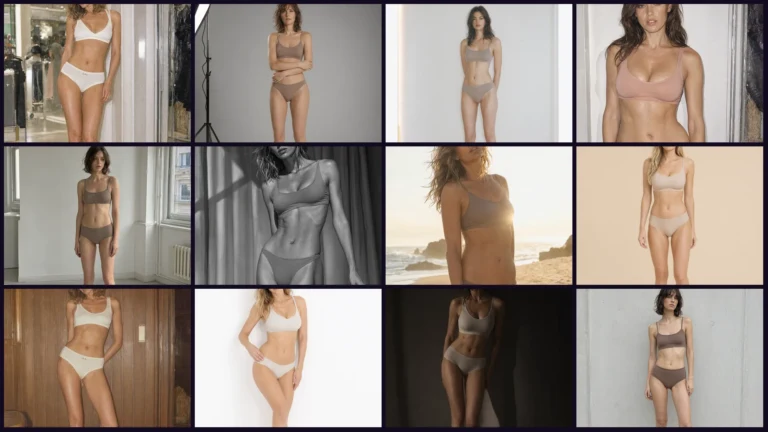 11Qwen-Image-2.1 Fashion Photography: Twelve Styles Tested35mm film, medium format, Polaroid, 90s flash, high key and low key. One base prompt, only the technique changed - and twelve different photographs.Read →
What the model brings to the table
- Compact size. The image-generation component has 7 billion parameters and 32 DiT layers in a single-stream architecture. HunyuanImage 3.0 Instruct, which ranks just behind it on both AA leaderboards, has 80 billion parameters and, according to Tencent, needs at least eight 80 GB graphics cards.
- One model for generation and editing. You do not need a separate Edit version, as you did with earlier Qwen generations.
- Native 2K. It can generate a 2048×2048 square image and panoramas up to 2752×1536 in 16:9.
- Built-in transparency. The model outputs an alpha channel directly, without a separate background-removal step. I measured 22.7% fully transparent pixels from a transparency prompt - see the details.
- Up to 10 reference images. The manufacturer shows a group photo assembled from six individual portraits, a styled look built from five inputs (model, clothes, shoes, bag and hat), and an interior assembled from 10 furniture photos. You can also make local edits by marking an area with a circle, painting over it or using a separate mask.
- Day-one support in Diffusers, ComfyUI, vLLM-Omni, SGLang and LightX2V.
My RTX 4090 tests
I measured generation times using the int8 version through ComfyUI, with 25 steps (12 for the first row), the Euler sampler and the simple scheduler:
| Resolution | Format | Time |
|---|---|---|
| 1024×1024 (12 steps) | 1:1 | 8.4 s |
| 1536×1536 | 1:1 | 18 s |
| 2048×2048 | 1:1, native 2K | 44 s |
| 1792×2400 | 3:4 portrait | 44-46 s |
| 2752×1536 | 16:9 panoramic | 46 s |
The full int8 model files take up 16.6 GB and fit on a 24 GB graphics card without offloading anything to the CPU. I have covered VRAM requirements for less powerful cards and the full cost breakdown separately, and my step-by-step ComfyUI installation guide for Windows is available too.
Then I ran Qwen through the same tests I used for Ideogram 4.5 and FLUX 3 via API. Its results were weaker than the AA ranking suggests:
- Polish text: 6 of 13 strings correct. The best closed models (GPT Image 2.5, Nano Banana Pro, Nano Banana 2 and Grok) scored 13 out of 13; Ideogram 4.5 scored 11 out of 13. Short wordmarks work well (in my rebranding test, all 10 were free of typos), but longer Polish text falls apart. We tested it in Polish. The displayed examples are translations of the original Polish test material, not new English-language tests.
- Layout described in words: 2 of 16 objects in the right place, with a mean IoU of 0.17. FLUX 3, given bounding boxes in JSON, placed all 16 correctly; Seedream placed 15 of 16. If you need a precise composition, Qwen may not follow your instructions.
- 4K street scene: maximum 2752×1536 (4.2 Mpx), effectively about 3.1 Mpx of detail, with 2 of 8 small signs legible. Native 2K does not mean small background text will be sharp.
I cover the full results, images and method in Qwen-Image-2.1 vs. closed models. In short, AA voters like its images because they look attractive and coherent, but the ranking does not measure Polish text or layout precision. Those are two areas where this model falls short.
Supported aspect ratios
| Aspect ratio | Resolution | Use |
|---|---|---|
| 1:1 | 2048 × 2048 | Square social media image |
| 4:3 | 2400 × 1792 | Standard landscape image |
| 3:4 | 1792 × 2400 | Portrait or vertical cover |
| 3:2 | 2528 × 1696 | Photographic framing |
| 2:3 | 1696 × 2528 | Poster |
| 16:9 | 2752 × 1536 | Header or video thumbnail |
| 9:16 | 1536 × 2752 | Short-form video or story |
What this model cannot do
- You cannot use it for paid work without an agreement. See the license section below and the separate licensing guide.
- It will not replace closed models for Polish text. Six correct results out of 13 is not enough for a poster or label. We tested it in Polish.
- It may not follow an exact layout. If the placement must be precise, look for a model that accepts bounding boxes.
- It is not available from major API providers. Even Artificial Analysis had to host it itself because no one offered it on the day of testing. On September 22, I also checked all 444 models on OpenRouter; Qwen was not among them.
- It can miss the requested age of a person. I asked for a portrait of a woman in her thirties and got someone noticeably older. The image was technically excellent, but it did not follow the prompt.
- It needs disk space. The int8 model files alone take up 16.6 GB; allow about 30 GB for the model, ComfyUI and libraries together.
How to get started
- Check whether your graphics card can run the model - the VRAM table gives you the answer in a minute.
- Read the license terms before deciding how you will use it.
- Follow the ComfyUI installation guide for Windows. It includes a ready-to-use script and three pitfalls I encountered.
- Start with transparent graphics and photo editing, where the model is strongest, and add Polish text later in a graphics editor.
License
Qwen-Image-2.1 is released under the Qwen Research License Agreement. It permits you to use, copy and modify the model only for non-commercial purposes, research and evaluation. Commercial use requires a separate commercial license from Alibaba. Open weights do not mean “anything goes” here - I examine the terms separately. If you need an open model for commercial work, see the ranking of open models and their licenses.
When to choose Qwen-Image-2.1 - and when to pick another model
| Your need | Pick | Why |
|---|---|---|
| Local images for learning and private projects | Qwen-Image-2.1 | Highest-ranked open-weight model; 2K on one graphics card |
| Local photo editing | Qwen-Image-2.1 | 1,074 Elo, first among open-weight models for editing |
| Graphics with transparent backgrounds | Qwen-Image-2.1 | Alpha channel generated directly by the model |
| Local commercial use | Z-Image Turbo, Qwen-Image-2512, FLUX.2 [klein] 4B | Apache 2.0 license, lower ranking positions |
| Polish text in images | GPT Image 2.5, Nano Banana Pro, Ideogram 4.5 | 13/13 and 11/13 in my test, compared with 6/13 |
| Precise object placement | FLUX 3 with bounding boxes in JSON | 16/16 objects placed correctly, compared with 2/16 |
| Highest quality, regardless of cost | GPT Image 2.5 Sunburst (max) | Ranked first on both AA leaderboards |
For a full comparison of closed and open image generators, see the AI image generator ranking.
The easiest way to install it: Hangar
You can also install Qwen-Image 2.1 through Hangar, without arranging the model files yourself. It is my free manager for local image, video and music models on Windows, with no account required and ComfyUI running underneath. The catalog has two versions: int8 (17.3 GB of files: 7.26 GB for the model, 9.35 GB for the Qwen3-VL-8B int8 encoder and 0.68 GB for the VAE) and a lighter version with a w4a8 encoder (14.2 GB) for cards with less memory. The model listing shows its license: Qwen Research, for non-commercial use only.
- Download the 14 MB installer from the Hangar page. It is not digitally signed yet, so Windows SmartScreen will show a warning: click “More info,” then “Run anyway.”
- Hangar detects your graphics card (Nvidia with CUDA, 8 GB VRAM or more; 12 GB or more is recommended) and shows whether the model will fit.
- Choose Qwen Image 2.1 and a version. Hangar downloads the files from Hugging Face and checks their SHA-256 hashes.
- Enter a prompt in English and click Generate.
In my Hangar test on an RTX 4090 (October 17, 2026, int8 version), a 1024×1024 image took 52 seconds to generate in 25 steps, including model loading. Get the installer and details from Hangar.
Frequently asked questions
Is Qwen-Image-2.1 the best image-generation model?
No. It is the best among open-weight models, but ranks 18th overall on the Artificial Analysis text-to-image leaderboard and 18th for editing. Closed models rank above it, including GPT Image 2.5, Nano Banana 2 and Grok Imagine Image 2.0.
Can I use Qwen-Image-2.1 commercially?
Not without a separate agreement. The Qwen Research license permits non-commercial use, research and evaluation only. For paid work, you need to request a commercial license from Alibaba.
What graphics card do I need?
I tested it on an RTX 4090 with 24 GB: the int8 version takes up 16.6 GB and fits entirely in memory, and a 2048×2048 image takes 44 seconds to generate. I cover versions for cards with less memory in the VRAM guide.
Does Qwen-Image-2.1 handle Polish text well?
No. In my test, 6 of 13 Polish text strings came out correctly, compared with 13 out of 13 for the best closed models. Short wordmarks work; longer Polish text does not. We tested it in Polish.
How does it differ from Qwen-Image-3.0?
Qwen-Image-3.0 and 3.0-Pro are available only through an API, with no open weights. They score higher for text-to-image (1,075 and 1,089 points, compared with 1,034), but open-weight 2.1 (1,074) beats standard 3.0 (1,055) for editing and nearly matches the Pro version (1,076).
See also: Local AI: text, image and video models on your own computer · Open image model rankings
Sources and test date
- Artificial Analysis - text-to-image leaderboard (as of October 2, 2026)
- Artificial Analysis - image editing leaderboard (as of October 2, 2026)
- Artificial Analysis post on X from October 2, 2026
- Qwen/Qwen-Image-2.1 model card and Qwen Research license on Hugging Face
- Tom’s Hardware on Alibaba’s launch claims
Generation times, memory use, and text, layout and 4K test results are my own measurements, taken on an RTX 4090 with 24 GB using the int8 version through ComfyUI.
More on this from QUANTSLANT
 news·Kling 4.0 Flash: Early Access from Sept 28, Who Gets ItKling 4.0 Flash launched Sept 28, 2026 in early access for Ultra plan subscribers. 720p, up to 20s clips, ahead of full Kling 4.0 in October.