What SkyReels V4 Can Do: 8 Video Editing and Generation Examples
SkyReels V4 transfers motion onto photos, swaps objects, alters backgrounds, and changes time of day. Here are 8 prompt-backed examples from Skywork AI.
👁 114 reads
SkyReels V4 from Skywork AI led the text-to-video with audio rankings in March 2026, and sits at 9th place today. What does it still do better than the models ahead of it? Editing existing video footage: swapping objects, changing backgrounds, altering materials, shifting the time of day, and transferring motion from a video onto a character in a photo. Here are eight examples - five directly from Skywork’s research paper with exact prompts, plus three from the official model page - along with where each feature fits into a real workflow. Pricing and access details are in our SkyReels V4 guide.
Where these examples come from
- Examples 1-5: Frame stills from the “SkyReels-V4” paper (arXiv 2602.21818, Skywork AI, CC BY 4.0 license). Prompts are quoted verbatim from the paper; frame comparisons were assembled by our team.
- Examples 6-8: Direct clips from the official SkyReels API site. The host prevents direct embedding, so we link directly to the source files (opening in a new tab).
- We do not have custom clips here: SkyReels V4 is not currently hosted on OpenRouter, fal.ai, or reAPI, which we regularly test with.
| No. | Use Case | SkyReels V4 Mode |
|---|---|---|
| 1 | Character animation from photo | Image + motion from video |
| 2 | Object replacement in video | Inpainting with mask |
| 3 | New background behind a person | Inpainting with mask |
| 4 | Changing color and material | Local editing |
| 5 | Turning day into night | Global editing |
| 6 | Multi-angle action sequence | Auto multi-shot |
| 7 | Bringing figurines to life | Image-to-video |
| 8 | Car across three terrains | Text-to-video |
1. Transferring motion from video to a still image
Use case: Animating characters from a single still, transferring an actor’s performance, choreography, or presenter gestures onto another person or digital avatar.
Prompt (from Skywork’s paper):
Animate the person in @image_1 using the movements from @video_1.
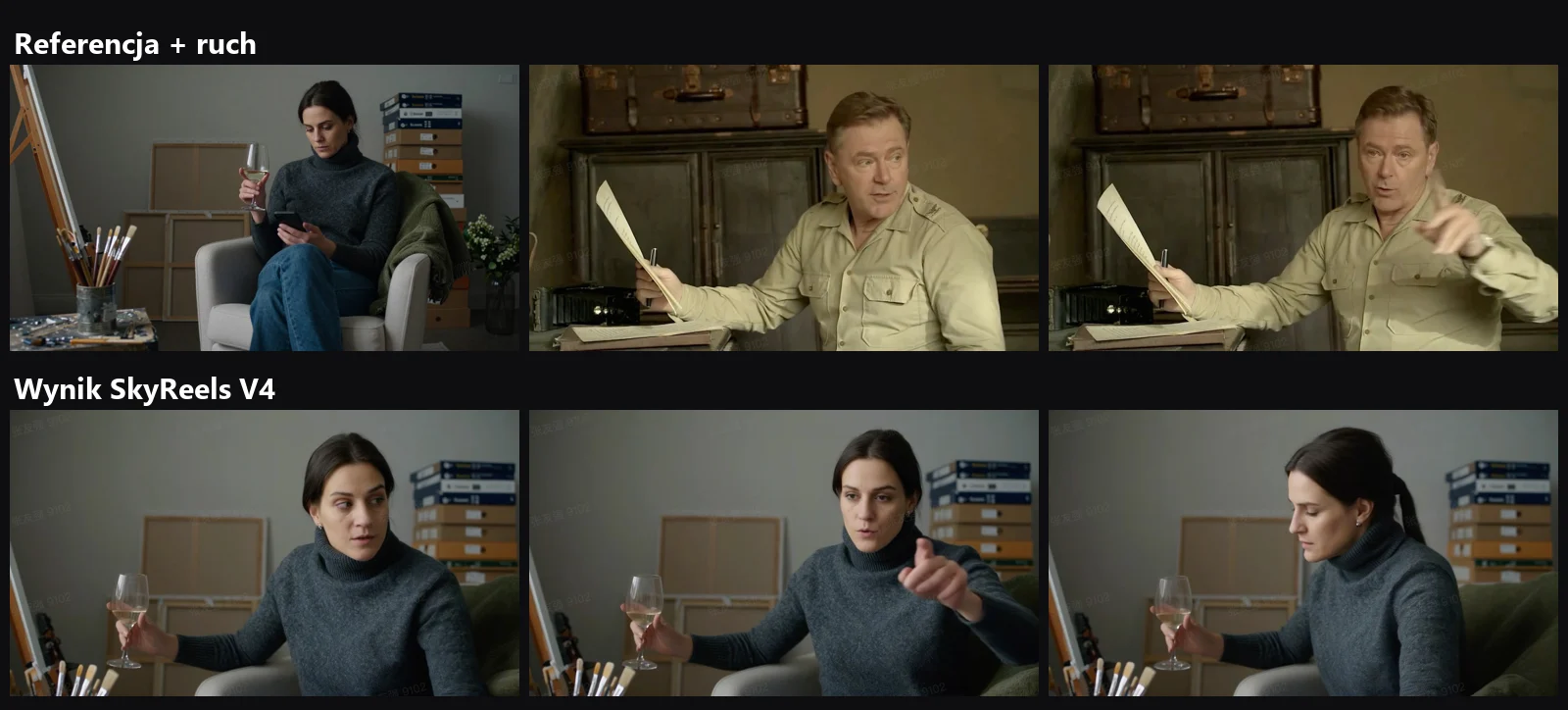
Our take: The woman in the photo adopts the gestures of the man in the video, while her face, sweater, and ambient environment stay faithful to the reference image. The prompt is minimal because the uploaded files handle the heavy lifting. The same research paper highlights a two-person dance sequence transferred cleanly using this exact technique.
2. Object replacement: Swapping a bison for an elk
Use case: Commercials and post-production - swapping a hero product, animal, or prop within existing footage without reshooting.
Replace the subject in the mask area in @video_1 with a majestic elk standing in the same field.
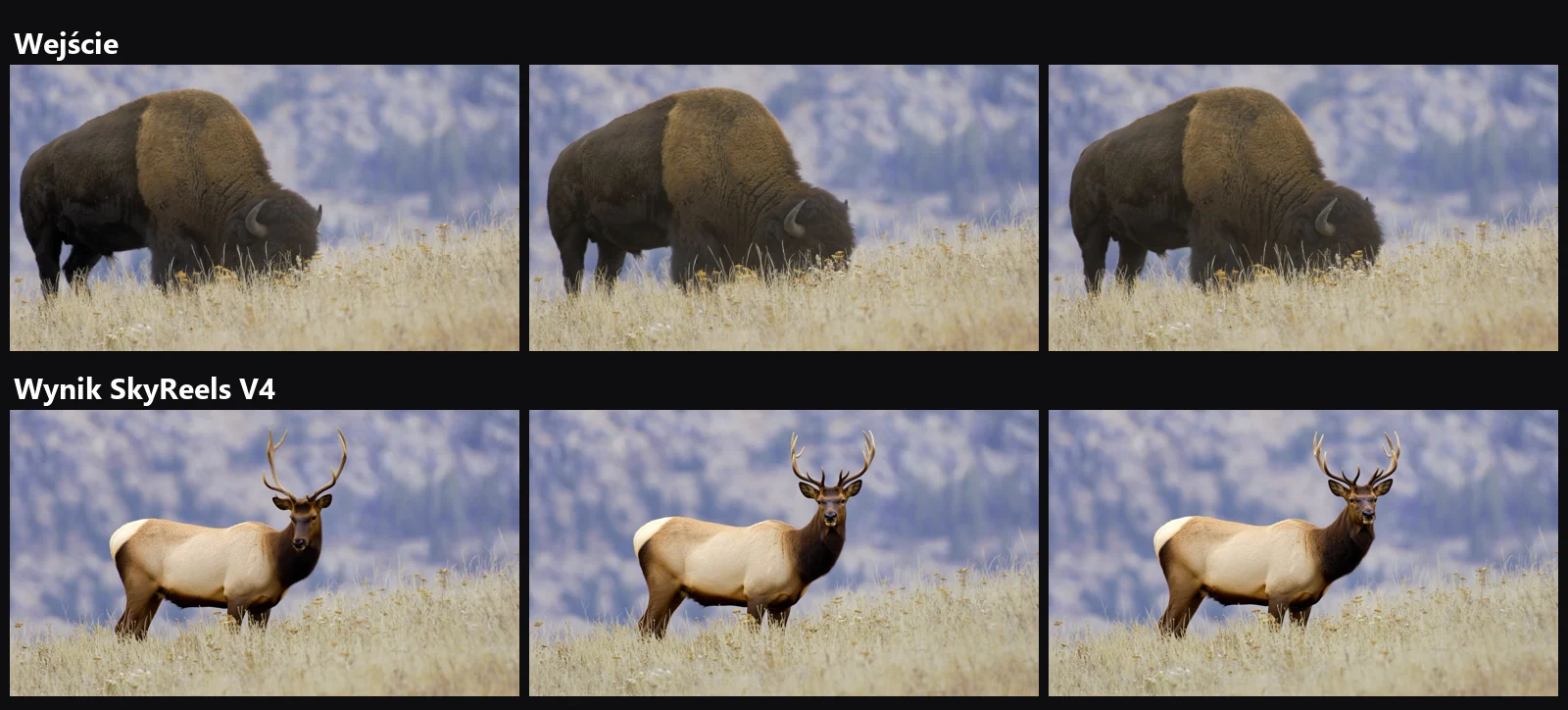
Our take: Only the masked area changes - the grass, sky, and lighting stay intact from the original plate. This mode requires an explicit area mask (noted as “Masked Video” in the paper), making it tailored for workflows alongside dedicated video editing software.
3. Background replacement: Amalfi Coast
Use case: Relocating on-camera talent or transforming handheld smartphone clips into high-production travel backdrops.
Replace the background in the masked area of @video_1 with a stunning cinematic view of the Amalfi Coast in Italy during a warm golden hour sunset.
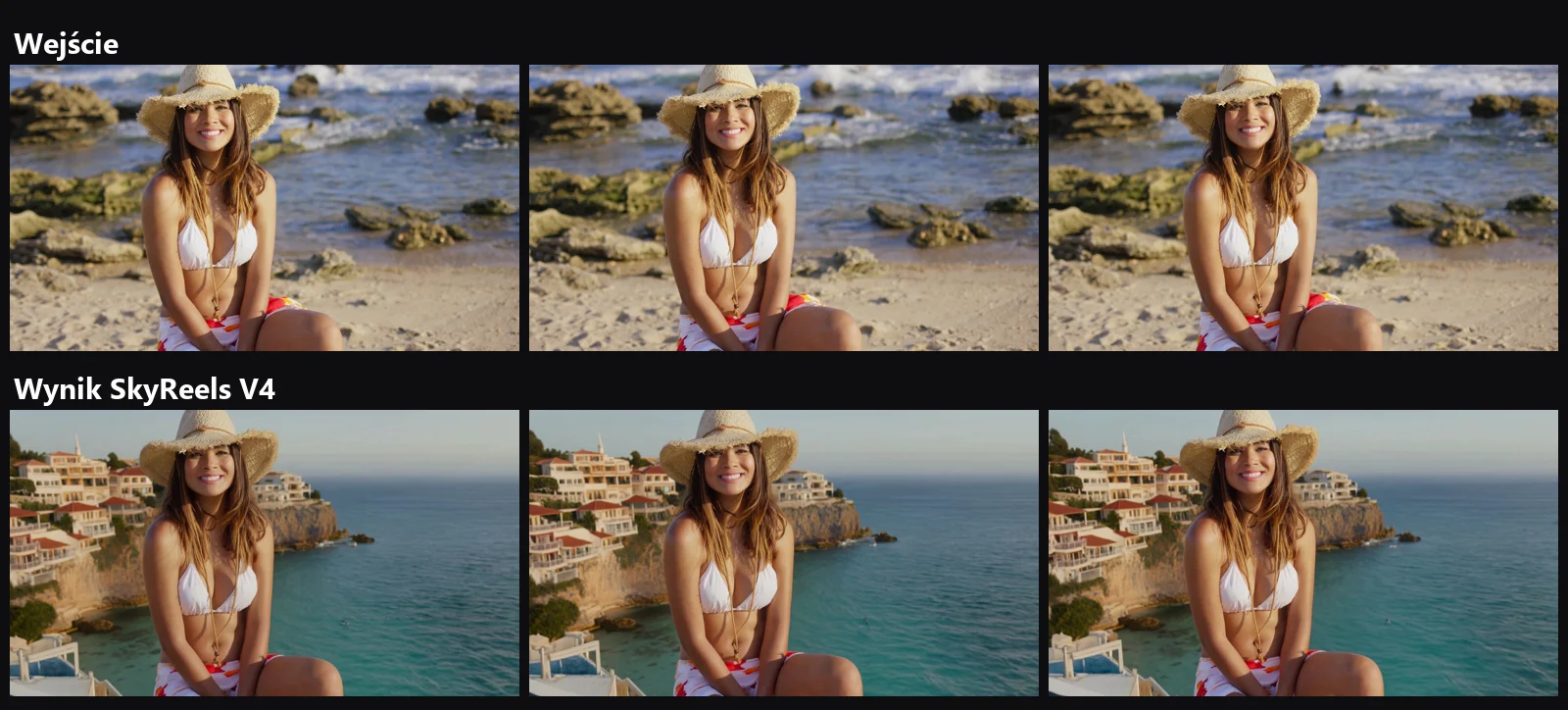
Our take: The foreground subject remains untouched while the background gains a cliffside village and ocean. When replacing backdrops like this, always check whether the subject’s original lighting matches the new scene, as the model only alters pixels inside the masked boundary.
4. Color and material alteration: Armchair
Use case: Product colorways, material variants within a single commercial cut, or digital furniture and fashion catalogs.
Change the chair's color to black and replace its edges with wooden material in @video_1.
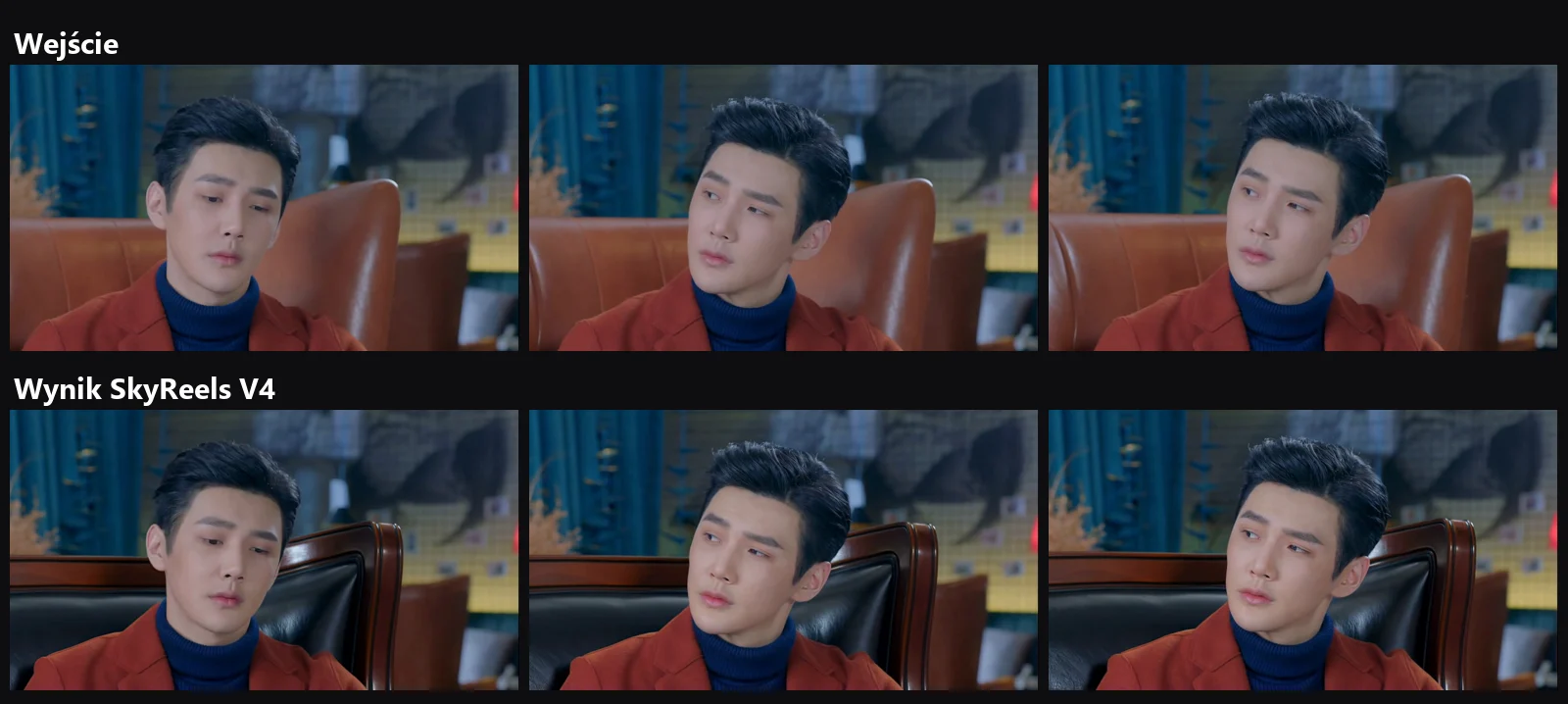
Our take: A brown leather armchair turns black with a distinct wood frame, while the actor’s face, hair, and head movement carry over from the plate. No mask was needed here - the prompt was enough. According to Skywork’s paper, this local edit mode also works for apparel (such as changing polo shirts) and inserting new objects into empty areas.
5. Turning day into night
Use case: Weather and time-of-day changes without reshoots, or adapting a single ad creative for seasonal campaigns.
Make @video_1 nighttime.
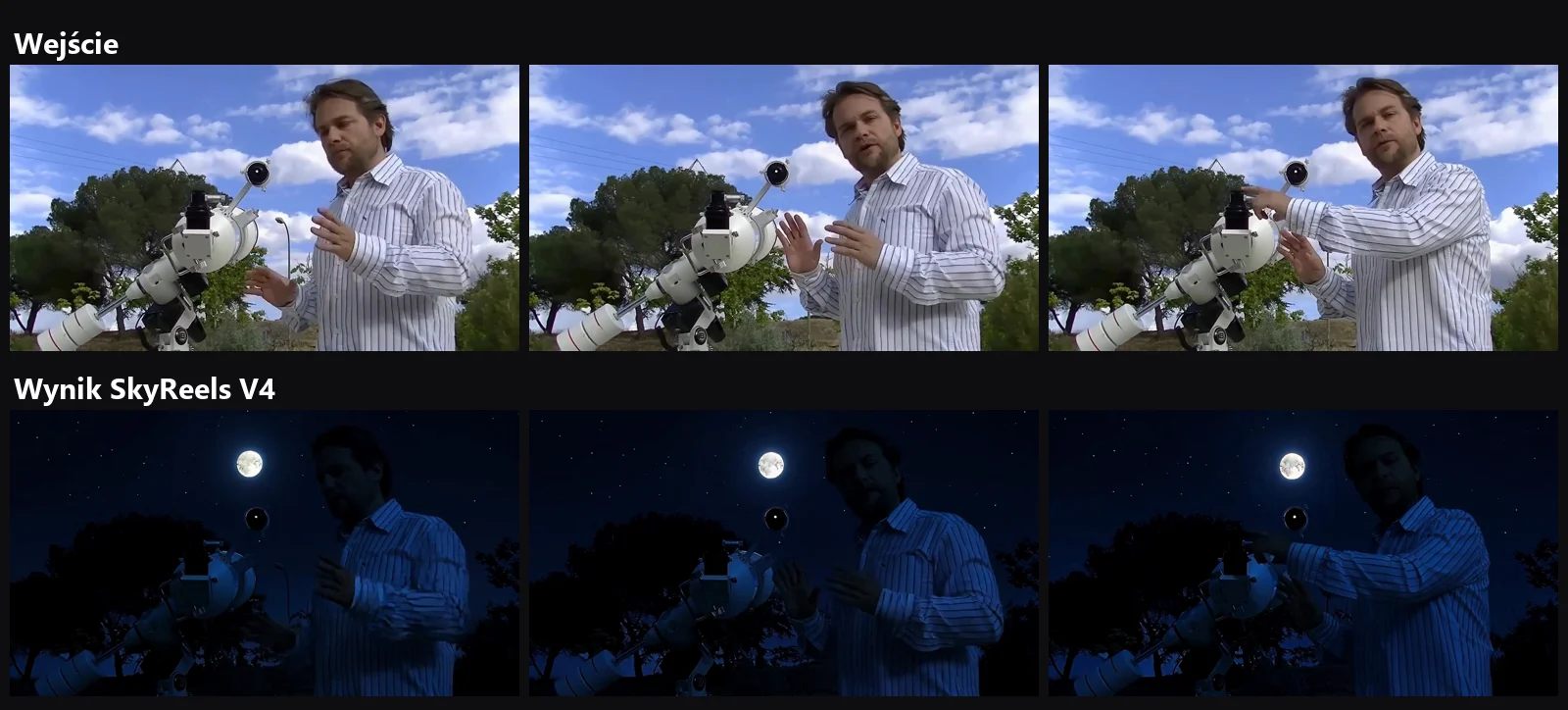
Our take: A three-word prompt successfully shifted daylight into night with a visible moon, while adjusting the overall exposure across the scene and the man by the telescope. The paper also demonstrates “Make @video_1 snowy,” artistic style transfers (paper craft, toy building blocks), and camera trajectory adjustments.
6. Multi-shot action sequences
Use case: Movie trailers, teasers, and fast-paced commercial reels requiring multiple cuts within a single generation.
Source clip: “Auto Multi-Shot” sample from SkyReels (11s, 1080p, with audio).
Our take: The video starts with an aerial view of a burning city, cuts between close-ups of an armed team, shows an explosion, and cuts back to character close-ups - all rendered in an 11-second audio-equipped clip. Skywork did not publish the exact prompt, defining this feature as automated multi-scene video generation featuring dynamic angles and cut continuity.
7. Image-to-video: Porcelain violinist
Use case: Bringing digital concept art, collectible figurines, game characters, or product renders into motion.
Source clip: “Image to Video” sample from SkyReels (8s, 1080p, with audio).
Our take: A porcelain-styled figure plays the violin inside a concert hall as the camera tracks in smoothly. In the Artificial Analysis image-to-video leaderboard, SkyReels V4 currently places 17th (1070 Elo) - sitting behind models like MiniMax H3 Max, Vidu Q4, and Gemini Omni Flash.
8. Text-to-video: Sports car across three environments
Use case: Automotive spots, continuous motion across transitioning landscapes.
Source clip: “Text to Video” sample from SkyReels (8s, 1080p, with audio).
Our take: A blue sports car navigates a redwood forest, passes into desert terrain, and continues along a mountain pass while the tracking camera keeps pace. This type of multi-environment continuity is what secured V4 the #1 spot on Artificial Analysis for text-to-video with audio back in March. Today it ranks 9th in that category, edged out by newer alternatives like Wan 3.0, Seedance 2.5, and FLUX 3.
Key takeaways
- Where it excels: Modifying existing video assets - swapping subjects, backdrops, surface materials, time of day, and transferring motion. Here, SkyReels V4 remains one of the most capable models accessible via API.
- Where it falls behind: Raw text-to-video and image-to-video generation, where newer model releases hold higher arena rankings.
- Editing costs: Using a video plate input, 1080p generation runs at $0.625 per second in standard tier, putting a 5-second edit at approximately $3.13.
For alternative models in a similar price bracket, see our head-to-head comparison: SkyReels V4 vs Seedance 2.0 vs Kling 3.0. Explore more benchmark results in our video arena.
Sources
- Skywork AI: SkyReels-V4: Multi-modal Video-Audio Generation, Inpainting and Editing model (arXiv 2602.21818 v3, CC BY 4.0) - prompts and frames 1-5
- SkyReels API Platform - clips 6-8
- API Pricing
- Artificial Analysis Leaderboard. Verified October 11
- 2026
More on this from QUANTSLANT


 benchmarks·SkyReels V4 vs Seedance 2.0 vs Kling 3.0: ComparisonSix months after launch: Artificial Analysis rankings, API pricing, video editing features, and performance breakdown for three top AI video models.