Wan 2.2 on RTX 4090: timings, VRAM and four test clips
My four-clip Wan 2.2 TI2V 5B test: RTX 4090 timings, memory use, visible mistakes and the limits of applying these results to another GPU.
👁 321 reads
The two warm renders in my earlier RTX 4090 test took 239 and 232 seconds. The four downloadable clips all contain 121 frames at 24 frames per second, but they are not all the same resolution. I checked the actual public MP4s against the archived files: the tram and llama downloads are 960 × 528; the coffee and illustrated cat downloads are 1280 × 704. That distinction matters if a UK production team is using the samples to estimate delivery quality.
What the timing measures, and what the viewer receives
The September test used the Wan 2.2 TI2V 5B workflow on a Windows machine with a 24 GB RTX 4090. The times and memory readings below are the historical test record. The frame counts and dimensions are a separate inspection of the delivered MP4s on 12 November. A published file can be resized after generation. Its dimensions verify what readers can download, not the internal resolution of every stage of the workflow.
| Clip | Recorded run | Total VRAM peak in test | Public MP4 |
|---|---|---|---|
| Coffee | 574 s, including loading | 23.6 GB | 1280 × 704 |
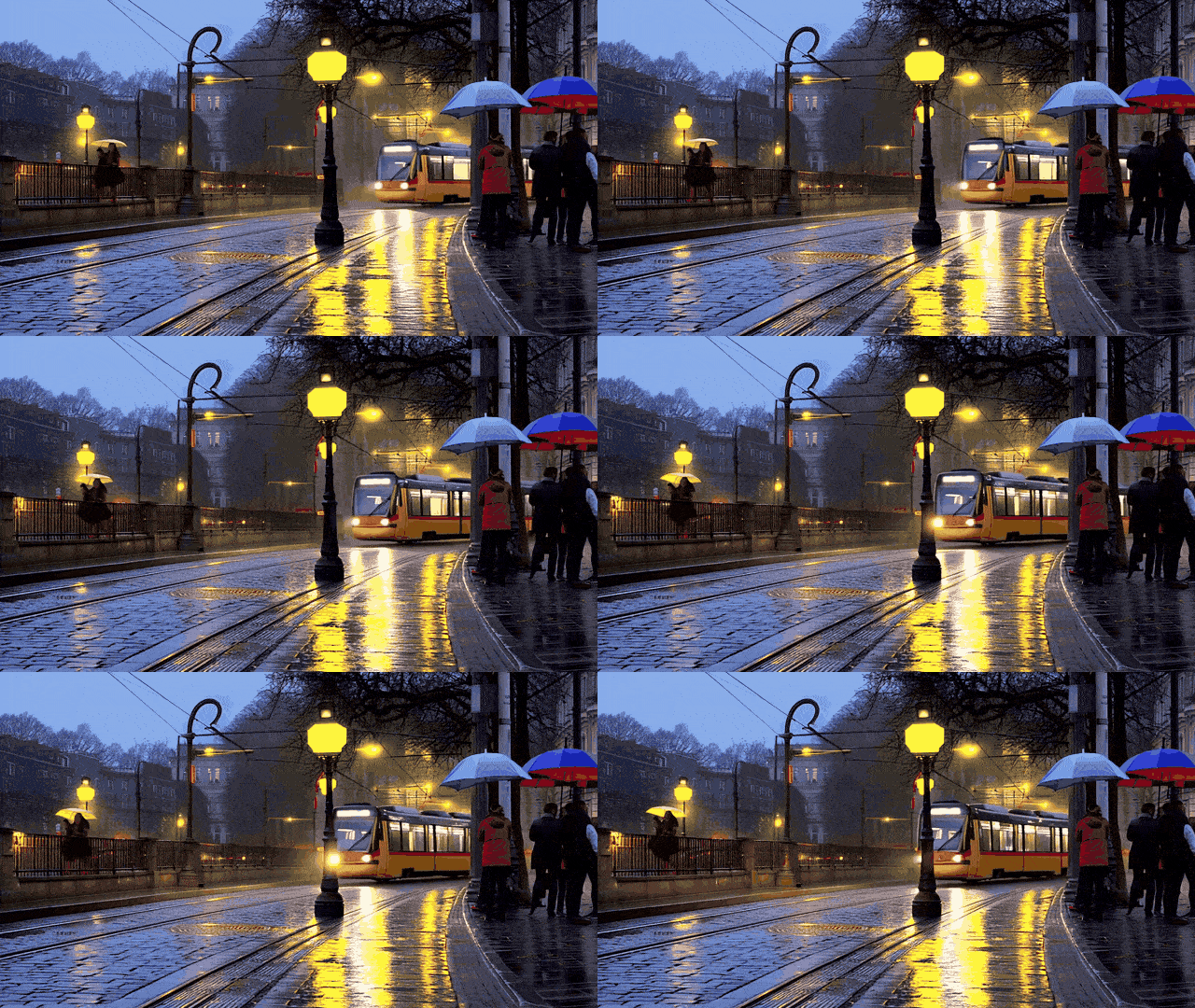
| Tram in rain | 592 s, first run in another series | 23.6 GB | 960 × 528 |
| Llama | 239 s, warm | 23.9 GB | 960 × 528 |
| Illustrated cat | 232 s, warm | 23.4 GB | 1280 × 704 |
The logged memory figures include other allocations on the machine. I would not advertise the smallest value in that table as the minimum VRAM required. Nor would I use a warm time for a quote that includes loading the model, setting up the shot, trying it again and reviewing the result. A second test on different hardware or with another precision is a new measurement, not a conversion from this one.
Watch the four files
Coffee: follow the liquid at the wall of the cup. The original test note records the liquid appearing through the porcelain. A warm-looking image can still fail the action in the brief.
Tram: use the wet street and straight edges as continuity checks while the tram enters the frame. This depicts a generated scene; I would not caption it as documentary footage of a named British tram route.
Llama: compare the motion with the intended head turn. An animal that looks convincing in a still can perform a different action from the one commissioned.
Illustrated cat: judge the style and the movement separately. With only a few seconds to deliver, a small jump at the planned edit point can matter more than texture detail in a single frame.
A UK budget line you can actually reproduce
For the llama run the original average GPU power was 312 W. Multiplying 0.312 kW by 239/3600 hours gives about 0.0207 kWh at the GPU. To express that line in pence, multiply it by the studio’s applicable electricity unit rate in pence per kWh. This does not measure the whole workstation, cooling, preparation, editing or failed attempts. A domestic price-cap illustration is not automatically a commercial studio’s tariff.
The useful comparison between local and hosted video is cost per usable delivery with matching specifications. Record the aspect ratio, delivered dimensions, frame count, number of accepted shots and paid or staff time used. In this test two warm runs took roughly four minutes, but none of that tells a producer whether the client’s specific action can be delivered on the first attempt.
MP4 metadata and public file matches checked: 12 November 2026.
Google · Your sourcesQuantslant higher in your Google - one clickAdd to preferred sources →Sources
Frequently Asked Questions
What GPU is needed for Wan 2.2?
My measured configuration was an RTX 4090 with 24 GB VRAM. The roughly 20 GB attributed to Wan excludes memory already occupied by the system and browser. I cannot turn that estimate into a minimum requirement for another GPU or another Wan variant.
How long does it take to generate a video in Wan 2.2?
About 4 minutes for a 5-second 720p clip (121 frames, 20 steps) on RTX 4090, when the model is already loaded. Generating the first clip after startup took 574 s because it included loading 18 GB of files from disk.
Is Wan 2.2 free and can you use it commercially?
The TI2V-5B weights are available without a model-license fee. Apache 2.0 permits commercial use under its terms. The roughly 0.02 kWh figure estimates the GPU energy for a warm generation, not the whole PC or the first model load. Hardware, storage and the rights to any source material are separate considerations.
Does Wan 2.2 TI2V 5B make video with sound?
No. The 5B version generates image only. Audio must be added in editing.
Does this test prove Wan 2.2 works on a 12 GB card?
No. It records a 24 GB RTX 4090 configuration. Offloading may help another setup, but it does not establish a tested minimum or a generation time for that card.
Does the electricity figure include the entire PC?
No. It estimates GPU energy for a warm generation. CPU, system memory, storage, cooling and model loading are outside that estimate.

More on this from QUANTSLANT
 benchmarks·Mushroom Identification Apps: AI Test on 6 PhotosWe tested three AI models on six mushroom photos, including death caps. None allowed eating, but they confused boletes with bitter boletes.