Build an MCP Server in 15 Minutes: Python SDK 2.x Guide
Create a Model Context Protocol server in Python with three tools: currency rates, working days, and note search. Test in MCP Inspector and Claude Code.
👁 127 reads
An MCP server is a small program that exposes your functions in the Model Context Protocol standard, so Claude Code, Claude Desktop, Cursor, ChatGPT, or your own agent can use them. In the official Python SDK, you write regular functions with an @mcp.tool() decorator and one line to run. I built a server with three tools (currency rates, working days with holidays, note search), tested it in MCP Inspector, and connected it to Claude Code. The whole thing took me fifteen minutes, including the trap that catches everyone copying old tutorials. This text is part of the AI Agents from Scratch learning path.
Status as of October 4, 2026
- The official
mcppackage for Python is version 2.3.0. In version 2, theFastMCPclass was renamed toMCPServer, so code from most 2025 tutorials won’t work without a fix. - MCP Inspector (the server testing tool) is version 2.9.0 and has a command-line mode
--cli. - The latest MCP specification version on modelcontextprotocol.io is dated 2026-07-28.
- Tests: Windows 11, Python 3.13, Node.js 26, Claude Code 2.1.287. Cost of testing in Claude Code with Claude Haiku 4.5 model through OpenRouter: approximately $0.06.
MCP in One Paragraph
Without MCP, you have to describe each function separately for every application: one way for OpenAI API, another for Claude, another for code editors. MCP is a universal plugin. You write the server once, and every MCP-compatible client automatically asks it “what tools do you have?” and calls them when the model requests. Under the hood it’s the same function calling, just with standardized transport. A broader introduction to the protocol itself is in the text MCP: What It Is.
A server can expose three types of things:
- tools: functions the model calls, e.g., “fetch currency rate”;
- resources: data for reading, e.g., file contents or database records;
- prompts: ready-made command templates that users select from a list.
In this text I’m only doing tools, because that’s where 90% of practical servers start.
Step 1: Installation (2 Minutes)
- Create an environment:
python -m venv .venvand.venvScriptsactivate. - Install the SDK:
pip install "mcp[cli]" requests. - For browser testing you need Node.js (MCP Inspector runs via
npx).
Step 2: Server with Three Tools (5 Minutes)
"""05 - Custom MCP server (official Python SDK, version 2.x: MCPServer class, formerly FastMCP).
Browser test:  npx @modelcontextprotocol/inspector python 05_mcp_server.py
In Claude Code: claude mcp add polish-tools -- python C:/full/path/05_mcp_server.py
"""
import datetime as dt, pathlib
import requests
from mcp.server import MCPServer

mcp = MCPServer("polish-tools", instructions="NBP currency rates, working days in Poland, and notes from data/ folder.")
NOTES = (pathlib.Path(__file__).parent / "data").resolve()

@mcp.tool()
def nbp_rate(currency: str = "EUR") -> dict:
    """Average currency rate from NBP table A (e.g., EUR, USD, CHF, GBP)."""
    r = requests.get(f"https://api.nbp.pl/api/exchangerates/rates/a/{currency.lower()}/?format=json", timeout=15)
    if r.status_code != 200:
        return {"error": f"NBP doesn't recognize currency {currency}"}
    k = r.json()["rates"][0]
    return {"currency": currency.upper(), "rate_pln": k["mid"], "table_date": k["effectiveDate"], "table": k["no"]}

def easter(year: int) -> dt.date:  # Meeus/Jones/Butcher algorithm
    a, b, c = year % 19, year // 100, year % 100
    d, e = divmod(b, 4); f = (b + 8) // 25; g = (b - f + 1) // 3
    h = (19 * a + b - d - g + 15) % 30; i, k = divmod(c, 4)
    l = (32 + 2 * e + 2 * i - h - k) % 7; m = (a + 11 * h + 22 * l) // 451
    return dt.date(year, (h + l - 7 * m + 114) // 31, (h + l - 7 * m + 114) % 31 + 1)

def holidays(year: int) -> set:
    e = easter(year)
    fixed = [(1, 1), (1, 6), (5, 1), (5, 3), (8, 15), (11, 1), (11, 11), (12, 24), (12, 25), (12, 26)]  # 24.12 from 2025
    return {dt.date(year, m, d) for m, d in fixed} | {e, e + dt.timedelta(1), e + dt.timedelta(49), e + dt.timedelta(60)}

@mcp.tool()
def working_days(from_date: str, to_date: str) -> dict:
    """Counts working days in Poland between dates YYYY-MM-DD (inclusive), excluding weekends and public holidays."""
    a, b = dt.date.fromisoformat(from_date), dt.date.fromisoformat(to_date)
    hol = set().union(*(holidays(r) for r in range(a.year, b.year + 1)))
    days = [a + dt.timedelta(n) for n in range((b - a).days + 1)]
    working = [d for d in days if d.weekday() < 5 and d not in hol]
    return {"from": from_date, "to": to_date, "working_days": len(working), "holidays_in_period": sorted(str(d) for d in days if d in hol)}

@mcp.tool()
def search_notes(phrase: str) -> list[dict]:
    """Searches for phrase in .txt files from data/ folder and returns matching lines."""
    results = []
    for p in NOTES.rglob("*.txt"):
        for nr, line in enumerate(p.read_text(encoding="utf-8").splitlines(), 1):
            if phrase.lower() in line.lower():
                results.append({"file": p.name, "line": nr, "text": line.strip()})
    return results[:20]

if __name__ == "__main__":
    mcp.run()  # default stdio: client (Claude Code, Inspector) runs this file as subprocess
What’s happening here:
MCPServer("polish-tools", instructions=...)creates the server. Instructions go to the client and suggest to the model what the server is for;- each function with
@mcp.tool()becomes a tool. Function name, docstring, and type hints are converted into a JSON description and schema that the model sees. That’s why I write docstrings like instructions; - a function can return a dictionary or list, the SDK automatically converts the result to JSON;
mcp.run()starts the server in stdio mode: the client launches this file as a subprocess and communicates with it through standard input and output. You don’t need a port or web server.
The working_days tool calculates Easter using the Meeus algorithm, and from it Easter Monday, Pentecost, and Corpus Christi. It also has Christmas Eve, which has been a non-working day since 2025. The model doesn’t have this knowledge reliably in its head, and this is a classic place for a tool.
The Trap: FastMCP No Longer Exists in Version 2
Most tutorials (including official examples from 2025) start with from mcp.server.fastmcp import FastMCP. On mcp package 2.3.0 I got:
No module named 'mcp.server.fastmcp'. This is mcp 2.x, where FastMCP was renamed to MCPServer
(from mcp.server.mcpserver import MCPServer) and other APIs changed; see the migration guide
at https://py.sdk.modelcontextprotocol.io/v2/migration/#fastmcp-renamed-to-mcpserver
or pin 'mcp<2' to keep running v1 code.
Two paths: rewrite the import to from mcp.server import MCPServer (the @mcp.tool() decorators work the same) or install the old version with pip install "mcp<2". I chose the first.
Step 3: Test Without Any AI Client (1 Minute)
Before connecting the server to a model, test it from Python. The SDK has a client that connects to the server in memory:
"""Test MCP server from Python (without Claude Code and without Inspector): tool list + 3 calls."""
import anyio, importlib, json
from mcp import Client

server = importlib.import_module("05_mcp_server").mcp   # in-memory client; could be http://.../mcp address instead

async def main():
    async with Client(server) as c:
        for t in (await c.list_tools()).tools:
            print("TOOL:", t.name, "-", t.description)
        for name, args in [("nbp_rate", {"currency": "CHF"}), ("working_days", {"from_date": "2026-12-01", "to_date": "2026-12-31"}),
                            ("search_notes", {"phrase": "deadline"})]:
            r = await c.call_tool(name, args)
            print(f"n{name}({json.dumps(args, ensure_ascii=False)}) ->", r.content[0].text)

anyio.run(main)
Result for December 2026 (we tested it in Polish): 21 working days, holidays December 24, 25, and 26 (December 26 falls on Saturday, so it doesn’t reduce working days). Swiss franc rate from NBP table from October 2: 4.6942 PLN. Everything executed in 0.36 seconds.
Step 4: MCP Inspector (3 Minutes)
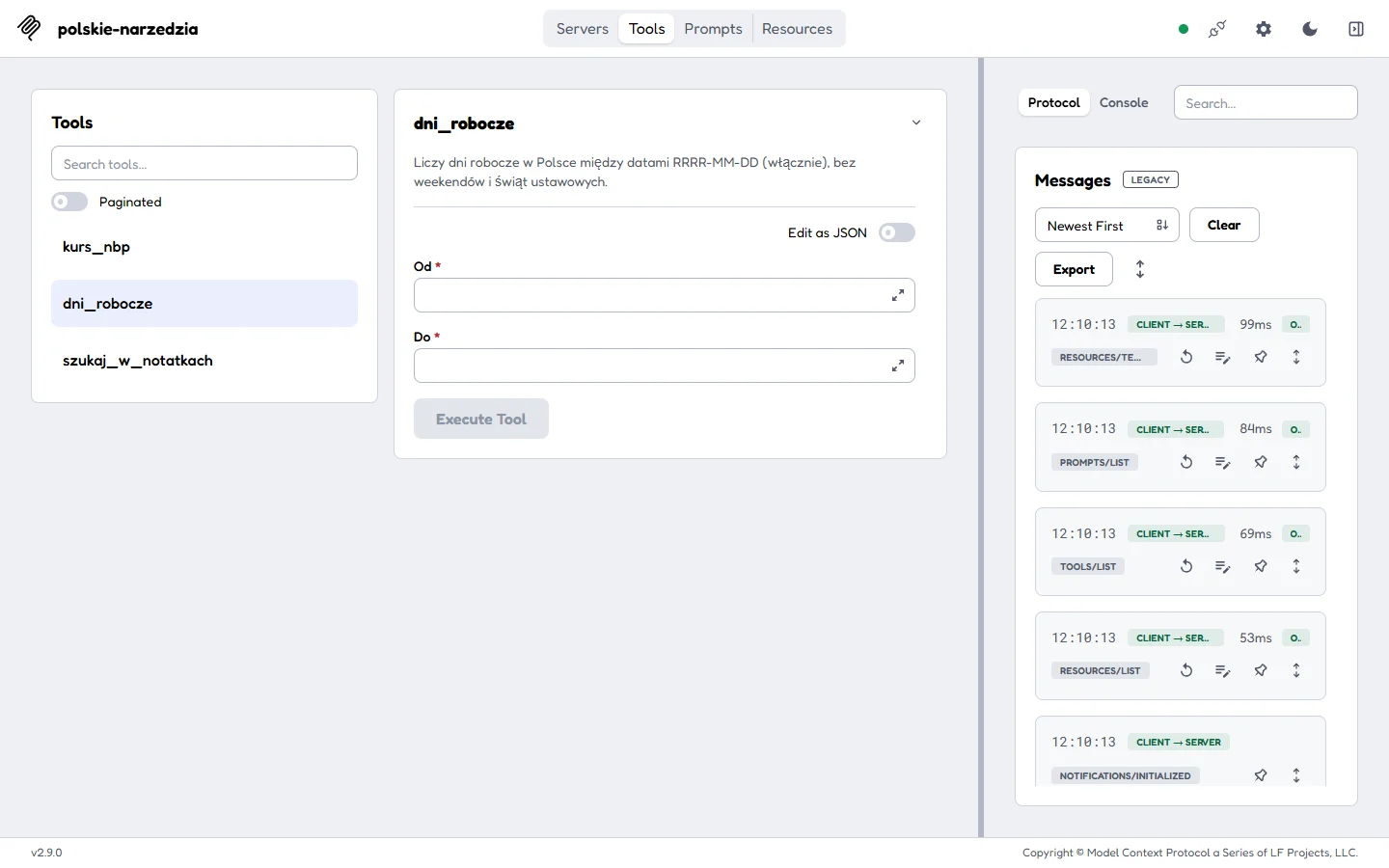
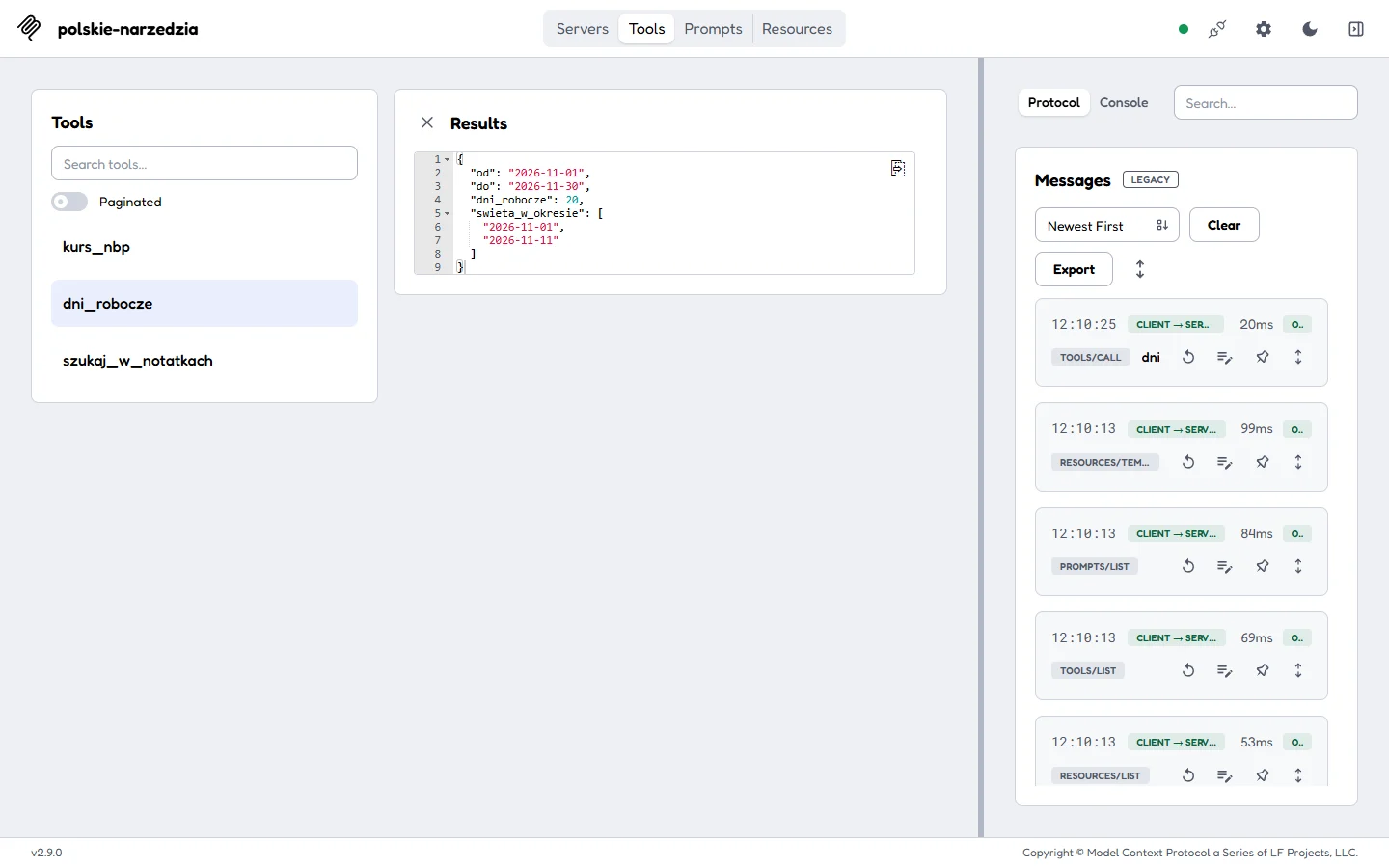
MCP Inspector is the official tool for viewing servers. You run it with one command: npx @modelcontextprotocol/inspector python 05_mcp_server.py. An address with a one-time token appears in the console (http://127.0.0.1:6274?MCP_INSPECTOR_API_TOKEN=...). After opening, you toggle the switch by the server, and Inspector shows the tool list and log of the entire protocol conversation (initialize, tools/list, tools/call).
Inspector also has a browser-free mode, useful in scripts and automated tests:
> npx @modelcontextprotocol/inspector --cli python 05_mcp_server.py --method tools/call --tool-name working_days --tool-arg from_date=2026-11-01 --tool-arg to_date=2026-11-30
{
  "content": [
    {
      "type": "text",
      "text": "{n  "from": "2026-11-01",n  "to": "2026-11-30",n  "working_days": 20,n  "holidays_in_period": [n    "2026-11-01",n    "2026-11-11"n  ]n}"
    }
  ],
  "isError": false
}
November 2026 has 20 working days: November 1 falls on Sunday, and November 11 on Wednesday.
Step 5: Connecting to Claude Code (4 Minutes)
You permanently add the server with one command (user or project scope):
claude mcp add polish-tools -- python C:pathto5_mcp_server.py
claude mcp list
I didn’t want to change Claude Code’s configuration on this computer, so I passed the server one-time via JSON file (--mcp-config, with --strict-mcp-config to not mix it with other servers) in headless mode (-p):
{"mcpServers": {"polish-tools": {
  "command": "C:/.../.venv/Scripts/python.exe",
  "args": ["C:/.../05_mcp_server.py"],
  "env": {"PYTHONUTF8": "1"}}}}
Session from October 4 (Claude Haiku 4.5 model, we tested it in Polish):
> claude -p --mcp-config mcp_cfg.json --strict-mcp-config --model anthropic/claude-haiku-4.5 "I have an invoice for 120 EUR with payment term 14 working days from 2026-11-02. Give me the amount in PLN at current NBP rate and check how many working days are in November 2026. Use MCP tools."

[init] MCP servers: polish-tools (connected)
[Claude] I'll check the EUR rate and working days in November.
[tool] mcp__polish-tools__nbp_rate {"currency": "EUR"}
[result] {"currency": "EUR", "rate_pln": 4.3745, "table_date": "2026-10-02", "table": "192/A/NBP/2026"}
[tool] mcp__polish-tools__working_days {"from_date": "2026-11-01", "to_date": "2026-11-30"}
[result] {"from": "2026-11-01", "to": "2026-11-30", "working_days": 20, "holidays_in_period": ["2026-11-01", "2026-11-11"]}
[tool] mcp__polish-tools__working_days {"from_date": "2026-11-02", "to_date": "2026-12-31"}
[result] {"from": "2026-11-02", "to": "2026-12-31", "working_days": 41, "holidays_in_period": ["2026-11-11", "2026-12-24", "2026-12-25", "2026-12-26"]}
[Claude] I have the rate and working days in November. Now I'll check the exact payment deadline - 14 working days from 2026-11-02:
[tool] mcp__polish-tools__working_days {"from_date": "2026-11-02", "to_date": "2026-11-24"}
[result] {"from": "2026-11-02", "to": "2026-11-24", "working_days": 16, "holidays_in_period": ["2026-11-11"]}
[tool] mcp__polish-tools__working_days {"from_date": "2026-11-02", "to_date": "2026-11-20"}
[result] {"from": "2026-11-02", "to": "2026-11-20", "working_days": 14, "holidays_in_period": ["2026-11-11"]}
[Claude] Here are the results:

**Conversion to PLN:**
- EUR rate from NBP table 192/A/2026 (dated 2026-10-02): **4.3745 PLN/EUR**
- 120 EUR × 4.3745 = **524.94 PLN**

**Working days in November 2026:** **20 working days**
(Accounting for holidays: November 1 - All Saints' Day and November 11 - Independence Day)

**Payment deadline:**
- From: November 2, 2026
- 14 working days = until **November 20, 2026** (Friday)

The invoice should be paid no later than November 20, 2026 in the amount of **524.94 PLN**.

(turns: 6, time: 27.2 s)
Claude figured out on its own how to calculate the payment deadline with a tool that can only count working days in a range: it guessed the end date until it got 14 (first to the 24th, then to November 20). The result is correct: November 2-6 is 5 days, November 9-13 is 4 days (excluding 11.11), November 16-20 is 5 days. This is a good example of how the model uses tools creatively, but also a hint that I’m missing an add_working_days(from_date, count) tool. Adding it is 5 lines.
Important when connecting on Windows:
- in the configuration, provide the full path to
python.exefrom venv, otherwise the client will run the system Python withoutmcpinstalled; - add
PYTHONUTF8=1so Polish characters in results don’t turn into gibberish; - a server in stdio mode cannot write anything to standard output (no
print), because that’s the protocol channel. Direct logs tostderror a file.
Where Else This Same Server Will Work
| Client | How to Add Server |
|---|---|
| Claude Code | claude mcp add name -- command or .mcp.json file in project |
| Claude Desktop | Settings, developer section, claude_desktop_config.json file (same mcpServers format) |
| Cursor, VS Code, Windsurf | MCP configuration file in editor settings, format as above |
| Your Own Agent | OpenAI Agents SDK, Claude Agent SDK, and LangGraph have MCP clients. Description in the text AI Agent Frameworks |
| Remotely via HTTP | mcp.run(transport="streamable-http"), server listens at /mcp address |
MCP Server Security
- The server runs with your permissions. A “read file” tool without path restrictions means access to the entire disk. My search only sees the
data/folder. - Install ready-made servers from the internet only from trusted sources and read their code. A malicious server can smuggle commands for the model in the tool description.
- Mark tools that write, send, or pay as requiring confirmation. Claude Code asks for consent by default for each new tool.
- Don’t expose an HTTP server publicly without authentication. The SDK supports OAuth.
Frequently Asked Questions
What is an MCP server?
A program that provides tools, data, and command templates in the Model Context Protocol standard. A client (e.g., Claude Code) connects to it and passes these tools to the model.
Do you need an API key for an MCP server?
Not for the server itself. My server doesn’t pay for anything: it gets rates from the free NBP API, calculates the rest locally. You only pay for the model in the client that uses the server.
Python or TypeScript for an MCP server?
Both SDKs are official and equivalent. Choose the language you know. In Python, MCPServer with decorators gives the least code.
How does MCP differ from a regular API?
An API requires each application to learn its format. MCP reverses this: the server describes its tools in a standard format, and every compatible client can use them without additional code.
Does MCP work with ChatGPT and Gemini?
The standard has been adopted by all major companies, and OpenAI Agents SDK and Google ADK have built-in MCP clients. Connection details in chat applications change frequently, so check the documentation for the specific application.
How to debug an MCP server that doesn’t work?
First test with the Python client or Inspector in --cli mode. If it works there but not in Claude Code, the culprit is almost always the Python path or print to standard output.
Sources and Verification Date
- Model Context Protocol Documentation (verified October 4, 2026).
- MCP Python SDK, v2 documentation and migration guide (verified October 4, 2026).
- Free courses: Anthropic Academy: Introduction to MCP (14 lessons), Hugging Face MCP Course.
- Tests: my computer, October 4, 2026, 14:04-14:10. Code in the ai-agents-starter package.


More on this from QUANTSLANT


 benchmarks·LangGraph vs CrewAI vs OpenAI Agents SDK vs Claude SDKWe built the same AI agent five times: no framework, OpenAI Agents SDK, LangGraph, CrewAI, and Claude Agent SDK. Lines of code, time, cost, and when to use each.