I Got My Instagram Account Back After 4 Weeks: All Appeal Paths
I recovered my account after a 4-week ban that hit 8 accounts at once. In-app appeals, Appeals Centre Europe, Oversight Board: what works, how long it takes.
👁 130 reads
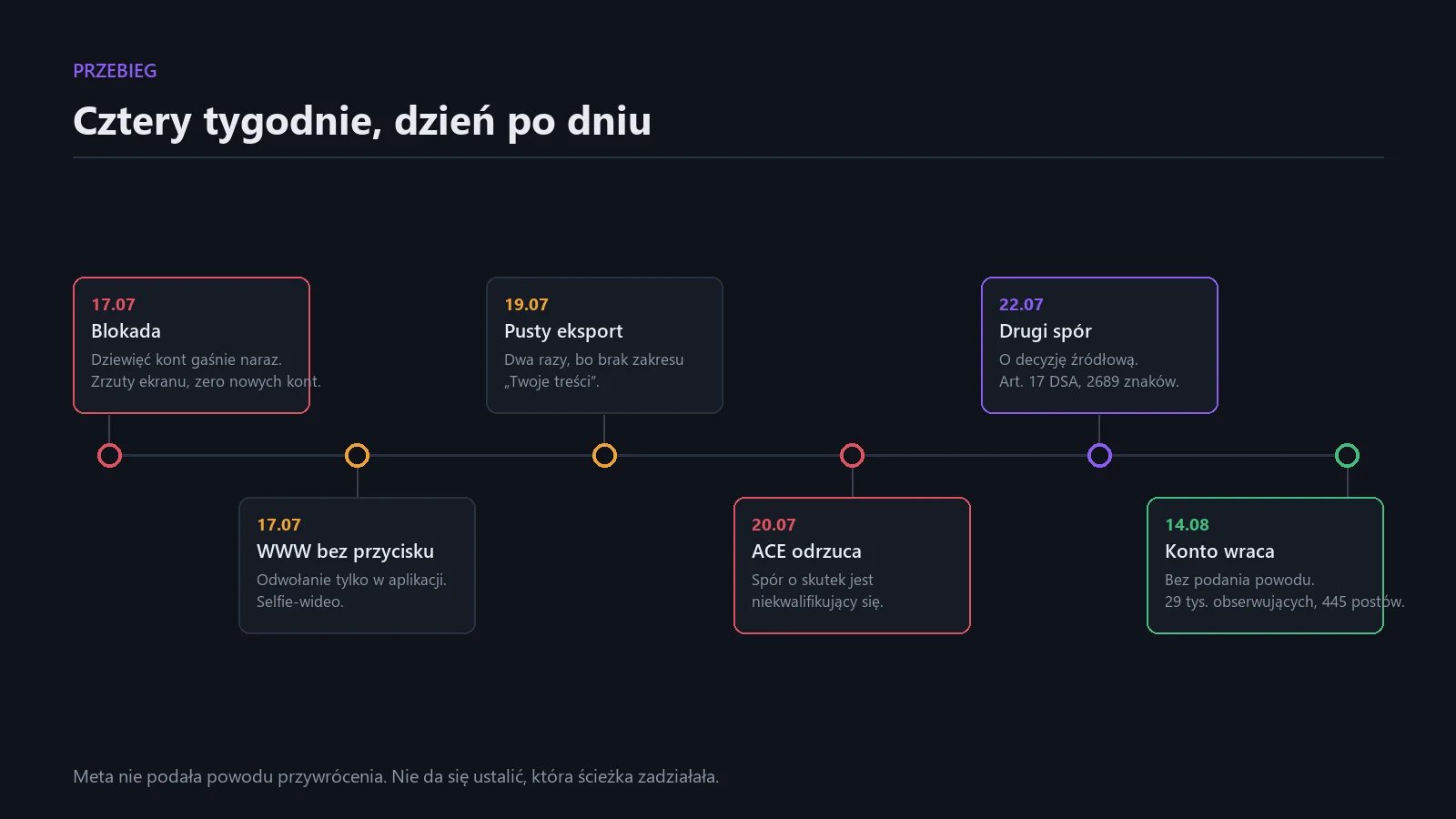
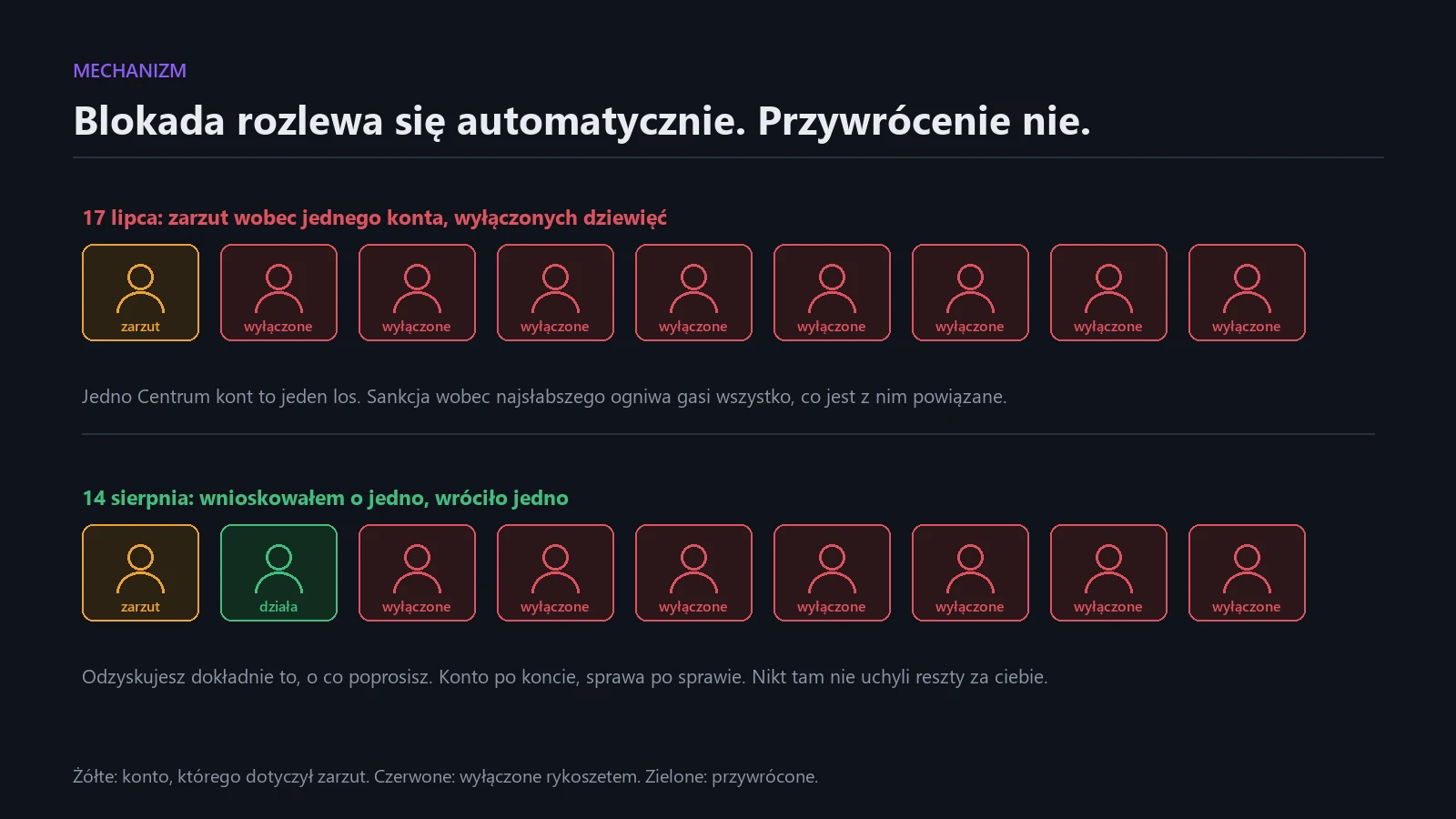
On July 17, 2026, I saw a gray screen instead of my profile. My Instagram account, 29,000 followers, 445 posts, years of work. Along with it, seven other Instagram accounts and my Facebook profile disappeared, because they all sat in one Accounts Center. The reason Meta gave concerned one of them, the least important to me. The other eight went dark as collateral damage.
On August 14, the account came back. All content intact, not a single post missing. I have no idea which of the things I did over those four weeks worked, and I’ll explain in a moment why nobody knows. But I have something better than a guess: a complete map of what you can actually do, in what order, and at what cost.
This article is that map. Not a guide in the style of “fill out a form and wait,” because the form old guides write about hasn’t existed for a long time.
The First Hour Determines the Next Three Months
Before you start appealing, do three things. In this order.
Screenshots of everything. The ban message, date, exact wording of the reason, name of the account the decision concerns, day counter. This is the only evidence you’ll have. After restoration or permanent deletion, this screen disappears and you can’t get back to it. I have mine and it later allowed me to write an appeal that stuck to facts instead of impressions.
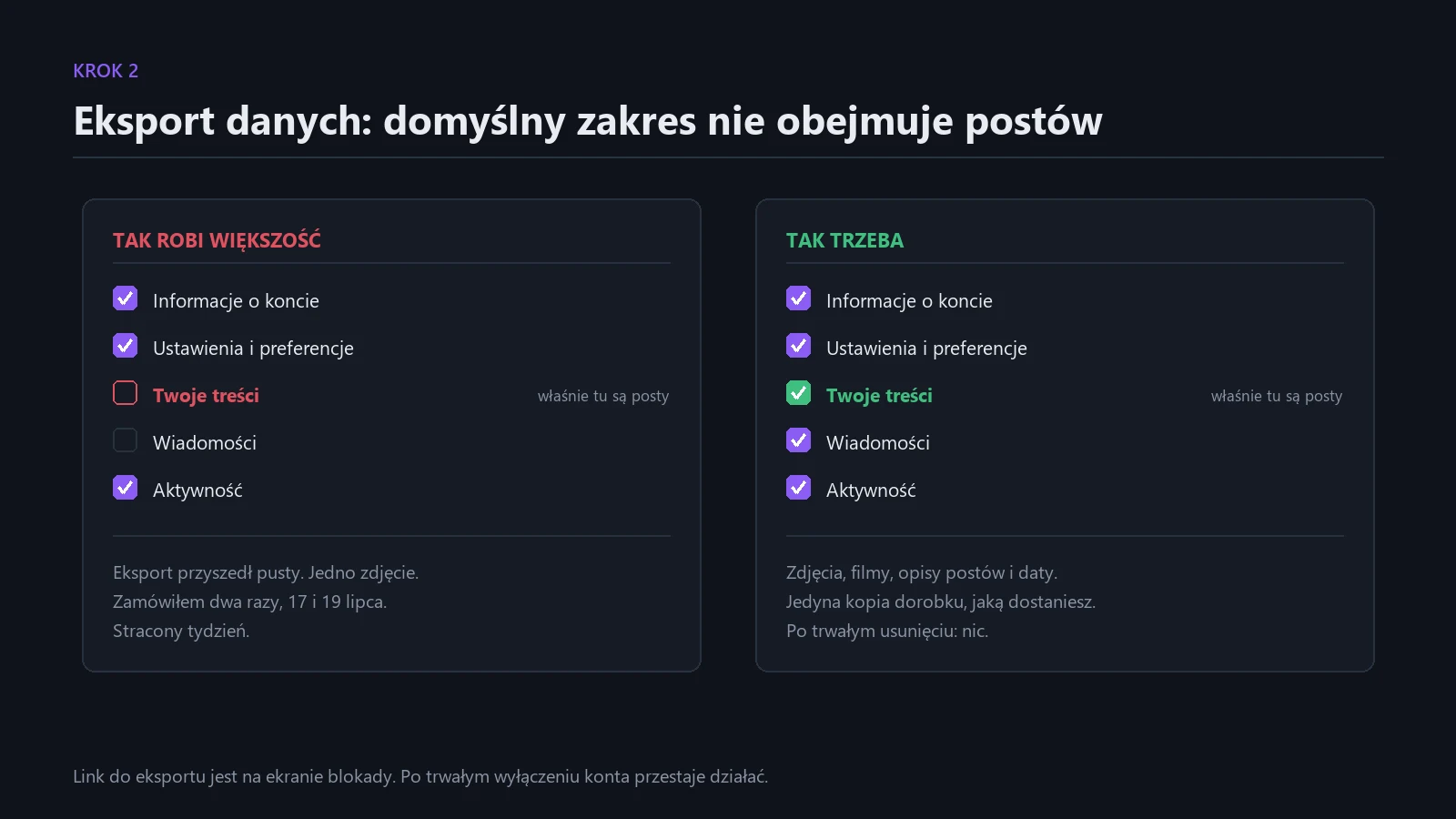
Download your account data. On the ban screen there’s a link to download information. Click it immediately and, this is crucial, select the “Your content” scope. I ordered the export twice, on July 17 and 19, and both came back empty, with one photo, because the default scope doesn’t include posts. I lost a week on this. After permanent account deletion, this option stops working entirely.
Don’t create a new account. This is the most common reflex and the worst possible move. Meta treats this as circumventing a ban and has a separate category of sanctions for it, this time indefinite. If you have a banned account and create a backup from the same device, same IP, same email, you’re closing the door to returning to the original. For four weeks I didn’t create any new account and I consider that one of the more important decisions.
Path 1: In-App Mobile Appeal
This is the only route Meta officially documents, and simultaneously the one about which it’s hardest to find reliable information.
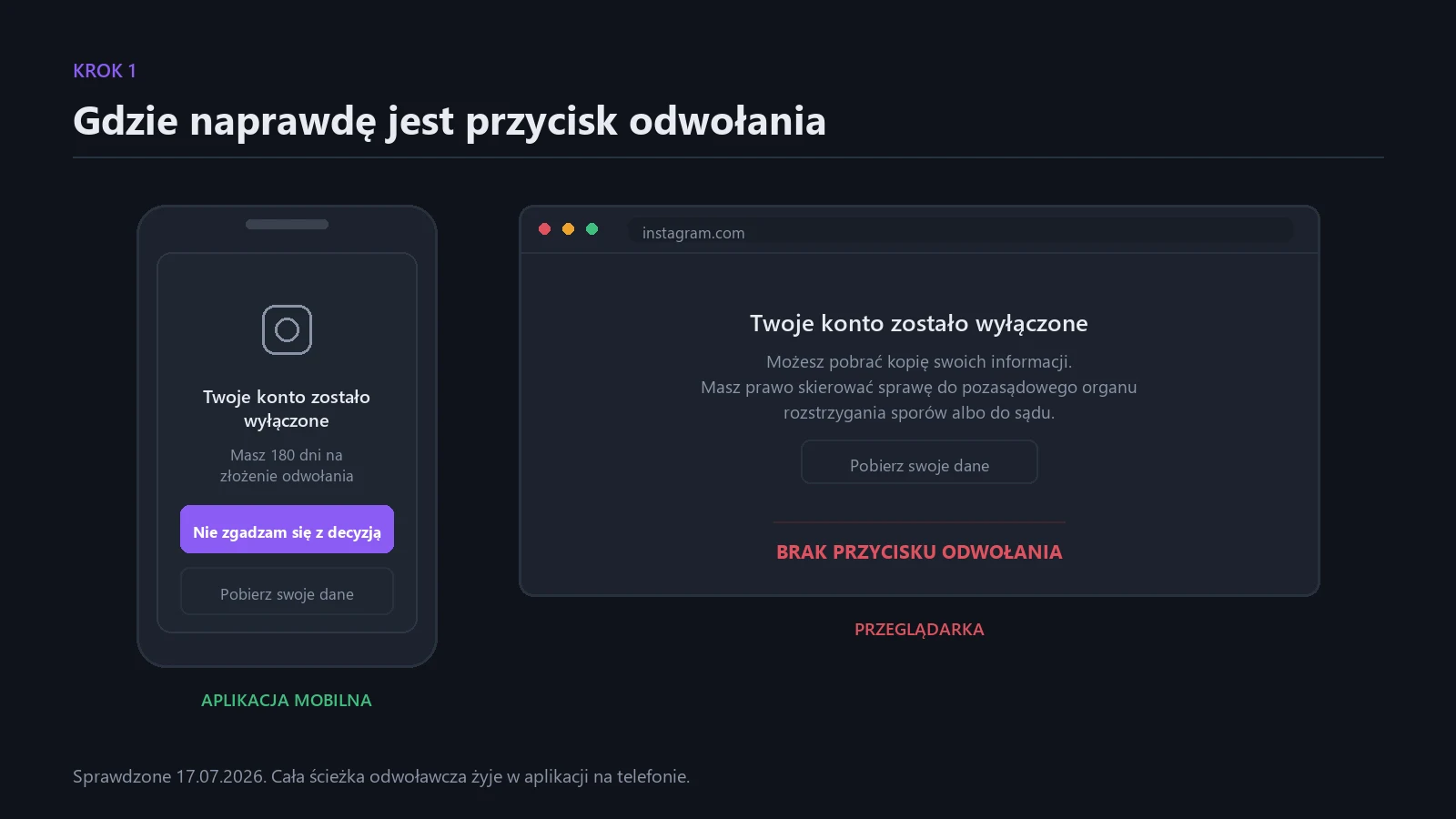
On instagram.com there is no appeal button. I checked this on day one. The browser shows a screen with data download and mention of the possibility of dispute, and that’s it. The entire appeal path lives in the phone app.
It looks like this: you log into the app with the banned account credentials, you get a gray screen with information about the suspension, and on that screen there’s a button like “I disagree with this decision” or “Request review.” Next comes identity verification. Usually a selfie video where you turn your head, sometimes a photo with a piece of paper with a handwritten code and account name, sometimes an identity document.
Two things worth knowing before you click.
First, selfie verification assumes your face matches the account history. If you run a brand account, an account managed by multiple people, or a character account, this verification is impossible to pass. For me, this was exactly the case with the account the decision concerned: I had neither a phone number, email, nor backup codes for it, so formally I couldn’t even log in to file an appeal.
Second, deadlines aren’t what they seem. The message talks about 180 days until permanent deletion and in the EU that’s a real deadline. But the window for a meaningful appeal is much shorter, practically the first 30 days count. After that, the case doesn’t disappear, it just falls into a queue from which things rarely return. Treat 30 days as the deadline, and 180 as the date after which there’s nothing left to save.
Don’t file the same appeal multiple times a day. Resubmitting after a week is fine, a series of submissions in one day can flag you as spam.
Path 2: Meta’s New Support Center
Since December 2025, Meta has centralized support for Facebook and Instagram in one place in the app, admitting outright that previous options didn’t meet expectations. There’s a tool there to report an account problem, to recover access, and an AI assistant.
The catch is that to use the support center, you need to be logged in, and you’re banned. This is a closed loop that thousands of people complained about in 2026. There’s one way out: if you have another device or another browser where the session hasn’t expired yet, go in from there before it expires. Don’t manually log out anywhere “for tidiness.”
Path 3: Advertiser Channel
If you spend money on ads and have a Business Manager, you theoretically have access to live chat in Meta Business Help Center. Meta in practice prioritizes accounts with advertising budgets and this is one of the few routes to a live person.
For me it was immediately ruled out. `business.facebook.com` and `facebook.com` returned “Sorry, this content isn’t available right now,” because the ban also covered the FB profile on which the Business Manager hung. If your ad account sits on the same profile that went down, this channel dies with it. This is an argument for keeping your business Business Manager on a separate admin profile.
Path 4: Meta Verified, a Route I Don’t Recommend
The subscription promises direct access to customer support. Sounds like an insurance policy for exactly this situation.
It’s not. First, buying Meta Verified after a ban is usually physically impossible, because to purchase a subscription, you need to log in. Second, reports from paying subscribers from the 2026 ban wave are damning: months of correspondence with no effect, consultants referring to forms, a petition with over 25,000 signatures. I know a case where after three months from purchase, the case was still at a standstill.
Meta Verified speeds up contact for minor issues. For a disabled account, it’s decoration.
By the way, a warning, because this is multiplying now: Meta does not provide phone support for accounts. Every “Meta helpline” number that pops up in search is a scam. Same with paid “account recovery” services promising contact with a Meta employee. You’re paying for someone to file the same form as you, or for nothing.
Path 5: Appeals Centre Europe, the Most Powerful Tool in the EU
This is the part about which there’s the least information online, and which is the most important.
The DSA gives EU residents the right to out-of-court dispute resolution with a platform. In practice, this is implemented by Appeals Centre Europe, a certified body from Dublin that since June 2025 accepts disputes about account suspension and deletion as well, not just individual posts.
Specifics that matter:
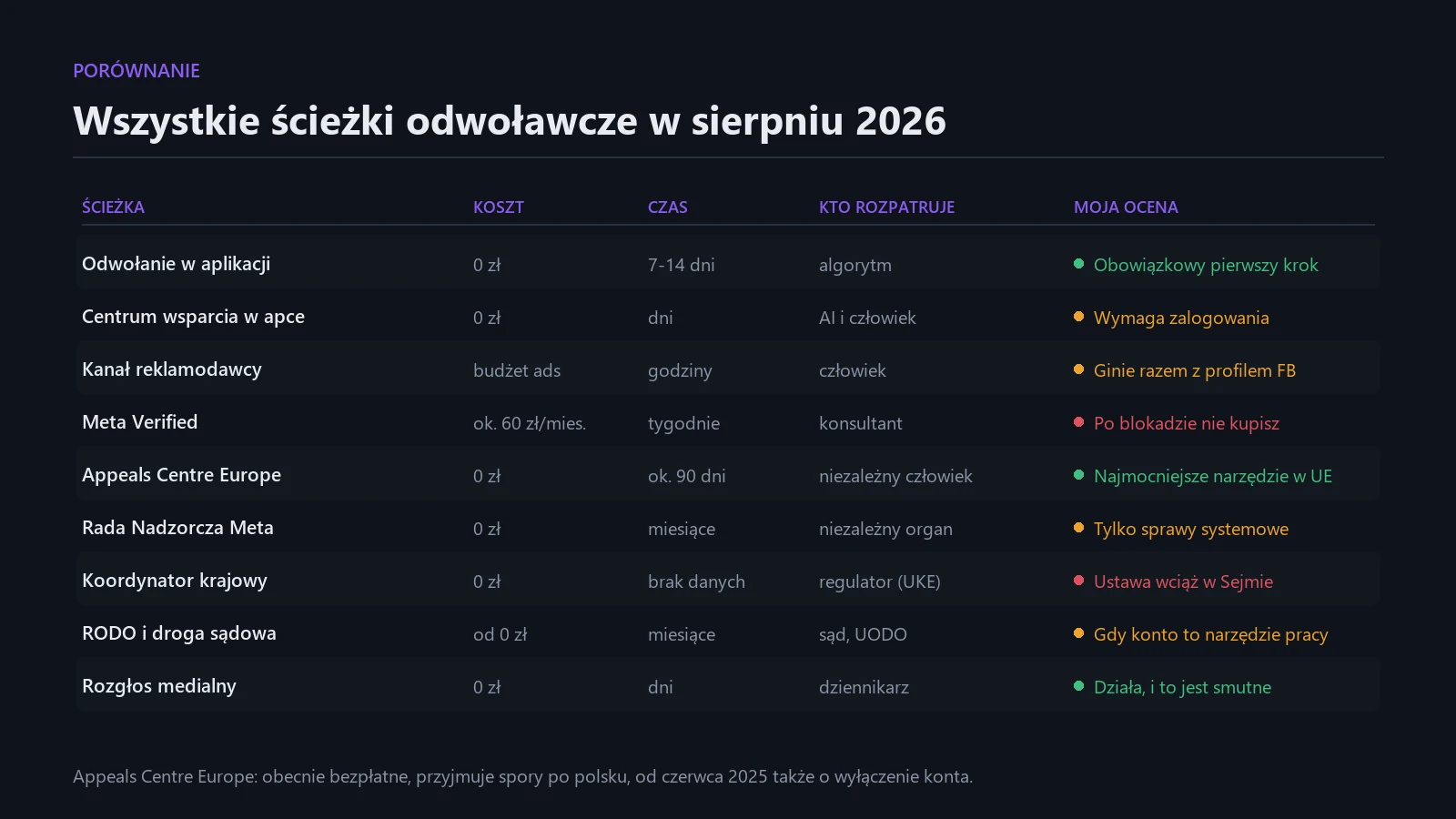
The service is free. The regulations provide for the possibility of introducing a 5 euro fee in the future, refundable in case of success, but currently the user pays nothing, platforms bear the costs.
You can file a dispute in your own language. Multiple EU languages are operational. I still wrote in English because I wanted to avoid any risk in translation, and I fit into 2,689 characters of the 3,500 limit.
The case is reviewed by a human, not the same algorithm that disabled you. That’s the entire difference from an in-app appeal.
The decision is not binding. The platform is supposed to act in good faith and in practice often changes its mind, but nobody can force it.
Effectiveness is real, but uneven. Between April 2025 and March 2026, over 24,000 complaints were filed, of which over 12,000 were qualified for review. In hate speech cases, the center overturned platform decisions in 70 percent of cases. The problem lies elsewhere: in 72 percent of submissions, platforms didn’t provide material for review at all, and for account bans Meta provided materials in fewer than a hundred of over 4,600 cases. So the biggest obstacle isn’t that the center will side with Meta, but that Meta can simply not respond.
And now the most important trap, which I fell into myself.
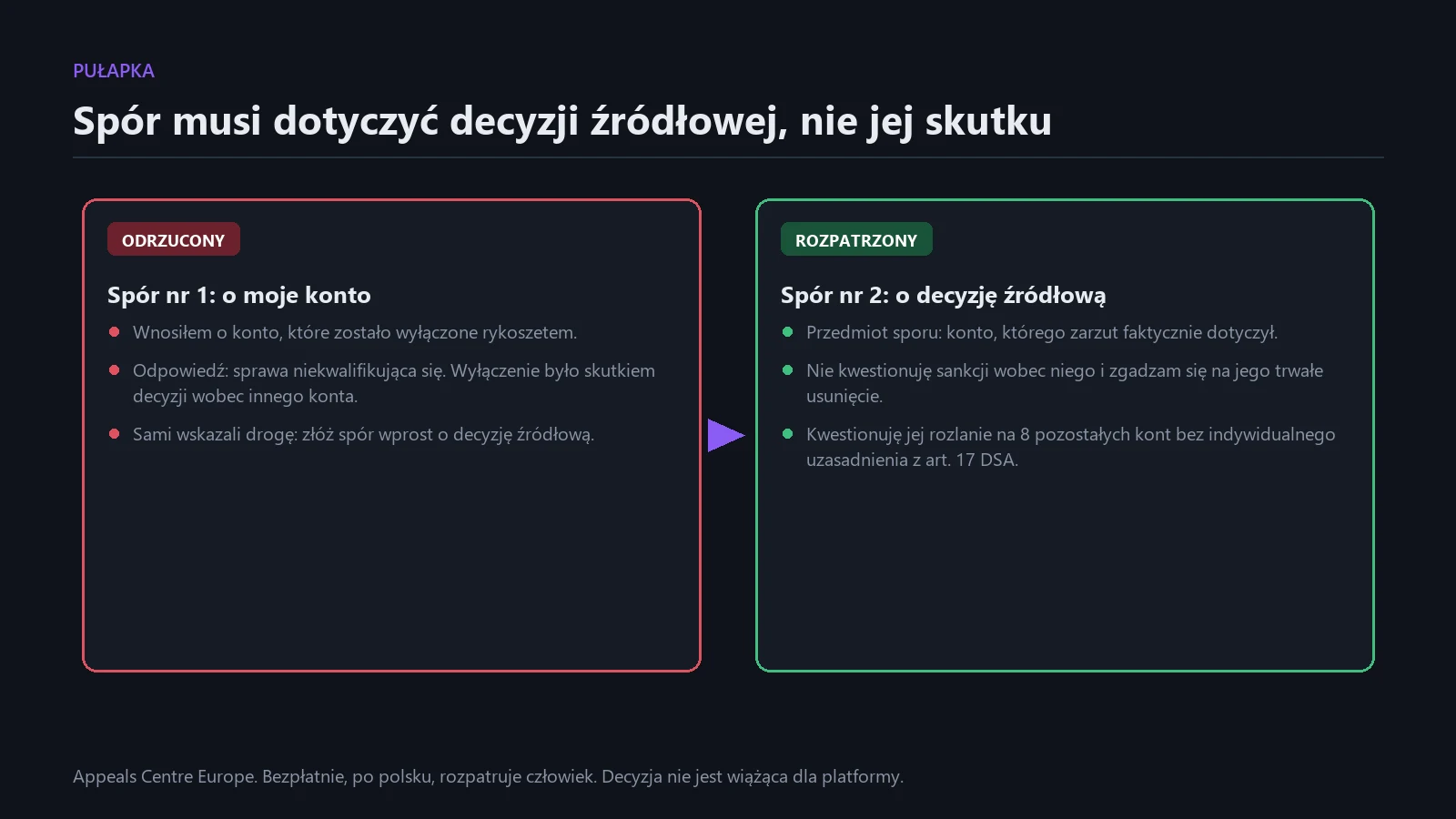
My first dispute was rejected as not qualifying. I filed it regarding my suspended account. The response was: suspension of this account was a result of a decision made regarding another, linked account, so the center cannot review it. They pointed me to the path themselves: file a new dispute concerning directly that source decision.
That’s what I did. On July 22, I filed a second dispute, this time entering as the subject the account the allegation actually concerned. I based the content on one argument: I don’t contest the sanction against that account and agree to its permanent deletion, I contest the spillover of that sanction to eight other accounts without individual justification, which Article 17 of the DSA requires. One account with an allegation, nine disabled. This is disproportionality that can be named in two sentences.
Three weeks later the account came back.
Path 6: Meta Oversight Board
The Oversight Board is an independent body that can overturn Meta’s decisions and whose decisions in specific cases are binding. For years it dealt mainly with individual content, but in January 2026 it accepted the first case directly about the policy of permanently disabling accounts.
Realistically: it accepts a fraction of submissions, chooses cases of systemic significance, takes months. If your story has precedent-setting dimensions, it’s worth submitting. If you want to recover your account this quarter, this isn’t your path.
Path 7: Regulator, a Path Still Opening in Many Countries
The DSA provides for a national Digital Services Coordinator to whom you can file a complaint about a platform. Implementation varies by country.
As of August 2026, this route doesn’t yet work fully in many jurisdictions. The regulatory framework is still being established in various EU member states, with some countries facing delays in implementation. The European Commission has taken legal action against several member states for delays in DSA implementation.
Practically: where available, you can file a complaint with your national coordinator, but don’t count on it speeding up your case. Treat it as building systemic pressure, not as a recovery tool. A separate path is a complaint directly to the European Commission, because Meta is a very large online platform and is subject to Commission oversight.
Path 8: GDPR and Court
A request for access to personal data under GDPR is a tool few people think about in the context of a ban, but which can extract from the platform information you won’t get from any form: what exactly was recorded in the decision.
The legal route exists and the ban page explicitly mentions it. For a private account, the economic calculation usually doesn’t add up. For an account that’s a work tool and you can demonstrate lost revenue, the conversation looks different.
Path 9: Publicity
This isn’t a procedure, but it works. Documented cases where an account came back after the case was picked up by media are numerous, and this is the sad truth about what customer service looks like at this scale. If you have reach or access to a tech journalist, describing the case with dates and case numbers costs you one afternoon.
What Worked for Me? I Don’t Know and Nobody Would
I need to write this plainly, because the internet is full of guides with guarantees.
The account came back on August 14, four weeks after the ban and three weeks after filing the second dispute. Meta gave no reason for the restoration. I didn’t get an email saying “we granted your appeal,” I didn’t get a decision, I didn’t get a case number the restoration concerns. The profile just worked again.
Three things ran in parallel: the in-app appeal, the dispute in Appeals Centre Europe, and Meta’s internal review, about which I know nothing. It’s impossible to determine which one worked. I have a clue and nothing more: the account the allegation concerned is still disabled, and the eight others are exactly what I requested in the second dispute. Meta maintained the sanction against the account with the allegation and withdrew its spillover. This is a coincidence with the content of my request, not proof of causality.
I’m not a lawyer and this is not legal advice. This is an account of what I did and what happened.
The Most Important Thing I Learned
This sentence is worth writing down, because it cost me six accounts:
A ban spills over to the entire Accounts Center automatically. Restoration doesn’t spill over at all.
One account came back because I requested one. The remaining six real Instagram accounts and the Facebook profile are still disabled because they weren’t covered by the request. Nobody at Meta thought “since we’re overturning it, let’s overturn everything.” You recover exactly what you ask for, account by account, case by case.
If the ban covered several of your accounts, list them all by name in every appeal and conduct a separate proceeding for each one you care about. A separate decision is a separate case, also in Appeals Centre.
Schedule If This Happens to You Tomorrow
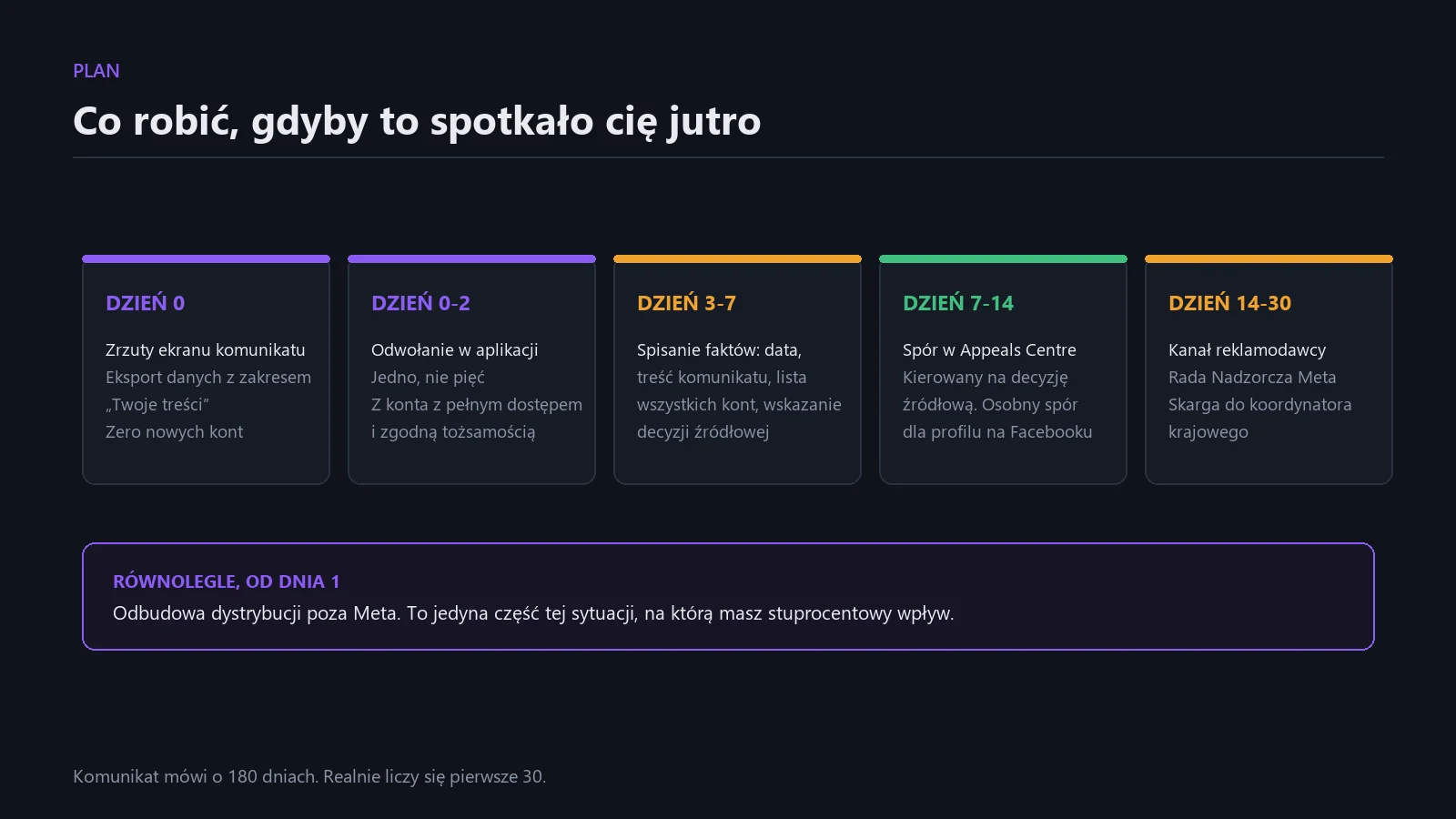
Day 0. Screenshots. Data download with “Your content” scope. Zero new accounts. Check if you’re still logged in somewhere.
Day 0 to 2. In-app appeal from an account you have full access to and whose identity matches your documents. One appeal, not five.
Day 3 to 7. Write down the facts: ban date, exact wording of the message, list of all affected accounts, identification of the account the decision actually concerns. This is material for a dispute, not something you’ll make up in a form on the fly.
Day 7 to 14. Dispute in Appeals Centre Europe. Direct it at the source decision, not the collateral effect. Separate dispute for the Facebook profile, because it’s formally a different decision.
Day 14 to 30. Advertiser channel if it’s still alive. Submission to Oversight Board if the case has systemic dimensions. Complaint to national coordinator.
In parallel, from day 1. Rebuild distribution outside Meta. This isn’t consolation, it’s risk calculation. I had 180 days until permanent deletion and I estimated the chances at one in three. Newsletter, own website, and another video channel are the only part of this situation over which you have one hundred percent control.
Hygiene That Will Prevent This From Happening Again
Three rules I implemented after the fact.
One Accounts Center is one fate. Personal account, brand account, and any experimental account cannot sit in the same Accounts Center, on the same number, email, and device. A sanction against the weakest link kills everything connected to it.
An account you don’t have full access to is a time bomb. The account where this started had 2FA on a number I no longer have, and zero backup codes. I couldn’t recover it, delete it, or even appeal it. Do an audit today: for every account you have, you must have a current email, current number, and saved backup codes. Accounts that don’t meet this, delete while you can.
Offline archive. I was lucky and reconstructed locally 1,116 unique files from my publications, 2.3 GB, but it was several days’ work from scattered folders. Monthly data export with “Your content” scope and a copy of graphics on disk costs you half an hour a month.
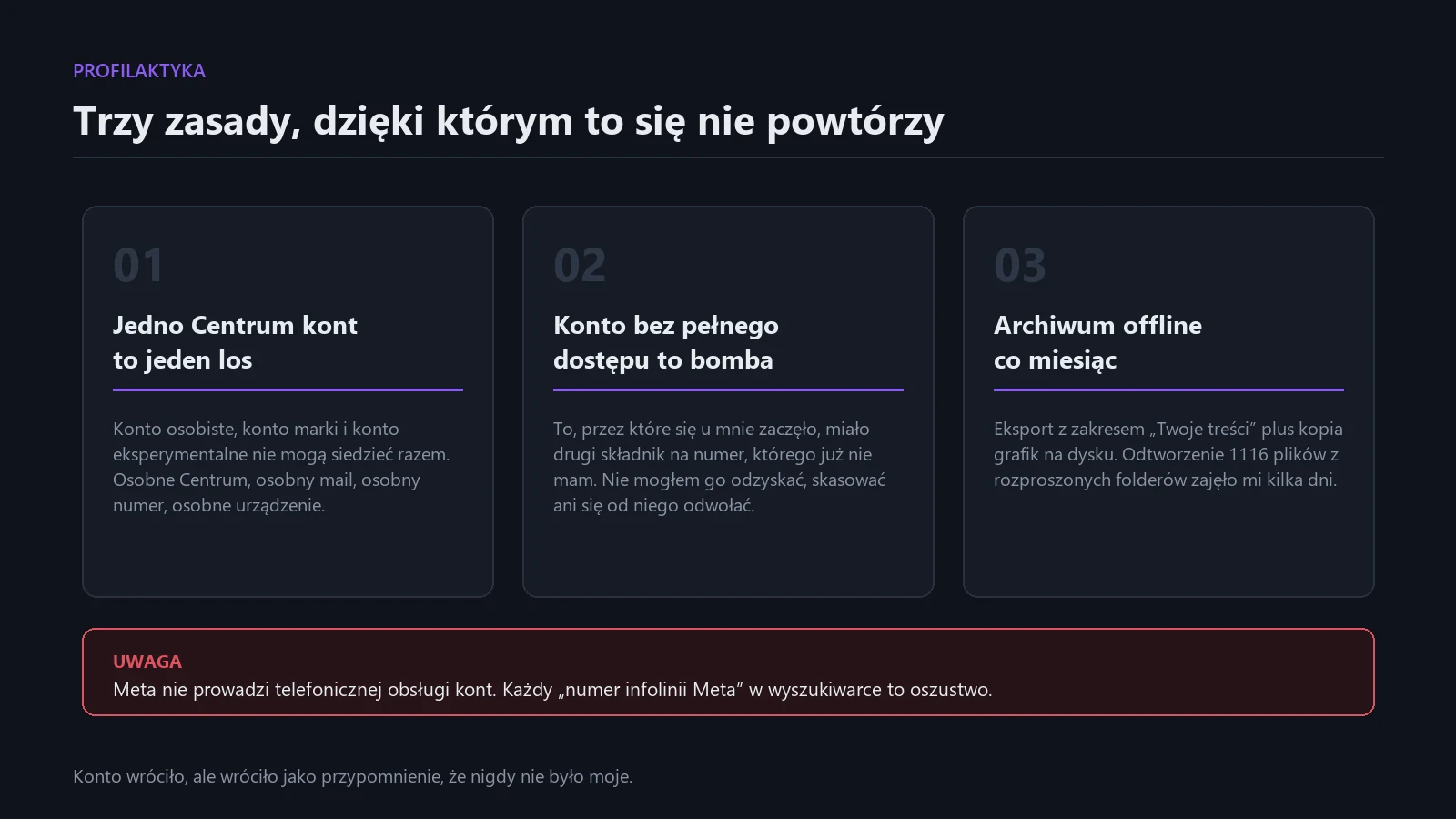
The account came back, but it came back as a reminder that it was never mine. It was borrowed and at any moment can be taken away without justification that nobody has to present to me. An address on your own domain and an email list are the only two things in this setup that no algorithm will disable in the morning.

More on this from QUANTSLANT
 magazine·Cursor, Copilot, Windsurf: What If You Can’t Code?AI coding tools promise anyone can build apps without writing code. We examine where the magic ends and invisible technical debt begins.