Civitai Guide: How to Download Models Safely
Everything you need to know about Civitai: downloading checkpoints, LoRA, and embeddings, understanding licenses, Buzz pricing, and checking files safely.

👁 140 reads
Civitai is the largest public catalog of image generation models: checkpoints, LoRA, and embeddings for Stable Diffusion, SDXL, Flux, and newer architectures, with an online generator that runs on credits called Buzz. You download files from there and then run them locally, for example in ComfyUI. In this guide we explain what “Civitai Red” is, how to read licenses, what membership costs, and how to check a downloaded file before loading it into your software. We verified everything on the official sites on September 28, 2026.
Quick Summary
Civitai is free to browse and download from, and you only pay for generating on the service’s servers: membership costs from $10 to $50 per month, and 1000 Buzz equals roughly $1. Since April 15, 2026, the service has two domains: civitai.com shows only safe-for-work content (SFW), while Civitai Red is a second domain of the same service with adult content, which we won’t link to. Only download .safetensors files, because the old .ckpt format can execute code when loaded. Terms of service require users to be 18 or older. Who it’s for: adults who generate images locally. Who it’s not for: minors and people who just want a simple browser-based generator.
What Civitai Is
Civitai is a social platform where creators publish image models they’ve trained, and others download them, rate them, and share images they’ve generated. The company has operated since 2022, is headquartered in Boise, Idaho, and received funding from Andreessen Horowitz in November 2023. Each model has its own page with versions, downloadable files, statistics, license information, and an example gallery.
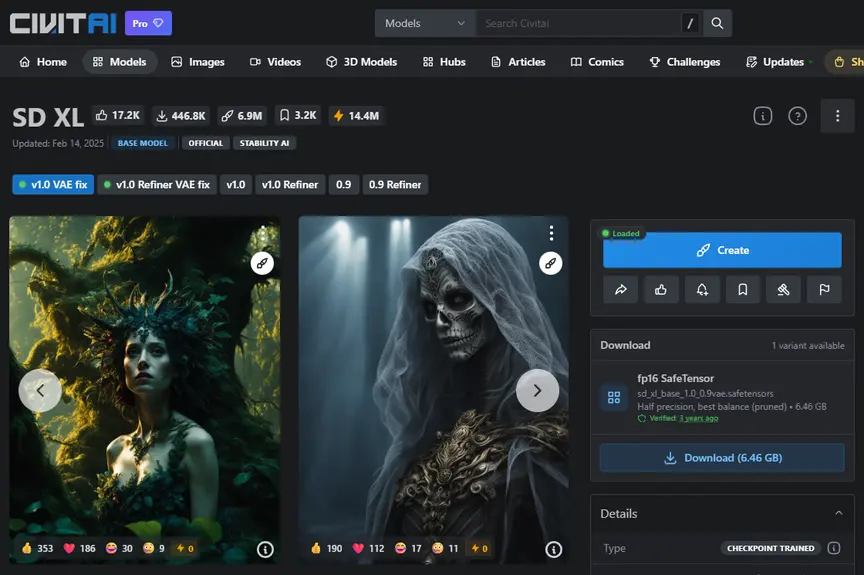
On top of that, there’s an online generator billed in Buzz and training for your own LoRA. Downloading itself doesn’t require payment. We verified that the official SD XL can be downloaded even without an account: the API link redirects straight to the file. For community models, the author sets the download conditions.
What Civitai Red Is
“Civitai Red” is not a new model or separate company, just a second domain of the same service. Civitai announced the split on April 9, 2026 in a post titled “Two Front Doors,” and since Wednesday, April 15, 2026, it works like this:
- civitai.com shows only safe-for-work content (SFW) and accepts card payments,
- Civitai Red is a separate domain with the full catalog, including adult content, and separate payment processing,
- the old civitai.green domain redirects to civitai.com,
- your account is shared: models, images, follows, and Buzz remain the same across both domains.
Civitai stated the reason themselves: payment card processors agreed to service the site only if adult content was completely separated from the main domain. Hence the different “colors” of Buzz: you buy green with a card on civitai.com and spend it on safe content, while you earn blue through activity. We won’t link to or describe the contents of Red.
File Types: Checkpoint, LoRA, Embedding, VAE
Before you download anything, check the “Type” and “Base Model” fields in the model details.
| Type | What It Does | Typical Size | ComfyUI Folder |
|---|---|---|---|
| Checkpoint | full model, generates images on its own | 2-7 GB (SD 1.5, SDXL), more for newer ones | models/checkpoints |
| LoRA | small add-on to checkpoint: style, character, object | tens to hundreds of MB | models/loras |
| Embedding | learned keyword for prompts, often for negative prompts | a few to tens of kB | models/embeddings |
| VAE | image encoder, affects colors and sharpness | about 0.3 GB | models/vae |
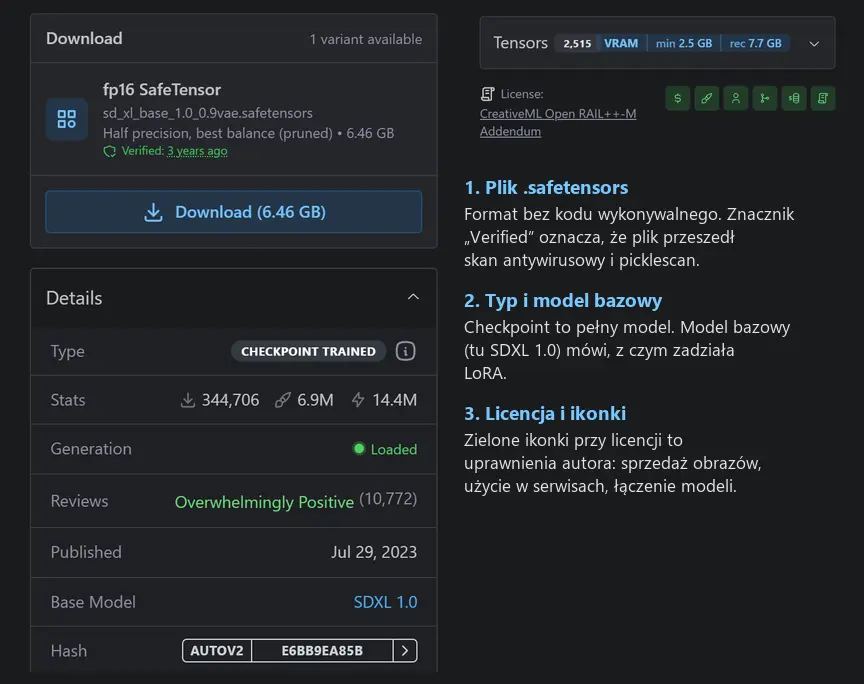
The most common mistake is using a LoRA with a different base model than your checkpoint: an SDXL LoRA won’t work with Flux. The SD XL file from our screenshot weighs 6.46 GB, and the page recommends 7.7 GB of GPU memory. We detailed how much memory different models need in our article on how much VRAM you need to run models locally.
How to Download and Run a Model Locally
- Choose a model and version (buttons above the gallery), check “Base Model” and license.
- In the “Download” panel, select the variant labeled “SafeTensor”. If there’s only
.ckptor.pt, look for a different model. - Check the file with the script from the section below: format, AutoV2 hash, and whether Civitai recognizes that hash.
- Put the file in the appropriate folder (table above). In Forge the equivalents are
models/Stable-diffusion,models/Lora, andmodels/VAE. - Restart the program or refresh the model list.
To get started, read our guide to Stable Diffusion locally. We showed ComfyUI installation on Windows in our Qwen-Image-2.1 article.
Is Civitai Safe: .safetensors Instead of .ckpt
Old .ckpt, .pt, and .pth files use Python’s pickle format internally. When loaded, such a file can call any function, for example a system command. The .safetensors format contains only a JSON header and raw numbers, so there’s no room for code.
Civitai scans every uploaded file with two tools: ClamAV antivirus and picklescan, which looks for dangerous imports in pickle. The result appears as a green “Verified” badge. This helps, but doesn’t guarantee safety: Sonatype described four ways to bypass picklescan, and a 2026 arXiv paper showed that popular scanners detected between 7.23% and 62.75% of malicious pickle files from their test set. That’s why we recommend sticking to one rule: only .safetensors.
Ready-Made Script: Check Files Before Loading
We wrote a short script in pure Python (no torch) that doesn’t load anything into memory. For .safetensors it only reads the header, for pickle files it lists imports and warns about suspicious ones, and at the end it calculates SHA256 and the AutoV2 hash - the first 10 characters of SHA256 that Civitai shows in the “Hash” field. With the --civitai parameter it queries the service’s public API to see which model that hash belongs to.
We tested it on two files. Flux’s VAE (ae.safetensors, 0.34 GB) was recognized as safetensors with 244 tensors, and Civitai’s API matched hash AFC8E28272 to the model “Flux vae.sft” (base model Flux.1 D). The second file was a harmless .ckpt trap we prepared that would print text to the screen when loaded: the script found the builtins.print import and marked the file as dangerous. Download: civitai-check-model.zip (2 kB).
Running from command line:
python check-model.py D:ComfyUImodelslorasmy-lora.safetensors --civitai
Full code:
"""check-model.py - checks a model file downloaded from Civitai WITHOUT loading it into memory.
Usage:  python check-model.py <file> [--civitai]
- .safetensors: reads only the JSON header (number of tensors, data types, LoRA training metadata),
- .ckpt/.pt/.pth/.bin: lists pickle imports (statically, pickletools) and warns about suspicious ones,
- always: SHA256 and AutoV2 hash (first 10 characters of SHA256, what Civitai shows in Hash field),
- --civitai: queries Civitai's public API to see which model this hash belongs to (no key, no login).
Requires only Python 3.9+ (no torch, no safetensors)."""
import hashlib, json, os, pickletools, struct, sys, urllib.request, urllib.error, zipfile
sys.stdout.reconfigure(encoding="utf-8")
DANGEROUS = ("os", "posix", "nt", "subprocess", "builtins", "__builtin__", "sys", "socket", "shutil", "runpy", "webbrowser", "requests", "urllib")

def sha256(p):
    h = hashlib.sha256()
    with open(p, "rb") as f:
        for block in iter(lambda: f.read(1 << 22), b""): h.update(block)
    return h.hexdigest().upper()

def safetensors_header(p):
    with open(p, "rb") as f:
        n = struct.unpack("<Q", f.read(8))[0]
        if n > 100_000_000: raise ValueError("suspiciously large header - probably not safetensors")
        h = json.loads(f.read(n))
    meta = h.pop("__metadata__", {}) or {}
    types = {}
    for t in h.values(): types[t["dtype"]] = types.get(t["dtype"], 0) + 1
    print(f"Format: safetensors (header only, {n} bytes) - file cannot execute code when loaded.")
    print(f"Tensors: {len(h)}, data types: {types}")
    for k in ("ss_base_model_version", "ss_sd_model_name", "ss_network_dim", "ss_output_name", "modelspec.architecture", "modelspec.title"):
        if k in meta: print(f"  {k}: {meta[k][:120]}")

def pickle_imports(data):
    result = set(); stack = []
    for op, arg, _ in pickletools.genops(data):
        if op.name in ("SHORT_BINUNICODE", "BINUNICODE", "UNICODE", "SHORT_BINSTRING", "BINSTRING"): stack.append(arg)
        elif op.name == "GLOBAL": result.add(arg.replace(" ", "."))
        elif op.name == "STACK_GLOBAL" and len(stack) >= 2: result.add(f"{stack[-2]}.{stack[-1]}")
    return result

def check_pickle(p):
    print("Format: pickle (.ckpt/.pt/.pth/.bin) - can execute code when loaded by torch.load.")
    chunks = []
    if zipfile.is_zipfile(p):
        with zipfile.ZipFile(p) as z:
            chunks = [z.read(n) for n in z.namelist() if n.endswith(".pkl")]
    else:
        chunks = [open(p, "rb").read()]
    imp = set()
    for k in chunks:
        try: imp |= pickle_imports(k)
        except Exception as e: print("  failed to analyze chunk:", e)
    suspicious = sorted(i for i in imp if i.split(".")[0] in DANGEROUS)
    print(f"Pickle imports: {len(imp)}")
    for i in sorted(imp)[:25]: print("  ", i)
    if suspicious: print("WARNING, suspicious imports:", ", ".join(suspicious), "- DO NOT load this file.")
    else: print("No imports from suspicious list found, but this is not a guarantee. Look for .safetensors version.")

def main():
    if len(sys.argv) < 2: print(__doc__); return
    p = sys.argv[1]
    print(f"File: {os.path.basename(p)}, size: {os.path.getsize(p)/1e9:.2f} GB")
    if p.lower().endswith(".safetensors"): safetensors_header(p)
    else: check_pickle(p)
    s = sha256(p); print(f"SHA256: {s}nAutoV2 (Civitai): {s[:10]}")
    if "--civitai" in sys.argv:
        url = f"https://civitai.com/api/v1/model-versions/by-hash/{s[:10]}"
        try:
            try:
                import certifi, ssl; ctx = ssl.create_default_context(cafile=certifi.where())
            except ImportError:
                ctx = None
            req = urllib.request.Request(url, headers={"User-Agent": "check-model/1.0"})
            d = json.load(urllib.request.urlopen(req, timeout=30, context=ctx))
            print(f"Civitai: {d.get('model', {}).get('name')} / version {d.get('name')} / base model {d.get('baseModel')} / model id {d.get('modelId')}")
        except urllib.error.HTTPError as e:
            print("Civitai doesn't recognize this hash (HTTP", e.code, ") - file may have been modified or comes from another source.")
        except Exception as e:
            print("Failed to connect to Civitai:", str(e)[:120]); print("Check manually in browser:", url)

main()
Model Licenses: What the Icons Mean
Below the details panel you’ll find the license name and a row of icons. We decoded their meaning from Civitai’s source code (the PermissionIndicator component in the public repository): a green icon means permission, red means prohibition.
| Icon | Permission (green) | Prohibition (red) |
|---|---|---|
| Dollar sign | commercial use allowed, e.g. selling images | no commercial use |
| Paintbrush | model can run in paid generation services | no generation services |
| Person | no need to credit author | attribution required |
| Fork | may share merged models | no merging |
| Business plan | may sell merged models | no selling merges |
| Document | merge can have different terms | merge must have same terms |
The icons are the author’s declaration, not the complete agreement. The base model’s license also counts (SD XL has CreativeML Open RAIL++-M, and some newer models have non-commercial licenses that also cover derivative LoRA). The author can change permissions, so for commercial projects take a screenshot with the date. We write more about what you can do with AI images in our article on copyright for AI-generated images.
Online Generator and Buzz Pricing
Generating on Civitai’s servers is billed in Buzz. The cost of one job depends on the model, resolution, and number of images, and the service shows it before you click. Memberships from the pricing page (as of September 28, 2026):
| Plan | Price | Monthly Buzz | What Else |
|---|---|---|---|
| No membership | $0 | blue Buzz for activity | browsing, downloading, generating with earned Buzz |
| Bronze | $10/month | 10,000 | 8 images per job, 3 private models, no ads |
| Silver | $25/month | 25,000 | 10 images per job, 10 private models |
| Gold | $50/month | 50,000 | 12 images per job, 100 private models |
From the pricing ratios, 1000 Buzz equals roughly $1. You can only buy membership on civitai.com, but its benefits work on both domains.
Age, Filters, and Countries Where Civitai Doesn’t Work
- Age: Civitai’s terms of service explicitly state that the service may only be used by people 18 years or older.
- Filters: civitai.com by definition shows only safe content, and every uploaded image goes through automatic tagging and moderation.
- Countries: Since July 24, 2025, Civitai blocks the United Kingdom (reason: Online Safety Act), and since March 16, 2026, Australia (local age verification requirements). The site works normally from Poland, as shown in our screenshots.
Alternatives to Civitai
The most important alternative is Hugging Face: that’s where companies publish base models themselves, and files are also scanned for pickle and viruses. Catalogs with online generators are also run by Tensor.art and SeaArt. Our advice: download base models from Hugging Face, and get community LoRA from Civitai. That’s our opinion. If you don’t want to install anything, you’ll find a comparison of ready-made browser tools in our article on AI image generators.
Frequently Asked Questions
Is Civitai Free?
Browsing and downloading models is free. You pay for generating on Civitai’s servers: in Buzz or with membership starting at $10 per month.
What Is Civitai Red?
It’s a second domain of the same service, launched April 15, 2026, where you can also see adult content. Your account is shared with civitai.com, and the main domain has shown only safe content since that date.
Is Downloading Models from Civitai Safe?
.safetensors files cannot execute code when loaded, so they’re safe in that regard. .ckpt and .pt files can, and Civitai’s scan doesn’t catch everything, so avoid them.
Can I Sell Images from Civitai Models?
It depends on the license of the specific model and its base model. A green dollar icon means the author permits commercial use, red means prohibition.
Sources and Verification Date
- Civitai: Two Front Doors (domain split announcement, April 9, 2026)
- Civitai membership pricing
- Civitai terms of service
- Civitai beginner’s guide
- permission icon code in Civitai repository
- discussion about file scanning (ClamAV and picklescan)
- Sonatype on picklescan vulnerabilities
- arXiv 2602.19818 on pickle scanner effectiveness
- Civitai on Australia block
- Wikipedia: Civitai. Screenshots and script test (on ae.safetensors file from our ComfyUI): ours
- September 28
- 2026. Verified September 28
- 2026


More on this from QUANTSLANT


 guides·PostHog in Practice: Where Users Drop Off and What WorksPostHog delivers the most value when you're making decisions on gut feeling. Here's how to turn guesswork into concrete numbers and session recordings.