FLUX 3 Image: Native 4K, Bounding Boxes & Multi-Edit
Black Forest Labs released FLUX 3 Image on October 1, 2026: native 4K up to 5456×3072px, bounding box composition, and multi-area editing without touching the rest.
👁 124 reads
Black Forest Labs released FLUX 3 Image on October 1, 2026 - the image generation component of the FLUX 3 family announced in July. Three features stand out: native 4K up to 5456 × 3072 px, scene composition using bounding boxes (each object gets coordinates), and editing multiple areas at once without touching the rest of the image. Through the fal.ai API it costs $0.024 per megapixel until October 8 (1K image ~$0.024, 4K ~$0.40), then double that. We tested it the same day.
The FLUX 3 family has now seen three releases. In July, Black Forest Labs showed a single model trained simultaneously on images, video, and audio. In August they released FLUX 3 Video, and on September 23 FLUX 3 Action for robot control. Images came last, after ten weeks of waiting.
What’s New in FLUX 3 Image
- Native 4K. Five resolution levels: 512sq, 768sq, 1k, 2k, and 4k. In 4k mode I got a 5456 × 3072 px image (16.8 Mpx) without separate upscaling.
- Bounding box composition. The canvas is a grid from 0 to 1000 regardless of aspect ratio. Each object gets an identifier, description, and bounding box in [y_min, x_min, y_max, x_max] format.
- Multiple edits at once. According to the maker, pixels outside the edited boxes remain bit-for-bit identical.
- Up to 10 reference images. In the prompt you reference them as ref_image_0 through ref_image_9. Through fal.ai each input image can be up to 4 Mpx.
- Better text rendering. The maker recommends the model for posters, ads, and infographics.
- Weights. Commercial license for weights is available immediately, and an open version is set to appear “within weeks.”
How a Bounding Box Prompt Looks
Instead of describing “lamp in the upper left corner,” you provide coordinates. Here’s my first test prompt, entered in the prompt field on fal.ai:
{"caption": "Editorial photo of a minimalist desk in a bright apartment, morning light, 35mm.",
 "elements": [
  {"id": "lamp_1", "bbox": [80, 60, 520, 300], "desc": "a brass desk lamp"},
  {"id": "plant_1", "bbox": [300, 700, 900, 960], "desc": "a tall monstera plant in a white pot"},
  {"id": "laptop_1", "bbox": [450, 320, 850, 680], "desc": "an open silver laptop showing a spreadsheet"},
  {"id": "mug_1", "bbox": [700, 80, 900, 260], "desc": "a red coffee mug with text "[BRAND]""}]}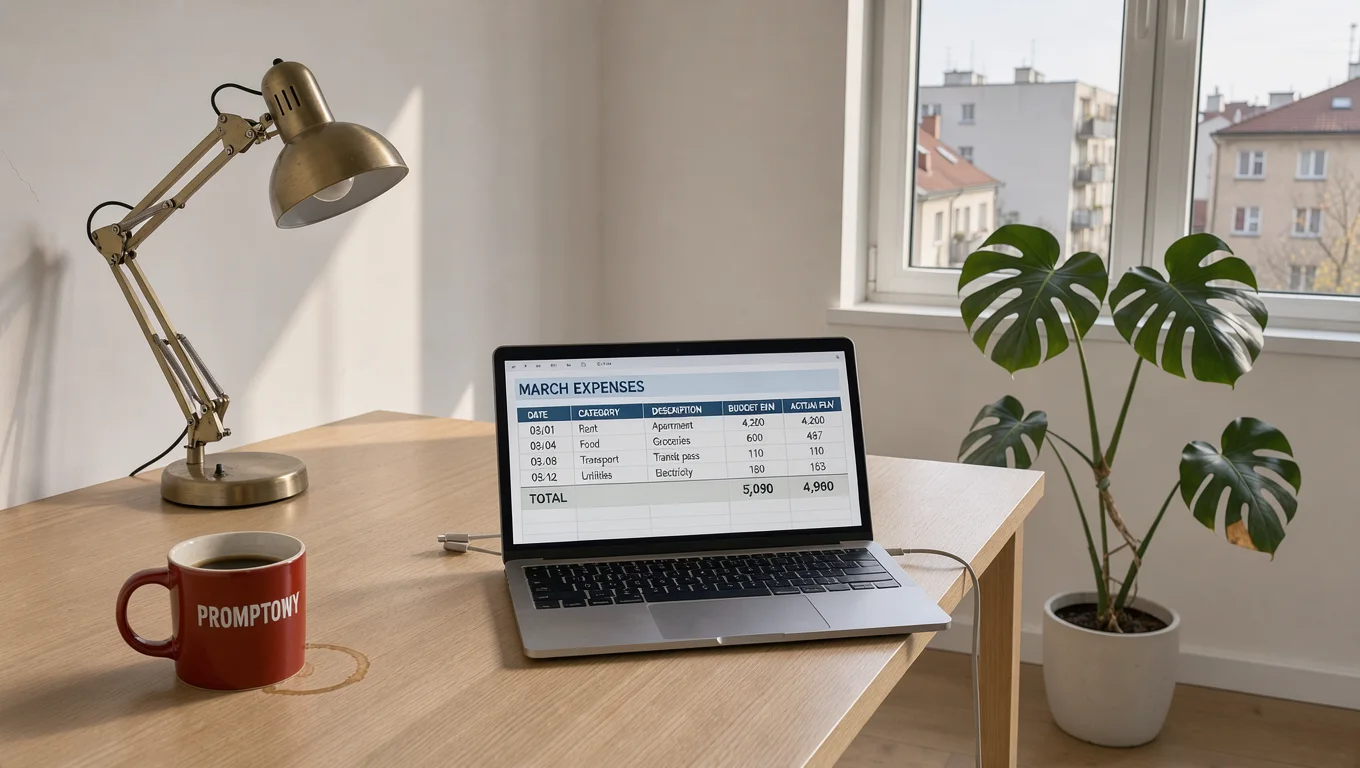
Pricing and Access
| Where | Price | Notes |
|---|---|---|
| fal.ai (text-to-image and editing) | $0.024 per megapixel until Oct 8, then $0.048 | 1K ~$0.024, 4K ~$0.40 |
| Black Forest Labs API | 50% off until October 8 | playground at dashboard.bfl.ai |
| Weights for commercial use | license from maker | open version announced |
At 1K resolution, FLUX 3 Image with the promotional pricing is several times cheaper than comparable models at highest quality. At 4K the difference disappears.
Google · Your sourcesQuantslant higher in your Google - one clickAdd to preferred sources →First Impressions from Testing
We ran three tests, each comparing FLUX 3 with top models: 4K under the magnifying glass, bounding box composition, and five edits in one prompt. Results and all images are in separate articles, with a summary in the FLUX hub.
- FLUX 3 under the magnifying glass: 4K vs. 6 models
- Bounding box composition: do objects land where you tell them
- 5 edits in one prompt: FLUX 3 vs. 6 models
More on this from QUANTSLANT
 ai tools·Magic Patterns in Practice: Prototype Instead of DocsMagic Patterns works best in product teams where an idea passes through product managers, designers, and developers. Here's where it saves the most time.