Gemini Omni 1.2 Conversational Video Editing: How It Works
Gemini Omni 1.2 Flash introduces conversational video editing. Here is how Google designed it, what failed on launch day, and regional restrictions.

👁 117 reads
Conversational video editing is the headline feature Google highlights for Gemini Omni 1.2 Flash, alongside 15-second clips and lower pricing. You generate a clip and then talk to the model like an editor: swap the background, replace a product, switch day to night, or reframe to vertical. Instead of regenerating the entire scene from scratch, the model modifies what you request and keeps everything else untouched. In version 1.2, this works across full 15-second clips.
I wanted to demonstrate this on my own test clips on launch day (November 5, 2026). It did not work, and that outcome is just as worth documenting. Below is how the feature works according to Google, what I attempted, why it failed, and where regional restrictions apply.
How Conversational Editing Works According to Google
In the Gemini app, Flow, and Google Vids, editing is handled as a standard follow-up message in the chat thread. In the API, the underlying mechanics work as follows:
- Each generation represents an “interaction” with a unique identifier. To modify it, you send a new request containing the
previous_interaction_idparameter. You do not need to re-upload the video file. - Each turn returns a new clip built directly on the previous one. You can refine iteratively: change the background first, then adjust lighting, then modify weather conditions.
- If you disable history retention (
store=false), the clip cannot be edited in subsequent turns. - Google recommends keeping edit instructions concise and appending “Keep everything else the same”.
- Users can also edit their own uploaded clips up to 15 seconds long.
Launch examples include swapping out products or backgrounds, adjusting lighting and weather, and altering aspect ratios. The model also supports extending clips further (up to 30 seconds total) and creating smooth transitions between the first and last frames.
Important Regional Restriction: Only Generated Clips in Europe
For users in the EEA, Switzerland and the UK, editing and extending user-uploaded videos are unavailable. You can only edit and extend clips originally generated by Omni itself. Additionally, videos featuring minors cannot be uploaded for editing anywhere in these regions.
In practice, you cannot upload footage from your phone and turn it into night or winter inside Omni if you are located in those regions. A clip generated from scratch, however, can be edited normally. This same restriction applied to version 1.1 and remains unchanged.
My Launch Test: Five Attempts, Five Failures
I ran my tests on November 5, 2026, using OpenRouter, which made the google/gemini-omni-1.2-flash model available on release day. I generated a 4-second base clip showing a ginger cat sitting on a windowsill of a historic apartment building in the rain. I then attempted an edit: “change the time of day to night, a yellow street lamp glows outside the window, the rain remains, the cat stays unchanged” (translated from my original Polish prompt). I submitted the video in five different configurations, testing various task parameter values and passing it as a public URL. Every single attempt failed with: “Video generation failed”. Fortunately, no credits were billed.
I was not alone in seeing this behavior. Testers at Segmind, who also had early access on release day, reported that the refinement feature returned “not available yet”, forcing them to route clips through standard video-to-video editing instead. It appears that conversational editing at launch functioned reliably inside Google’s native interfaces and direct Gemini API endpoints, while third-party API aggregators were still implementing full support.
The Image-Reference Workaround: Why It Falls Short
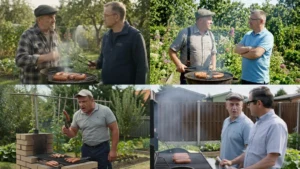
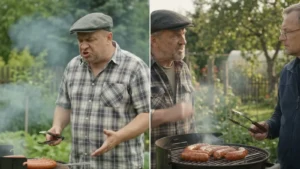
Next, I tried an alternative approach. I extracted the first frame of a previously generated clip showing two men grilling in an allotment garden and submitted it as an image reference with a new prompt: keep the same scene and identical characters, but set in winter with heavy falling snow, both wearing warm hats and scarves (translated from the Polish test prompt).
The result is revealing. The characters, clothing, grill setup, and framing match the original clip almost perfectly, and the requested Polish dialogue delivered cleanly. However, winter never appeared: lush green foliage, warm summer sunlight, and no winter gear. The model prioritized the reference image over the text prompt instructions. For character consistency across shots, that strong visual adherence is an advantage; for scene transformation, it makes image-based workarounds ineffective.
When Conversational Video Editing Matters
Despite the launch-day friction on third-party APIs, conversational editing remains the most promising long-term capability in Gemini Omni. With conventional video generators, every modification requires rolling the dice again: new faces, altered backgrounds, and unpredictable motion. If conversational editing works reliably as Google documented, it transforms production workflows for video ads and social formats. You lock down one solid base shot, then generate regional, seasonal, nocturnal, or vertical variants through targeted prompts rather than random restarts.
Where you can access it today:
- Google Vids: 15-second clips included with compatible Google Workspace tiers;
- Flow: Google’s dedicated multi-turn scene direction and editing tool;
- Gemini App: 15-second generation rolling out gradually to Google AI Ultra subscribers;
- Gemini API and Vertex AI: Full programmatic editing utilizing
previous_interaction_id.
I will rerun these conversational tests once third-party providers complete their integrations and update the findings here. For the features that worked out of the box on day one, see my Gemini Omni 1.2 Flash benchmark, or browse the full launch overview in the Gemini Omni Flash hub.

More on this from QUANTSLANT



 state of ai·AI Cybersecurity in 2026: From Mythos to GPT-6 CyberHow AI cybersecurity transformed in 2026, from Anthropic Mythos to OpenAI GPT-6 Cyber and automated Linux kernel exploits. A full timeline.