Google NotebookLM Web Mode: Add Websites Directly as Sources
NotebookLM's new Web Mode lets you add any URL directly as a source. No more copying and pasting - Gemini extracts and summarizes web content automatically.

👁 113 reads
Google isn’t waiting for the competition when it comes to productivity tools. NotebookLM, the Gemini-powered AI note-taking assistant, just got a game-changing feature - Web Mode. No more time-consuming copying of text from websites, pasting it into your notebook, and manual formatting. Now you just drop in a URL and Gemini does the rest.
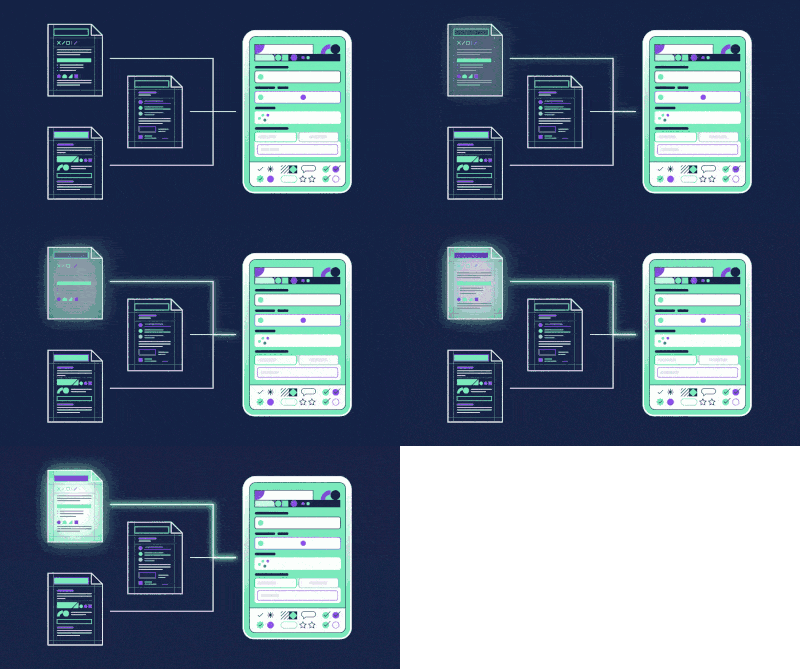
Web Mode is a solution for anyone who works with large amounts of information from online sources - researchers, journalists, students, business analysts. Instead of switching between your browser and notebook, you add a page directly to NotebookLM. The system automatically extracts the content, organizes it, and suggests an initial summary. You no longer need to worry about whether you copied the entire article or just a fragment.
How Web Mode Works
The mechanics are simple. In NotebookLM, instead of uploading a PDF or pasting text from your clipboard, you click the option to add a source and select “Web source” or paste a URL. The system connects to the page, reads the content, and automatically creates a note with basic metadata - source title, authors (if available), publication date. Gemini simultaneously generates a first-pass summary based on the content.
This isn’t just copying text. The tool understands the structure of the page, filters out ads, navigation menus, and other noise, focusing on the actual content. If an article has 5,000 words but 3,000 of them are less relevant background, Web Mode will catch the key elements. Later you can work with the notes as usual - edit, expand, link to other sources within your project.
Integration with the Gemini Ecosystem
Web Mode is a natural step for Google because NotebookLM already uses Gemini. This means content extraction, summary creation, and content analysis work together. If you have an article about artificial intelligence in your notebook, a research paper on language models, and an industry report - Gemini can connect them, find common threads, and generate a synthetic note combining all the knowledge. Web Mode is the first step toward making NotebookLM a truly intelligent research assistant, not just a repository for links.
Protip ✅
Web Mode works best with informational articles, reports, and blog posts. If you want to add content from a newsletter, a PDF copy on a page, or a document requiring login - the system may have problems. In those cases, traditional text pasting is still useful.
Practical Applications - Where This Helps
Imagine this scenario. You’re a researcher working on an article about AI industry trends. Instead of opening 20 articles from tech media, reading each one separately, and taking your own notes, you add their URLs to NotebookLM. Web Mode extracts the content, Gemini creates summaries, you see all the main points in one place. You connect them logically, add your own comments - and you have a knowledge base for your article.
A student preparing for an exam can add several Wikipedia articles, textbooks available online, and notes from professor’s scripts. Web Mode will create unified study material for them, where each source is clearly marked and linked. A business analyst doing due diligence on a company can add the HTML page of their financial report, an article from trade press, and a case study - all in one notebook, all analyzed by AI.
A freelancer working on marketing content can quickly review a dozen competitive articles by adding them to NotebookLM. Web Mode will catch common themes, structures, approaches - they’ll have a framework for writing their own text. Less time on research, more on creativity.
Availability and Google Workspace Integration
Web Mode has been rolled out to all NotebookLM users - there are no conditions, you don’t need to pay for a premium subscription (NotebookLM is available free for people with Google accounts). The feature works in both the web version and mobile apps. It integrates naturally with other Google tools - you can link notes to Docs, export to Sheets, collaborate on projects in Drive.
If you’re a Google Workspace user (meaning you work for a company with a corporate domain), Web Mode works seamlessly. Your notes remain secure in Google Cloud, your company’s security policies apply, and you can share notes with your team just like regular Docs.
What Google Has in Mind - Business Perspective
Web Mode is a strategic move by Google in the battle for position in the productivity tools market. Notion, Obsidian, Bear - all compete for users who want intelligent knowledge management. Google knows that Gemini is a more powerful tool than competitors’ AI systems. Instead of selling it as a separate product, they’re integrating it into tools people already use daily.
Web Mode also shows that Google thinks practically. The vast majority of information work today is work with online sources. Why should a user jump between browser and notebook? The integration is natural, useful, and gives NotebookLM a competitive advantage.
Google · Your sourcesQuantslant higher in your Google - one clickAdd to preferred sources →Does This Change the Productivity Tools Market?
Web Mode doesn’t revolutionize the notebook market - there are competitive solutions with similar capabilities. But it means NotebookLM becomes a serious competitor to Notion and Obsidian. For most users, NotebookLM plus Web Mode is a sufficient combination. You don’t need to pay for a Premium version, integration with Google Workspace is seamless, and Gemini actually does cool things with content.
The real change is a broader phenomenon - that Google isn’t waiting for others to build the future of productivity tools. They’re putting AI at the center of every product, even those considered for years to be - well - boring. This means that in a year we’ll have notes that actually understand content. Search, analysis, connections between sources - all automated. It will be a completely different experience than today.
More on this from QUANTSLANT



 ai tools·Poe AI: Pricing, Models & Is It Worth It? (2026)Poe from Quora gives you access to 342 AI models in one app.