H3 Max Relight, Turbo Extend and Pixelcut: Video Editing Test
A fal.ai test of H3 Max Relight, Turbo Extend and Pixelcut Looping Video, with scores for lighting changes, video extensions and a product loop.
👁 115 reads
H3 Max Relight changes the lighting in an existing video, Turbo Extend adds a continuation, and Pixelcut Looping Video animates an image into a loop. In my fal.ai test on October 20, 2026, the best lighting change scored 8.5/10. Another attempt barely changed the scene, while a third reversed the order of the shots.
At a glance
- Relight: three attempts, scoring 8.5, 5.5 and 6/10.
- Turbo Extend: two continuations, scoring 7.5 and 8.5/10.
- Pixelcut: one product loop, scoring 7/10.
- I describe Recast and Insert based on documentation only; I did not test them.
What is H3 Max?
According to fal, H3 Max was created by further training MiniMax H3, carried out by fal Research. Relight takes a video and a reference image for the lighting. The reference is a rendered sphere: its light and dark areas indicate the direction, colour and softness of the light. In this test, the sphere was not an object the model was supposed to add to the video.
Turbo Extend takes existing footage and an instruction for what should happen next. Pixelcut starts with an image and creates a loop with a stationary camera. These are different operations, so I do not compare them using a single average score. A successful loop says nothing about the ability to change lighting.
Prices
Relight costs $0.05/s at 480p, $0.08 at 768p, $0.16 at 1080p and $0.32 at 2K. Turbo Extend costs $0.025, $0.04, $0.08 and $0.16 per second of new footage at those resolutions, respectively. The source footage is not included in the duration of the continuation.
Pixelcut costs $0.08/s at 480p, $0.16 at 768p and $0.32 at 1080p. My loop was recorded at a cost of $0.40. A single Relight run had an estimated cost of $0.255, and Extend $0.1675. These are test cost estimates with a buffer, based on the USD rates listed above.
Access from Poland
I generated the clips using a fal.ai account in Poland on October 20, 2026, and the service worked. These results apply to access through that API and the settings recorded in the test. I have not extrapolated the time or cost to other applications.
My Relight test: source footage, lighting reference and results
The source footage had previously been generated with FLUX 3 Max. For the kitchen, I chose warm light from the right; for the character, hard light from above; and for the tram, blue light from the left with purple in the shadows. Each attempt had one run at 480p. The character in the source clip was AI-generated.
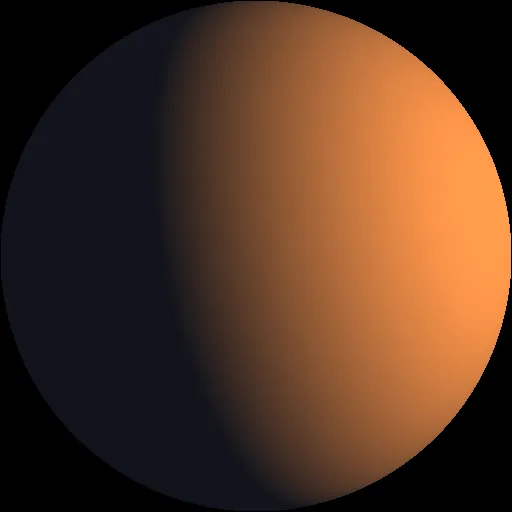

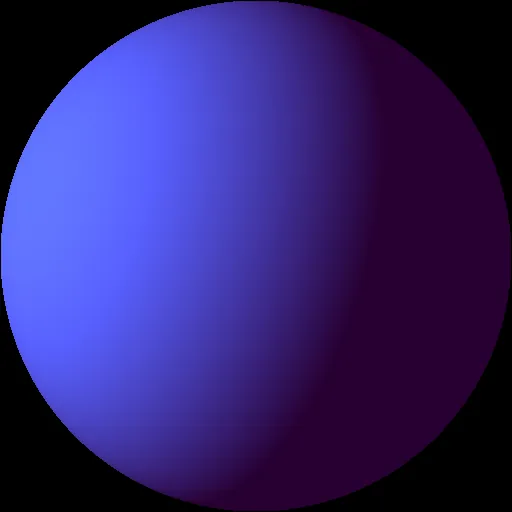
The kitchen best showed what the tool can do: the light became warmer while the rest of the scene was preserved. The 8.5/10 score reflects a successful change to this specific clip, not a guarantee that every video can be similarly shifted to sunset lighting.
The overhead-light attempt scored 5.5/10 because the light from above was barely visible. The tram scene took on a cooler evening look, but the model reversed the shot order compared with the source. The 6/10 score accounts for that loss. Check the whole timeline after using Relight, not just an attractive frame.
Video extensions and a product loop
For the tram extension, the instruction asked for it to stop at a tram stop, open its doors and let a passenger board. The result added a street scene with the tram, but the stop and boarding were not clear: 7.5/10. In the kitchen, the generated woman sat down and drank tea as instructed, while the room remained consistent: 8.5/10.
I gave Pixelcut an image of a jar and an instruction to make honey drip gently from a spoon. The loop had no visible seam, but the honey dripped onto the spoon from midair. It is a good example of the difference between a technically seamless loop and physically plausible action within the frame.
Recast and Insert: documentation only
According to fal, Recast replaces a character in a video with a character from a reference, while preserving movement and sound. It costs $0.30/s at 768p or $0.45/s at 1080p. Insert adds a new scene between specified points in a video: $0.05/s at 480p or $0.06/s at 768p, with additional rules for reference-image costs. I did not test these features, so I am not assigning them a Relight score.
Strengths
- Successfully warmed the light in the kitchen.
- Continued an action consistently in the same room.
- Pixelcut produced a loop with no visible seam.
Weaknesses
- The lighting change can be too subtle.
- Relight can disrupt the shot order.
- A good loop can still contain physically implausible liquid movement.
Who are these tools for?
These tools are for refining existing footage when you need a specific lighting change, a scene extension or a short product animation. Compare the full result with the source after each operation. In this test, an appealing visual change could hide an editing error.
Frequently asked questions
Does Relight require a description of the lighting?
In my test, it was controlled by a reference render of a sphere, supplied alongside the video.
Does Extend charge for the full video?
The documentation lists a rate for the new continuation, not for the source video’s duration.
Did Pixelcut fix the honey’s physics?
No. The loop was smooth, but the honey appeared in the wrong place.
For the wider context of this test, see the roundup of new models on fal.ai in October 2026. For a broader selection of tools, see the AI video generators guide.
Google · Your sourcesQuantslant higher in your Google - one clickAdd to preferred sources →Sources
- My test, October 20, 2026: three lighting changes, two continuations and one loop. Results and instructions recorded and reviewed on October 20, 2026.
- fal.ai: H3 Max Relight - accessed October 20, 2026.
- fal.ai: Turbo Extend - accessed October 20, 2026.
- fal.ai: Pixelcut Looping Video - accessed October 20, 2026.
- fal.ai: Recast - accessed October 20, 2026.
- fal.ai: Insert - accessed October 20, 2026.


More on this from QUANTSLANT



 news·Google Privacy Policy: Can Gmail Data Be Used for Ads?Google’s updated privacy policy adds an exception for Gmail, Drive and Photos data shared with other Google services. Here’s what changed and what the numbers suggest.