Kling 4.0 Pricing and Plans: Complete 2026 Breakdown
Kling 4.0 is now available to everyone without a standalone price tag. Here is a breakdown of Kling 4.0 pricing, credit tiers, subscription discounts, and commercial rules.
👁 119 reads
Kling 4.0 pricing and plans operate entirely on the existing Kling AI subscription credits rather than a separate model fee. You do not purchase a standalone license for the new generation engine; your monthly or annual membership allocation is consumed when you render video clips. Because Kling 4.0 officially became available to everyone today, you can immediately access the tool through your current account balance.
Before buying into any tier, it helps to understand how Kuaishou structures its tiers. You can explore our broader coverage of the launch in our Kling 4 hub, or review the rollout details in Kling 4.0 is now available to everyone.
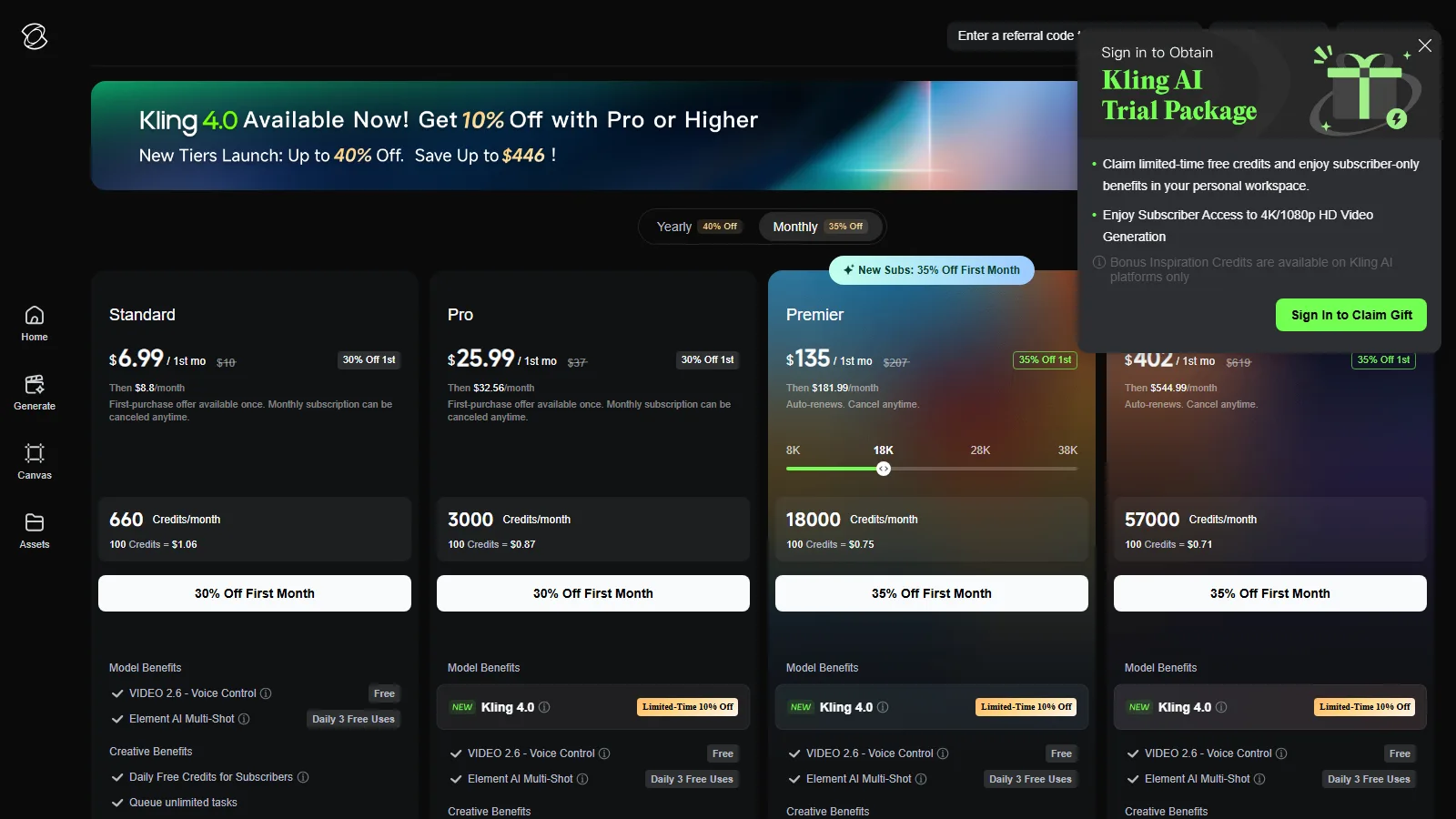
Kling 4.0 Pricing and Plans: Monthly and Annual Breakdown
Kling displays all tier prices in USD without VAT information. If you pay from regions subject to sales tax or value-added tax, your final checkout cost will reflect those additional adjustments. As of 15 October 2026, the membership page offers eight distinct tiers ranging from the free entry level up to the newly introduced Ultra+ tier.
| Plan | Monthly Cost (USD) | Credits Included |
|---|---|---|
| Basic | Free | Daily free allocation |
| Standard | 8.80 (6.99 first mo.) | 660 |
| Pro | 32.56 (25.99 first mo.) | 3,000 |
| Premier 8K | 80.96 (64.99 first mo.) | 8,000 |
| Premier 18K | 181.99 (135 first mo.) | 18,000 |
| Premier 28K | 283.99 | 28,000 |
| Premier 38K | 376.99 | 38,000 |
| Ultra+ | 544.99 (402 first mo.) | 57,000 |
The unit cost per 100 credits decreases as you climb the membership ladder. On the monthly tracks, the standard rates calculate as follows:
- Standard: 1.06 USD per 100 credits
- Pro: 0.87 USD per 100 credits
- Premier 8K: 0.81 USD per 100 credits
- Premier 18K: 0.75 USD per 100 credits
- Premier 28K: 0.75 USD per 100 credits
- Premier 38K: 0.73 USD per 100 credits
- Ultra+: 0.71 USD per 100 credits
If you prefer an annual billing cycle, Kling offers yearly commitments that reduce the effective rate:
- Standard Yearly: 79.20 USD per year
- Pro Yearly: 293.04 USD per year (equivalent to 0.81 USD per 100 credits)
- Premier 8K Yearly: 728.64 USD per year
- Ultra+ Yearly: 4,457 USD for the first year, then renewing at 4,902.99 USD per year (equivalent to 0.65 USD per 100 credits)
The 10% Kling 4.0 Discount: Which Plans Qualify?
Kling has introduced a promotional banner stating “Kling 4.0 Available Now! Get 10% Off with Pro or Higher”. This limited-time 10% discount applies strictly to Pro, Premier 8K, and Ultra+ memberships. The Basic and Standard rows display a hyphen in the discount column, meaning they do not qualify for this reduction.
The plans comparison adds one more detail: the Standard plan does not list Kling 4.0 in its “Model Benefits” at all, so if you are buying a plan for Kling 4.0, start with Pro. For earlier tier setups, see our guide on Kling AI pricing and credits.
What Changed Since September 28: Ultra Replaced by Ultra+
On 28 September 2026, Kling announced early access to Kling 4.0 Flash for a select segment of yearly Ultra subscribers. At that time, the highest tier offered was Ultra at 159.99 USD per month, which yielded 26,000 credits. For background on that rollout, check our report on Kling 4.0 Flash early access.
As of 15 October 2026, Ultra has been entirely replaced by Ultra+. The new ceiling tier costs 544.99 USD per month (discounted to 402 USD for the first month) and grants 57,000 monthly credits. On an annual agreement, Ultra+ requires 4,457 USD for the opening year, stepping up to 4,902.99 USD thereafter. This change represents a major restructuring aimed at heavy production accounts.
How many seconds of Kling 4.0 in 1080p you get on each plan
I checked in the kling.ai creator on 15 October 2026: Kling 4.0 at 1080p, 30 s, 16:9, one output costs 450 credits - 15 credits per second. The same clip at 720p costs 300 credits - 10 credits per second. The creator says: “Billed per second. Input video duration is included in the total billed duration.” - so an input video (a reference or a clip to edit) also counts towards billed seconds.
| Plan | First month | Credits | Seconds 1080p / 720p | Cost per second 1080p / 720p |
|---|---|---|---|---|
| Standard | 6.99 USD | 660 | Kling 4.0 is not in the plan benefits | |
| Pro | 25.99 USD | 3,000 | 200 / 300 s | 0.13 / 0.087 USD |
| Premier 18K | 135 USD | 18,000 | 1200 / 1800 s | 0.11 / 0.075 USD |
| Ultra+ | 402 USD | 57,000 | 3800 / 5700 s | 0.11 / 0.071 USD |
- After the first month (Pro 32.56, Premier 18K 181.99, Ultra+ 544.99 USD) a 1080p second costs 0.16 / 0.15 / 0.14 USD, and 720p 0.11 / 0.10 / 0.096 USD.
- A 30-second 1080p clip (450 credits) in the first month: Pro 3.90 USD, Premier 18K 3.38 USD, Ultra+ 3.17 USD (later 4.88 / 4.55 / 4.30 USD).
- Best value for music videos: Premier 18K. 1,200 seconds of 1080p is 40 shots of 30 s - enough for several takes of every shot in a 3-minute video. A second costs the same as on Ultra+ (0.11 USD), while the plan is almost 3 times cheaper.
- Standard (6.99 USD, then 8.80 USD) does not list Kling 4.0 in its plan benefits (“Model Benefits”) - do not buy it for Kling 4.0.
- The 10% discount from Pro up: it is not clear whether it lowers the credit rate, so I calculate without it. With the 10% discount you get roughly 10% more seconds.
- Without a paid plan the creator gives three 1080p trials (“3 trials left”) and credits are still deducted. 4K and HDR are marked “Coming Soon” in the creator, so the 4K cost is not known yet.
For comparison, Kling 3.0 developer pricing is 0.084 USD per second for silent 720p and 0.168 USD per second for 1080p with audio. Kling 4.0 is not in the API yet - the developer platform says existing API packages do not support the new model.
Native Language Support: A Major Advantage for Global Creators
One major operational asset in Kling 4 is the expanded language engine. English is officially on the list of nine supported languages for native audio, accurate lip synchronization, and on-screen text generation. The full language list covers English, Chinese, Japanese, Korean, Spanish, Portuguese, German, French, and Hindi.
The audio engine also handles three English regional accents: American, British, and Indian. Furthermore, on-screen text generation handles English typography alongside logos and emoji natively, meaning global creators do not have to rely on external video editors to lay down text plates or vocal tracks.
CLI and MCP Automation Billing
While the standalone developer API for Kling 4.0 remains labeled as coming soon, you can run automated tasks right now using the official Command Line Interface or the Model Context Protocol. I checked the developer platform and third-party catalogs, confirming that developer endpoints are not live yet.
Both MCP and CLI link directly to your main web profile via OAuth, meaning any execution burns your standard plan credits rather than a separate API invoice. You can install the global CLI through npm:
npm i -g @klingai/cli-global
kling login
kling text_to_video --model kling-video-v4_0 "drone shot flying over a snowy mountain peak" --duration 10 --aspectRatio 16:9 --poll 300
Free Plan Limits vs Paid Subscriptions
The free Basic tier remains functional for exploration, but it carries clear functional restrictions:
- Basic outputs include a prominent watermark.
- Content generated on Basic permits no commercial use.
- Without a paid plan, 1080p is limited to three trials (“3 trials left”).
Paid plans remove the watermark and grant commercial rights to generated media, but Standard does not list Kling 4.0 in its plan benefits - for Kling 4.0 start with Pro. If you intend to use Kling 4.0 assets for marketing campaigns or monetized channels, a paid tier is mandatory.
Which Plan Fits Your Needs?
Selecting the right tier comes down to your rendering frequency and output resolution:
- Standard (8.80 USD/mo): watermark-free clips and commercial rights on a small budget, but Kling 4.0 is not in its plan benefits - not a plan for Kling 4.0.
- Pro (32.56 USD/mo): The sweet spot for independent content creators. It qualifies for the 10% Kling 4.0 discount, drops the cost to 0.87 USD per 100 credits, and provides 3,000 credits each month.
- Premier 8K to 38K (80.96 to 376.99 USD/mo): Suited for boutique studios producing regular social media assets, multi-keyframe shots, or complex reference clips. For music videos, Premier 18K gives 1,200 seconds of 1080p.
- Ultra+ (544.99 USD/mo): Aimed at agencies and heavy production teams requiring continuous video workflows and maximum credit volume at the lowest per-credit rate.
Frequently Asked Questions
Is there an extra fee to use Kling 4.0?
No separate purchase is necessary to access the new model. Generations simply pull from your active subscription credit balance.
Can I use Kling 4.0 for commercial client work on the free plan?
No, outputs from the Basic plan strictly prohibit commercial use and include an embedded watermark. Commercial rights require an upgrade to Standard or higher.
How many credits does one second of Kling 4.0 cost?
Kling 4.0 costs 15 credits per second at 1080p and 10 at 720p - I checked in the creator on 15 October 2026. A 30-second 1080p clip uses 450 credits, which is 3.17-4.88 USD depending on the plan. 4K is marked “Coming Soon”.
Which plans receive the 10% Kling 4.0 discount?
The 10% promotional discount applies to Pro, Premier 8K, and Ultra+ subscriptions. Basic and Standard tiers do not qualify for this pricing deduction.
Sources
- Kling 4.0 Release Notes
- Kling AI Membership Plans
- Kling Developer Platform Pricing
- Kling AI Official Announcement on X
- Kling Global CLI on npm
- Kling AI on YouTube: official Kling 4.0 videos (28.09-15.10.2026)
As of 15 October 2026. Kling changes plans and availability often - check kling.ai before buying.
More on this from QUANTSLANT

 guides·Higgsfield Alternatives 2026: OpenArt vs Artlist vs Freepik