LTX-Video Locally: Open Video Model on Your Own GPU, Measured
I tested LTX-Video 13B distilled locally in ComfyUI on my RTX 4090, measuring generation times from 18 seconds per clip. Here is how it compares to LTX-2, Wan 2.2, and Kandinsky 6 along with step-by-step setup instructions.
👁 117 reads
Running LTX Video local on consumer hardware delivers impressive speed: a 5-second 768×512 clip generates in just 18 to 20 seconds on my RTX 4090 once loaded. The model is available under conditional commercial licensing as long as your organization earns under 10 million USD annually. To see how video synthesis fits into a broader offline workstation alongside text and image generation, explore my comprehensive guide to local AI models for text, image, and video.
As of 17 October 2026
- Model: LTX-Video 13B 0.9.8 distilled (16 July 2025 release), 8 steps, video only (no audio). Total weight footprint: 15.7 GB model file and 5.2 GB T5 text encoder (20.9 GB combined in fp8).
- Measured performance on RTX 4090 (ComfyUI 0.41): 5-second clip at 768×512 in 18-20 seconds; 1216×704 in 36.5-37.1 seconds. First run including initial disk load takes 63.2 seconds. Peak VRAM utilization: 15.3-16.4 GB across the entire GPU.
- License: LTXV Open Weights allows commercial use up to a 10 million USD annual revenue threshold, requires explicit machine-generated labeling, and has no regional exclusions.
- LTX-2, 2.3, and 2.5 (2026 releases) add native synchronized audio, but standalone model files require 18.7-22 GB plus Gemma text encoders (9.45-15.4 GB).
Understanding LTX Video and the LTX-2 Family
Lightricks provides two distinct families of open video weights alongside a dedicated desktop tool. Because their nomenclature is frequently mixed up, their hardware demands and capabilities differ significantly.
| Model | Parameters | Audio | Smallest Model File |
|---|---|---|---|
| LTX-Video 0.9.8 2B distilled | 2 billion | No | 4.5 GB (fp8) |
| LTX-Video 0.9.8 13B distilled | 13 billion | No | 15.7 GB (fp8) |
| LTX-2 (January 2026) | 19 billion | Yes | 20.0 GB (fp4) |
| LTX-2.3 (March 2026) | 22 billion | Yes | 21.7 GB (nvfp4) |
| LTX-2.5 (August 2026) | 22 billion | Yes | 18.7 GB (nvfp4) |
These file sizes reflect weights in the official Lightricks Hugging Face repositories as of 17 October 2026. LTX-Video requires a companion T5 encoder (5.2 GB in fp8). In contrast, LTX-2 and LTX-2.3 rely on Gemma 3 12B (the smallest repackaged build from Comfy-Org sits at 9.45 GB), and LTX-2.5 uses Gemma 4 12B (15.4 GB in int8). The NVFP4 format is optimized specifically for RTX 50 series hardware. Furthermore, LTX-2.5 requires an authenticated Hugging Face account with manual license acceptance before downloading.
The term LTX-2 refers strictly to the newer multi-modal architecture that synthesizes synchronized audio alongside visuals. While ComfyUI 0.41 includes ready-made workflow templates for LTX-2, LTX-2.3, and LTX-2.5, running them requires pulling several dozen gigabytes of model checkpoints and encoders.
LTX Desktop
LTX Desktop is an open-source standalone desktop application released under the Apache 2.0 license (version 1.3.0, published 9 October 2026) designed to manage LTX-2.x generation across Windows, Linux, and Apple Silicon. According to the official repository documentation:
- It runs LTX 2.5 Fast locally by default, provides an option for LTX 2.3 Fast, and reserves LTX 2.5 Pro for paid cloud endpoints.
- On Windows, it requires an Nvidia GPU with at least 15 GiB of VRAM, 16 GB of system RAM (32 GB recommended), and roughly 72 GB of free disk storage for the base LTX 2.5 Fast bundle.
- Downloading 2.5 weights requires Hugging Face credentials. The application defaults to cloud text encoding via a free LTX API key, though a fully local text encoder can be enabled in settings.
I have an earlier release (version 1.0.5) installed on my system, though for these benchmarks I focused purely on running LTX-Video 13B inside ComfyUI on Windows.
Hardware Benchmarks: LTX Video Local on an RTX 4090
I evaluated the distilled 13B checkpoint on my primary testing workstation: an Intel Core i9-14900KF, 64 GB RAM, Nvidia GeForce RTX 4090 24 GB, Windows 11, and ComfyUI 0.41.0, with model files stored on an external USB SSD. Baseline idle system usage accounted for approximately 1.7 GB of VRAM before starting. I launched ComfyUI with the --disable-smart-memory flag. Peak memory was monitored every 0.5 seconds via nvidia-smi, tracking total card allocation.
My test workflow used 8 inference steps, CFG 1, Euler sampling, 24 fps, tiled VAE decoding, and the exact sigmas bundled with the distilled checkpoint. Each 5-second clip consists of 121 frames.
| 5s Clip (121 Frames) | Resolution | Total Elapsed Time | Peak GPU VRAM |
|---|---|---|---|
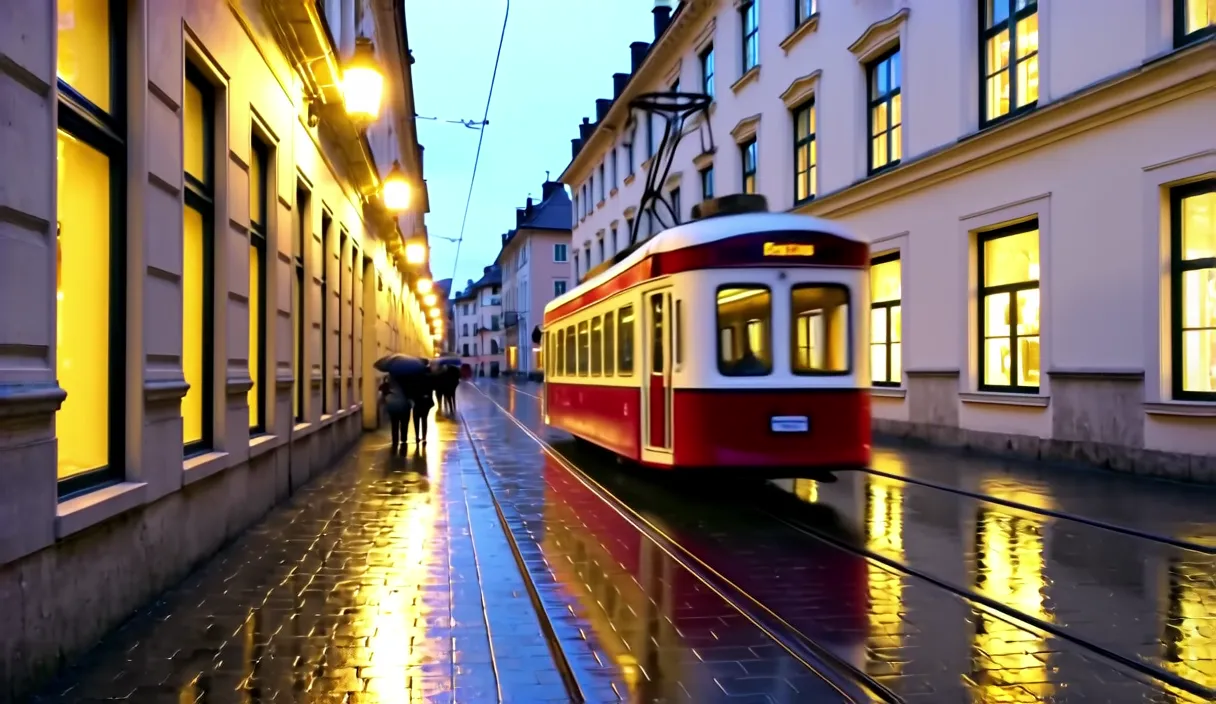
| Tram (initial cold run) | 768×512 | 63.2 s | 15.6 GB |
| Tram (cached in RAM) | 768×512 | 18.0 s | 15.5 GB |
| Stork (cached) | 768×512 | 20.2 s | 15.3 GB |
| Stork (cached) | 1216×704 | 37.1 s | 16.4 GB |
| Tram (cached) | 1216×704 | 36.5 s | 16.4 GB |
ComfyUI execution logs revealed that the 8-step sampler stage took only 8 seconds at 768×512 and 22 seconds at 1216×704. Text conditioning and VAE decoding accounted for the remaining time. On the initial cold start, reading 20.9 GB of safetensors files from external storage added roughly 43 seconds. By comparison, Wan 2.2 5B required approximately 4 minutes for a 5-second clip at 1280×704 using 20 steps in my earlier 26 September test, making distilled LTX-Video roughly six times faster in practical iteration cycles.
Visual Output and Generation Quirks
The tram sequence produced convincing environmental rendering: wet cobblestones with reflections from streetlamps, pedestrians holding umbrellas, and smooth camera tracking as the vehicle moved away into the street. However, directional signs on the tram hull were rendered as nonsensical artifacts, typical of video diffusion models.
The stork scene illustrated common kinematic limitations. The text prompt specified a stork landing onto a nest, but the model rendered the bird standing in the nest from frame zero while simply flapping its wings. The requested background church was omitted, an unreadable watermark-like artifact appeared in the lower left corner, and a blurred silhouette streaked across the bottom border at 768×512. For rapid storyboarding or background plates, these generations are practical, but complex articulated movements require multiple seeds.
Step-by-Step Setup in ComfyUI
If you prefer setting up the pipeline manually inside standard ComfyUI, configure your nodes using this exact sequence:
- Launch ComfyUI on Windows with
PYTHONUTF8=1active in your environment variables. Ensure the core installation is updated to release 0.41 or newer. - Download
ltxv-13b-0.9.8-distilled-fp8.safetensors(15.7 GB) from theLightricks/LTX-VideoHugging Face repository into yourComfyUI/models/checkpointsdirectory. If your GPU has 8-12 GB of VRAM, downloadltxv-2b-0.9.8-distilled-fp8.safetensors(4.5 GB) instead. - Download
t5xxl_fp8_e4m3fn_scaled.safetensors(5.2 GB) fromcomfyanonymous/flux_text_encodersintoComfyUI/models/text_encoders. The VAE weights are already packed within the primary checkpoint. - Open Workflow, select Browse Templates, and pick the standard “LTXV Text to Video” template. In Load Checkpoint, choose the 13B distilled file; in Load CLIP, point to the T5 encoder and set the clip type to
ltxv. - Because the distilled model requires 8 steps and CFG 1, bypass the default LTXVScheduler. Connect a ManualSigmas node directly to SamplerCustom using this exact comma-separated sigma sequence:
1.0, 0.9937, 0.9875, 0.9812, 0.975, 0.9094, 0.725, 0.4219, 0.0Set CFG to 1.
- Set video dimensions as multiples of 32. Frame counts must follow the
8n+1rule (for instance, 121 frames equals 5 seconds at 24 fps). Lightricks officially advises remaining at or below 1280×720 and under 257 frames. - Write detailed descriptive prompts in English detailing camera perspective, subject movement, and lighting conditions. Short prompts significantly degrade coherence.
- If you experience Out-Of-Memory errors during video assembly, replace the standard VAE Decode node with VAE Decode (Tiled).
If you plan to experiment with LTX-2 later, ComfyUI 0.41 features dedicated templates labeled “LTX-2 Text to Video (Distilled)”, “LTX-2.3: Text to Video”, and “LTX-2.5: Text to Video” that automatically configure the proper Gemma loader nodes.

Commercial Terms and Licensing Boundaries
Starting with version 0.9.6 (including 13B 0.9.8), LTX-Video is distributed under the LTXV Open Weights License. Reading the legal terms directly from the repository reveals clear commercial boundaries:
- Permitted uses include modification, redistribution, and commercial deployment across any region (including the EU), provided the use case does not violate listed restrictions in Exhibit A.
- Organizations generating 10 million USD or more in annual revenue cannot use the model under the free tier and must negotiate a separate commercial license with Lightricks. Operating without one triggers liability for double licensing fees.
- A mandatory condition often missed: all publicly published visual content produced by the model must be explicitly labeled as machine-generated.
The newer LTX-2 and LTX-2.3 models carry the LTX-2 Community License (dated 5 January 2026), while LTX-2.5 falls under the LTX-2.x Community License (dated 11 August 2026). Both preserve the 10 million USD revenue cutoff, though the 2.x terms allow large commercial entities to conduct non-commercial research without paying upfront fees.
Comparison: LTX-Video vs. Wan 2.2 and Kandinsky 6
Choosing among contemporary local video models depends heavily on rendering speed, licensing preferences, and whether your pipeline demands embedded audio. In my direct side-by-side benchmark conducted on 3 October 2026 (using an identical prompt depicting a rainy market square at seed 42), performance diverged substantially.
| Metric (RTX 4090, 5s clip) | Wan 2.2 5B (fp16) | LTX-Video 13B (fp8) | Kandinsky 6 Lite |
|---|---|---|---|
| Resolution tested | 1280×704 | 1216×704 | 864×480 |
| Sampling steps | 20 steps | 8 steps | Distilled Lite steps |
| Pure sampling time | 2:18 min | 20 s | Not split |
| Total clip time (warm) | 4:03-4:13 min | 36.5 s | 1:51-2:28 min |
| Total clip time (cold) | 9:28 min | 8:00 min | Not measured |
| Peak VRAM allocation | 17.3-23.4 GB | 17.8 GB | 19-20 GB |
| GPU energy consumed | approx. 19 Wh | 5.7 Wh | Not measured |
| Audio synthesis | No | No | Yes (speech/music) |
| License type | Apache 2.0 | LTXV Open Weights | MIT (Hunyuan VAE) |
Wan 2.2 5B maintains strict temporal camera stability and carries an unrestricted Apache 2.0 license, but it requires significantly more compute time per iteration. In my Krakow prompt test, Wan produced accurate architectural brick textures, but its horse carriage dissolved midway through the render. LTX-Video generated the sequence rapidly (20 seconds of sampling, consuming 5.7 Wh versus Wan’s 19 Wh), yet it experienced subject hallucination, turning the carriage horse into a white delivery van after two seconds.
Kandinsky 6 Lite generates integrated audio tracks and dialogue alongside video, needing roughly two minutes per 5-second clip. For broader image synthesis workflows where audio is not needed, pairing rapid video models with image-focused architectures like Stable Diffusion or high-resolution text processing via Open WebUI provides a well-balanced local production setup. When dealing with quantized models, understanding how weights scale across GPU memory is essential, as detailed in my guide to GGUF quantization formats.
Frequently Asked Questions
What is the difference between LTX-Video and LTX-2?
LTX-Video refers to the 0.9.x model family (2B and 13B parameters) which generates silent video using a T5 text encoder. LTX-2, LTX-2.3, and LTX-2.5 are larger architectures (19B to 22B parameters) released in 2026 that synthesize video and synchronized audio simultaneously using Gemma text encoders. The total downloaded file size for an LTX-2 setup is roughly 30 to 53 GB compared to 21 GB for LTX-Video 13B.
How much VRAM do you need to run LTX-Video locally?
Running the 13B fp8 model requires between 15.3 and 16.4 GB of total VRAM during generation at resolutions like 768×512 and 1216×704, which fits comfortably on a 24 GB card and barely fits a 16 GB GPU. For cards with 8 to 12 GB of VRAM, the distilled 2B fp8 checkpoint (4.5 GB model file) is designed to operate within smaller memory budgets. In my testing, running with --disable-smart-memory ensured predictable allocation.
Can LTX-2 run locally on a consumer GPU?
Yes, LTX-2 models can run locally on high-end consumer hardware. The weights are published on Hugging Face, ComfyUI 0.41 includes ready workflows, and Lightricks offers the LTX Desktop app. According to official system requirements, you need an Nvidia GPU with at least 15 GiB of VRAM, 16 to 32 GB of system RAM, and approximately 72 GB of storage space for the base weights.
Does LTX-Video support multilingual text prompts?
Prompt understanding is heavily optimized for English because the underlying T5 encoder was primarily trained on English video captions. When generating localized scenes or specific regional concepts, describing visual features directly in English yields far better results. Rendered text and signs inside the video frame typically appear distorted or unreadable regardless of language.
What is the maximum clip duration LTX-Video can generate?
Standard text-to-video generations in ComfyUI are designed around 5-second clips containing 121 frames at 24 frames per second. While documentation for 13B 0.9.8 mentions an extended generation method capable of producing up to 60 seconds of video using dedicated custom nodes, the base inference templates recommend keeping frame counts below 257 frames to prevent temporal drift.
Sources
- Lightricks/LTX-Video repository on Hugging Face (model weights, specifications, and architecture details).
- LTXV Open Weights License text (commercial terms, restrictions, and attribution requirements).
- Lightricks/LTX-Video on GitHub (release notes and official codebase updates).
- Lightricks/LTX-2.5 repository on Hugging Face (model cards and licensing requirements).
- Lightricks/LTX-Desktop on GitHub (system specifications and application release 1.3.0).
- Comfy-Org/ltx-2 repository on Hugging Face (repackaged Gemma text encoders for ComfyUI).
- Wan-AI/Wan2.2-TI2V-5B on Hugging Face (model parameters and Apache 2.0 license).
- Hardware measurements on Nvidia GeForce RTX 4090 under Windows 11, ComfyUI 0.37.0 and 0.41.0 (recorded 3 and 17 October 2026).
Checked on 17 October 2026.



More on this from QUANTSLANT
 ai tools·Opera WebAI: Run Local AI in Your Browser Without an API KeyOpera WebAI lets websites and extensions use local AI models without cloud services, API keys or subscriptions. On Macs, Opera One uses Apple's model.