AI Photo Booth: How to Create a Strip from One Photo + Prompts
Turn one photo into a four-frame photo booth strip with flash and different expressions in each frame. Step-by-step guide with 8 tested prompts.
👁 117 reads
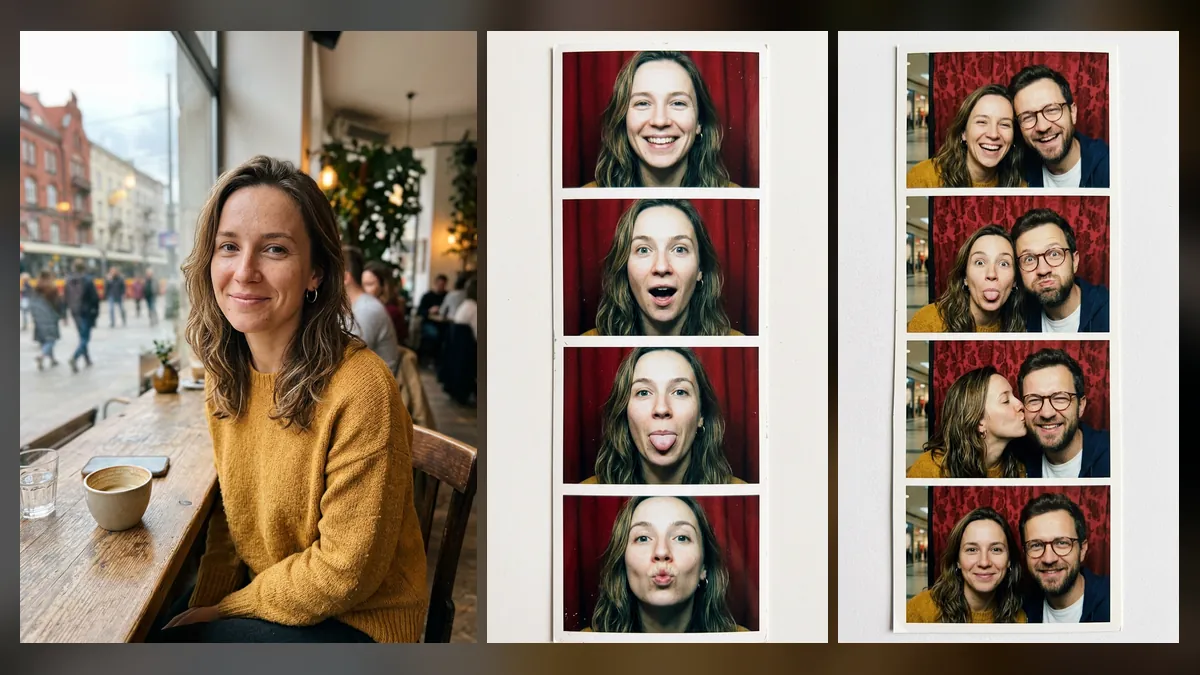
The AI photo booth trend lets you turn one regular photo into a strip of four frames like those from a mall booth: harsh flash, red curtain, different expression in each frame. Most people create them in Gemini (Nano Banana 2) or ChatGPT, either in Y2K 2000s style or as black-and-white 1960s shots. We tested three prompts, including a version for couples, and below you’ll find 8 prompts ready to use. For more current trends, see our AI photo trends roundup.
Quick Summary
The photo booth strip works well on the first try: in our test, the model kept the same face across all four frames and changed expressions exactly as requested. The couple version also worked, including a cheek kiss in the third frame. The black-and-white 1960s strip looks most authentic, but the model added a ticket with made-up, ungrammatical text. One image in Nano Banana 2 via API cost 0.068 USD. You can create these for free in Gemini and ChatGPT.
Where the Photo Booth Trend Came From
The photo booth trend is part of the broader “Y2K” wave - the aesthetic of early 2000s digital cameras: harsh flash, overexposed skin, grain. OpenArt in their July 2026 Gemini prompts roundup wrote that the “Y2K flash” look drives the entire retro trend, with the photo booth strip being its most popular variant. On TikTok, pages circulate with hashtags like “AI vintage photobooth prompt” and “ChatGPT prompts for pictures photobooth,” and one popular prompt is marketed as a free alternative to renting a real photo booth.
How to Create an AI Photo Booth Strip Step by Step
- Choose a front-facing photo of your face, ideally from shoulders up. Photo booths are close-ups, so full-body shots don’t work as well.
- In Gemini, select image creation and set vertical format (9:16). In ChatGPT, add “vertical image” to your prompt.
- Upload the photo and paste prompt 1. Describe the expressions in all four frames in sequence, otherwise the model produces four nearly identical smiles.
- For couples, upload two separate photos and specify who stands on the left and who on the right (prompt 2).
- Download the image. If you want to print it like a real strip, crop it to roughly 1:3 proportions.
Our Test: One Photo, Three Photo Booths
The people in the examples are AI-generated and do not exist. We first generated two regular “phone” photos, then fed them into Nano Banana 2 through OpenRouter with prompts 1-3 from the list below, tested in Polish.
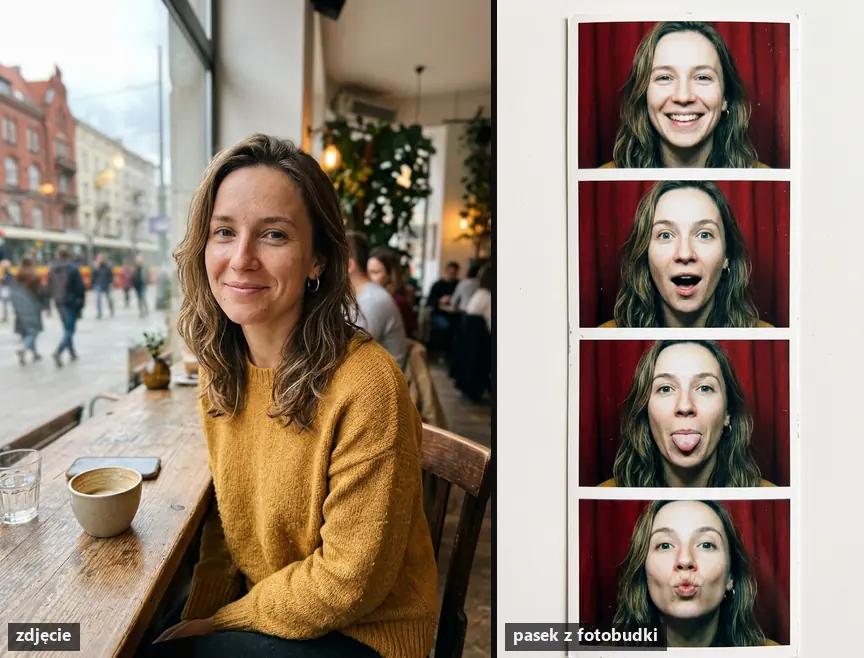
What we noticed:
- All four expressions came out according to the sequence in the prompt: smile, surprise, tongue, kiss. Earrings and hairstyle are the same in every frame.
- The model added no text or date because the prompt specified “no text.”
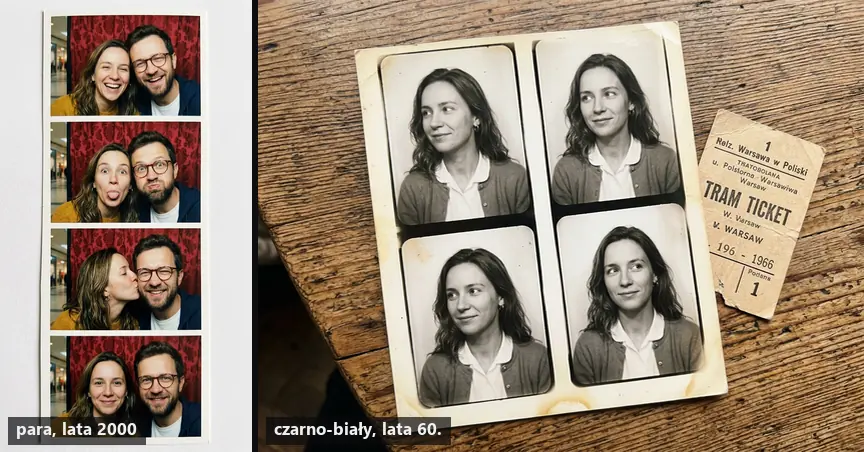
- In the couple version, both faces are recognizable, the man’s glasses carried through to every frame, and the mall background shows only slightly behind the curtain.
- In the black-and-white 1960s version, the model changed the sweater to period clothing as requested, but placed a tram ticket with nonsense words next to it. If you want a prop, describe it without text (“ticket without text”).
8 AI Photo Booth Prompts
We tested the first three ourselves; the rest follow the same structure. Replace text in square brackets with your own details.
Prompt to copy (1, 2003-style strip, tested):
Create a photo booth strip with the person from the attached photo: four frames stacked vertically on a narrow strip of glossy photo paper with a white border. Different expression in each frame: smile, surprise, tongue out, kiss to the camera. Harsh direct flash, slightly overexposed skin, booth curtain in background, colors and grain like a 2003 point-and-shoot camera. Keep the face, hairstyle and earrings from the original. No text.
Use for: Instagram story, wallpaper. Watch out: replace “earrings” with whatever distinguishes your face.
Prompt to copy (2, couple, tested):
Create a photo booth strip with two people from the attached photos: woman from first photo on the left, man from second photo on the right. Four frames stacked vertically on a narrow strip with white border: laughing, making funny faces, she kisses him on the cheek, both looking at camera. Harsh flash, grain, booth curtain in background, early 2000s mall atmosphere. Keep faces, hairstyles and glasses from both photos. No text.
Use for: anniversary, Valentine’s Day, invitation. Watch out: only with the other person’s consent.
Prompt to copy (3, black-and-white 1960s, tested):
Create a black-and-white 1960s photo booth strip with the person from the attached photo: four frames, classic portraits with slight smile and side glance. Strip on slightly yellowed paper with rounded corners lying on a wooden table next to an old ticket without text. Same face and hairstyle as in photo, period clothing.
Use for: gift for grandma, frame. Watch out: we added “without text” for the ticket after testing.
Prompt to copy (4, group of friends):
Create a photorealistic collage: photo booth strip with three people from the attached photos squeezed into one booth, plus several loose photos taped around the strip, hand-drawn hearts in pen. Flash, high contrast, dark background. Keep all three faces. No other text.
Prompt to copy (5, wedding photo booth):
Create a wedding photo booth strip with the couple from the attached photos: four frames, different prop on a stick in each: mustache, crown, heart-shaped glasses, sign without text. White background, even studio lighting, sharp colors. Small text at bottom of strip "[Anna & Tom 2026]". Keep faces and hairstyles.
Use for: guest thank-you, wedding announcement. Watch out: short text, maximum 4 words.
Prompt to copy (6, Y2K):
Create a photo booth strip with four vertical frames on a narrow strip of glossy photo paper with a white border, featuring the person from the attached photo. Different expression in each frame: smile, surprise, tongue out, kiss to the camera. Harsh direct flash, slightly overexposed skin, booth curtain behind, 2003 point-and-shoot colors and grain. Keep the same face, hairstyle and earrings. No text.
Prompt to copy (7, mall):
A playful mall photo booth strip with the two people from the attached photos squeezed together, making cute faces, early 2000s outfits, glossy highlights and soft grain, classic photo booth lighting, warm fluorescent mall ambience. Keep both faces exactly the same. No text.
Prompt to copy (8, vintage):
Turn the attached photo into a 1960s black-and-white photo booth strip with four classic portraits, slightly yellowed paper with rounded corners lying on a wooden table. Keep the same face and hairstyle, period clothing. No text anywhere.
Which Tools and Is It Free
| Tool | Free | Paid | Notes |
|---|---|---|---|
| Gemini (Nano Banana 2) | yes, daily limit | - | allows 9:16 format setting, which makes vertical strips easier |
| ChatGPT (Images 2.5) | yes, 2-3 images daily according to users | - | one prompt service rates ChatGPT as slightly better for this style, we haven’t verified |
| Higgsfield | no | from 15 USD / month | Nano Banana 2 for 2 credits (approx. 0.10 USD); 49 USD Plus plan includes 7-day unlimited window in 2K |
| CapCut, filter apps | partially | varies | ready-made templates, but usually just an overlay on the photo |
Gemini’s help page (as of October 3, 2026) confirms that Nano Banana 2 works without a plan, but doesn’t specify the number of images. From October 9, free Gemini chat switches to Flash-Lite, and Google hasn’t stated whether this changes anything for images. A comparison of free tools is in our article on free AI image generators.
If you want a single photo with a vintage camera effect instead of a strip, prompts from our articles on Polaroid effect and 1990s-style photos work better.
Common Mistakes
- No expression descriptions: the model produces four nearly identical frames.
- One shared couple photo instead of two separate ones: faces mix more often.
- Long text on the strip: comes out with typos. Add dates and names in an editor.
- Horizontal format: the strip comes out as a 2 x 2 grid instead of a vertical column.
Frequently Asked Questions
How do you create an AI photo booth strip for free?
Upload a photo to free Gemini or ChatGPT and paste prompt 1. In Gemini, set vertical format.
Does AI photo booth work for two people?
Yes. Upload two separate photos and specify who stands on the left and who on the right. In our test, both faces carried through to all frames.
Can you print an AI photo booth strip?
Yes. In our test, the vertical image was 768 x 1376 pixels, which is enough for a 5 x 15 cm print. For larger prints, request higher resolution.
Will AI photo booth replace wedding photo booths?
No. Real photo booths photograph guests on-site, while AI transforms photos you already have. For weddings, it’s more useful for invitations and thank-you cards.
Sources and Date Checked
- OpenArt: Gemini prompts including Y2K flash (July 21, 2026)
- TikTok: AI vintage photobooth prompt
- Media.io: Y2K prompts for Gemini
- Higgsfield: Nano Banana 2 plans and pricing (September 21, 2026)
- Google Help: Gemini limits. Test: Nano Banana 2 via OpenRouter
- October 3
- 2026. Checked October 3
- 2026
 AI Action Figure from Photo: Step-by-Step Guide + PromptsGuides
 AI Movie Poster from Photo: Step-by-Step + 9 PromptsGuides
 90s Photo Filter: How to Create a Vintage Photo EffectGuides
The link to Higgsfield is a partner link: if you buy through it, QUANTSLANT earns a commission and you pay the same price. It has no influence on the content, including where the coverage is critical.
More on this from QUANTSLANT



 guides·Warp in Practice: Commands, Error Diagnosis, Git and DockerHow Warp's AI agent saves time for developers and sysadmins who work in the terminal daily but don't memorize every command syntax.