Halloween Costume Ideas: Try Them On with AI Before You Buy
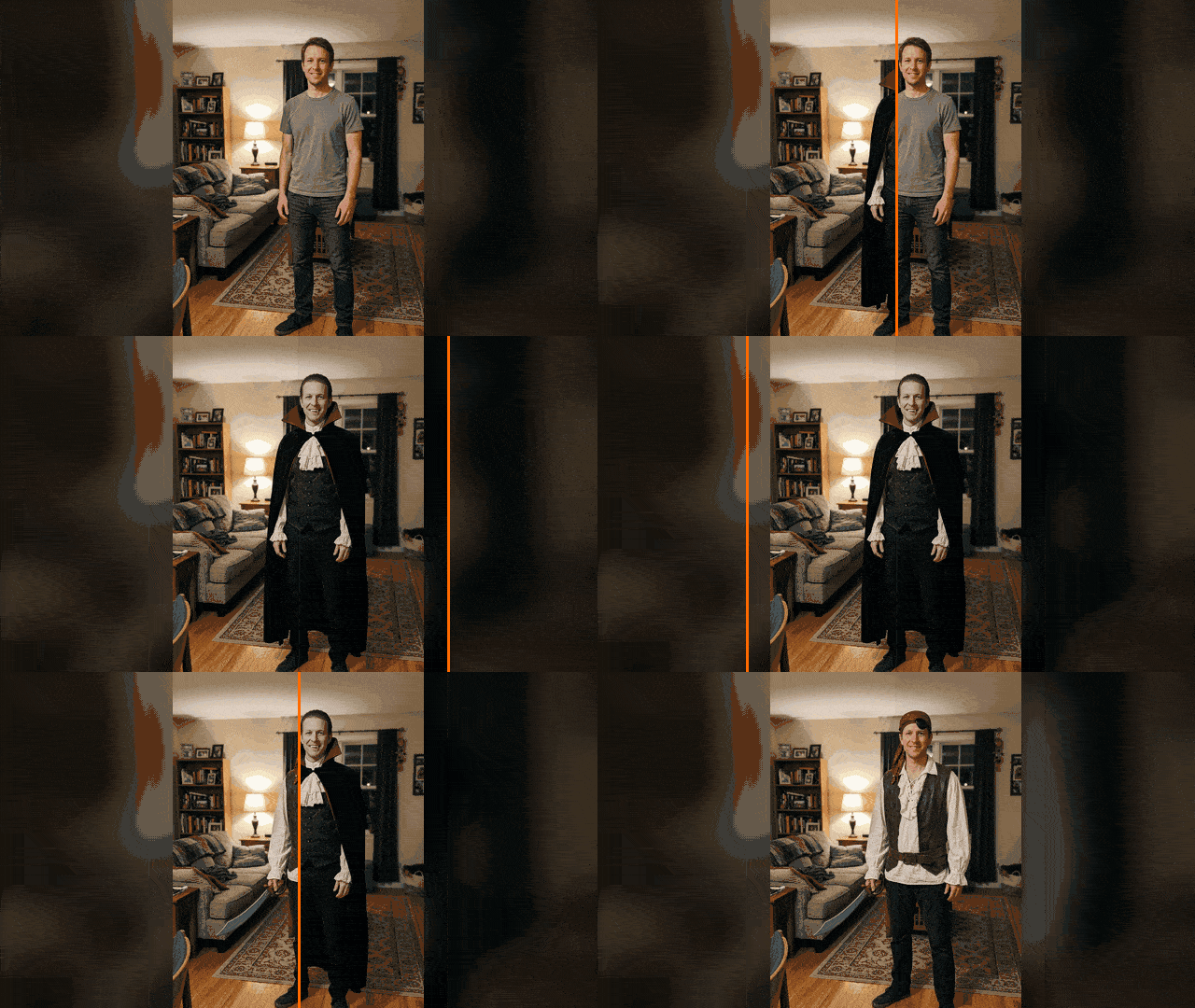
See yourself as a vampire, pirate or zombie before buying anything. Gemini and ChatGPT can dress you up in Halloween costumes without changing your face.
👁 121 reads
Choosing a Halloween costume is easier when you can see it on yourself before buying anything. Gemini and ChatGPT can “dress” a person in a photo as a vampire, pirate or zombie couple without changing their face. We tested four such try-ons and one AI-generated shopping list. Below: 20 ideas for adults, copy-paste prompts, and what to watch out for.
Quick Summary
AI try-on works well for costumes that don’t cover your face: in our test, a vampire, tape skeleton, pirate and zombie couple all preserved facial features, hairstyle and pose. One try-on in Nano Banana 2 via API cost us $0.068, and in free Gemini or ChatGPT you can fit several into your daily limit. After the try-on, ask AI for a shopping list: for the vampire it came out to around $30-35, but that’s the model’s estimate, not actual pricing. Only upload photos of adults who have given consent.
Why This Matters Now
According to Google Ads, the phrase “halloween costume” averages moderate search volume year-round, but in October it spikes significantly. Most people look for costume ideas only in October.
20 Halloween Costume Ideas for Adults
Quick Costumes from Things at Home
- Skeleton: black hoodie, black pants and white duct tape.
- Ghost from a sheet with cut-out eyes (works poorly in AI because your face isn’t visible).
- Mummy with bandages or strips of old sheet over gray sweatsuit.
- Witch: black dress or turtleneck, broom, pointed hat made from poster board.
- Zombie in everyday clothes: torn shirt, some fake blood.
For Couples
- Zombie couple returning from a wedding.
- Vampire and vampiress.
- Pirate and coast guard captain.
- Mad scientist and their monster.
- Gothic Victorian couple.
Group Costumes
- Pirate ship crew.
- Ghoul family from a haunted house.
- Ghostbusters team with cardboard backpacks.
- Zombie office: suits, ID badges, gray skin.
- Witch coven, each in a different color.
Store-Bought Classics
- Vampire with cape and fangs.
- Pirate with bandana and sword.
- Devil: red horns and tail.
- Skeleton in a jumpsuit.
- Creepy nurse or surgeon in bloodstained scrubs.
Try-On with Your Photo Step by Step
- Take a photo from head to at least your knees, facing forward, in good light. The costume needs your silhouette, a selfie alone won’t work.
- In Gemini, select image creation (Nano Banana) and add your photo; in ChatGPT tap “+” and add your photo.
- Paste a prompt from the list below, replacing the costume description.
- If your face changes, write in the same conversation: “preserve facial features, eye shape and smile from the original, change only the clothing.”
- Upload the finished image again and ask for a shopping list.
More generally about editing photos, including phone settings, is in our guide on how to edit a photo with AI. Free image limits in Gemini and ChatGPT are compared in the article about free AI image generators.
Our Test: Four Try-Ons
The people in the examples are AI-generated. First we generated two ordinary “phone photo” style images: a man in a living room and a couple in an entryway. Then we pasted prompts 1-4 from the list below into Nano Banana 2, without corrections. Three try-ons took about 11 seconds each, the pirate took 32 seconds.
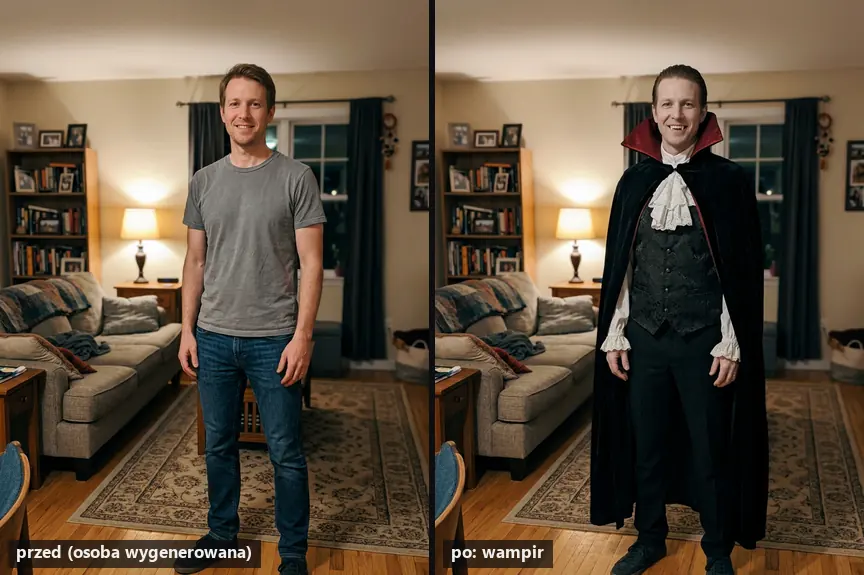
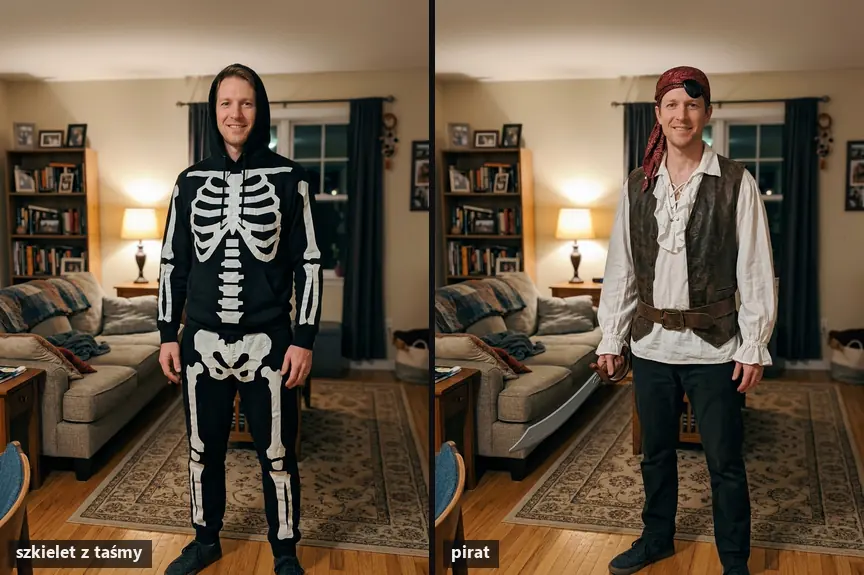
The vampire came out best: cape, jabot, slicked-back hair and visible fangs, while the face and living room didn’t change. The tape skeleton looks homemade, which is exactly what we wanted. The pirate has the eyepatch lifted to his forehead, as we requested, so his eyes are visible.
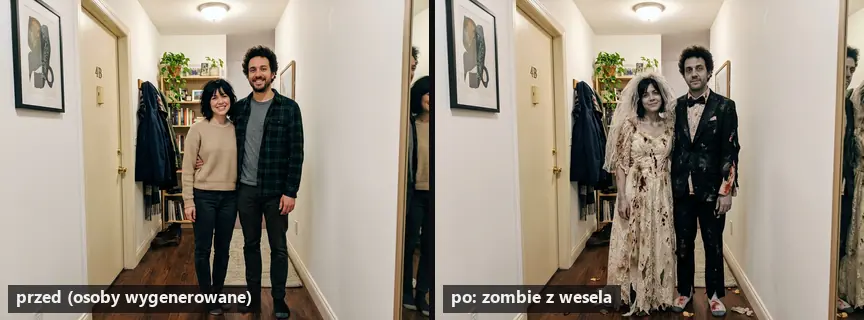
In the couple costume, the model changed both people’s outfits and kept their hairstyles, but the gray skin is barely visible: the zombie effect here comes mainly from torn clothes and fake blood. If you want a stronger effect, add “clearly gray-green skin and shadows under the eyes.”
Copy-Paste Prompts
These work in Gemini (Nano Banana) and ChatGPT after adding a photo. We tested the first four ourselves, exactly in this version. Note: we tested these prompts in Polish, a useful proxy for non-English, heavily inflected languages.
Copy-paste prompt (1, vampire, tested):
Dress the person from the attached photo in a classic vampire costume for Halloween: black cape with high red collar, white shirt with jabot, dark vest, hair slicked back, slightly pale complexion and fake fangs. Preserve facial features, eye shape and smile. Same location and same pose, lighting as in the photo. Realistic phone photo, no text.
What it’s for: classic costume for one person. What to watch out for: in our case the fangs were visible because the person in the photo was smiling; with closed mouth the model might omit them. This is our opinion.
Copy-paste prompt (2, homemade skeleton, tested):
Dress the person from the attached photo in a homemade skeleton costume for Halloween made from a black hoodie, black pants and white duct tape stuck on in the shape of bones. Face without makeup. Preserve facial features, eye shape and smile. Same location and same pose. Realistic phone photo, visible that the costume is homemade, no text.
What it’s for: preview of a costume for a few dollars. What to watch out for: the phrase “visible that the costume is homemade” ensures AI doesn’t draw a store-bought jumpsuit.
Copy-paste prompt (3, pirate, tested):
Dress the person from the attached photo in a pirate costume for Halloween: white loose shirt, red bandana on head, leather belt, vest, plastic sword in hand and eyepatch over one eye lifted to forehead so eyes are visible. Preserve facial features, eye shape and smile. Same location and same pose. Realistic phone photo, no text.
What it’s for: costume with a prop. What to watch out for: an eyepatch over the eye covers half the face and makes it harder for the model to preserve likeness, which is why we lifted it to the forehead.
Copy-paste prompt (4, zombie couple, tested):
Dress both people from the attached photo as a zombie couple returning from a wedding: him in torn suit with crooked bow tie, her in tattered wedding dress with veil, slightly gray skin and some fake blood on clothes, no wounds on faces. Preserve facial features of both people, hairstyles and pose. Same location, realistic phone photo, no text.
What it’s for: costume for a couple from one shared photo. What to watch out for: the second person must consent to uploading the photo.
Copy-paste prompt (5, group):
Dress all people from the attached photo as a pirate ship crew: captain in coat and hat, rest in shirts, bandanas and vests, each person in a different bandana color. Preserve faces, hairstyles and arrangement of all people. Same location, realistic photo, no text.
What it’s for: costume plan for a group of friends. What to watch out for: with groups larger than 4-5 people, faces in the background change more often. This is our opinion, we didn’t test this variant.
Copy-paste prompt (6, universal template):
Dress the person from the attached photo in a costume [costume description: clothing, colors, accessories, props]. Preserve facial features, eye shape, smile and hairstyle. Don't cover face with a mask. Same location and same pose. Realistic phone photo, no text.
What it’s for: any idea from the list above. What to watch out for: the more precisely you describe colors and accessories, the closer it will be to what you actually buy.
Copy-paste prompt (7, shopping list, tested on vampire image):
Break down what elements make up the costume in this photo. Provide a shopping list with approximate prices in USD, stay within $40. Note what can be made yourself from things at home. Answer briefly, in bullet points.
What it’s for: from image to shopping cart. What to watch out for: prices are the model’s estimate, check them in stores.
More ready-made prompts for images are in our collection of 30 useful prompts for ChatGPT Images, and similar photo edits in a different style are described in the article about photos in 1980s style. If you prefer a drawing instead of a realistic try-on, check out the article on caricature from photo AI.
From Image to Shopping List
We sent the vampire image to Gemini 3.6 Flash with prompt 7 (cost $0.007). The model listed 7 costume elements and assumed you have black pants, shoes and a white shirt in your closet, and that you’ll make the jabot and cuffs from old curtains or lace. Left to buy were a cape with red collar ($12-16), fangs with adhesive ($4-5), black vest from thrift store or secondhand app ($8-11) and lace from a fabric store (about $3). Total $30-35. We didn’t verify these prices in stores.
What AI Won’t Do Well
- Masks and costumes covering the face: the model has nothing to “preserve,” so the try-on won’t show how you look in them. This is our opinion.
- Skin effects: in our test “slightly gray skin” barely showed up, you need to describe this more strongly.
- Text on shirts and signs: add “no text” because the model likes to add it, and non-English characters can be incorrect.
- Size and material: an image won’t tell you if a cape from a chain store will be as stiff as in the photo.
Choose children’s costumes based on descriptions, without uploading their photos to the chat. Only edit your own photos and photos of adults who have consented to this.
Frequently Asked Questions
How do I try on a Halloween costume on my photo for free?
Upload your photo to Gemini or ChatGPT and paste prompt 6 with the costume description. The free plan is enough for several try-ons per day.
What kind of photo should I upload?
From head to at least your knees, facing forward, in good light, with no other people in the frame.
Will AI change my face?
In our test, faces didn’t change, and each prompt ended with a sentence about preserving facial features. Without that sentence, the risk is higher.
Can I try on a couple’s costume in one photo?
Yes, prompt 4 changed the costumes of both people in a shared photo. The second person must consent to this.
How much does a Halloween costume made according to AI cost?
For the vampire, the model estimated $30-35 with some items from home. Treat this as a starting point and check prices in stores.
Sources and Verification Date
Our own test: Nano Banana 2 (google/gemini-3.1-flash-image) and Gemini 3.6 Flash via OpenRouter, September 28, 2026. Verified September 28, 2026.
More on this from QUANTSLANT



 guides·Customer.io Use Cases: Onboarding, Cart Abandonment & MoreCustomer.io works best when you message users based on their behavior. Here are the most effective automations and how to build them.