AI Hairstyle Try-On Free: Gemini & ChatGPT Test Results
Free AI hairstyle try-on in Gemini and ChatGPT: 6 prompts to copy, before-and-after results, face shape analysis, and how it compares to paid hairstyle apps.
👁 139 reads
Free AI hairstyle try-on doesn’t require a salon app: you just need one photo and Gemini or ChatGPT. We tested it on two AI-generated portraits, one woman and one man, and paid a total of $0.34 USD for the images through the API. Below you’ll find 6 prompts to copy, before-and-after comparisons, a look at paid apps, and a list of things no hairstyle simulator will show you.
Summary
Gemini (Nano Banana 2 model) changes hairstyles in photos while keeping the face, clothing, and background almost unchanged, and ChatGPT has a similar photo editing function. In our test, 4 out of 4 hairstyles from one prompt preserved facial features, but the “copper” color came out more orange than natural copper. Hairstyle apps cost between $3.99 USD per week and $39.99 USD per year according to the App Store, and their privacy policies show they collect photos linked to identity. For checking “whether bangs suit me,” a chat is more than enough. That’s our opinion. To assess whether your hair can actually be styled that way, you need a hairstylist.
How to Try On Hairstyles with AI on Your Phone
The steps are the same in the Gemini app and in ChatGPT. The most important thing is the photo: face forward, daylight, hair down, no hat.
- Take a selfie by a window, phone at eye level.
- Open Gemini or ChatGPT, add the photo using the paperclip or plus icon.
- Paste one of the prompts below and send. If the result changed your face, write in the same chat: “The face must be identical to the original, change only the hair.”
Free account limits aren’t given numerically. Google’s Gemini help says that image generation with the Nano Banana 2 model is available on the free plan, but doesn’t give a daily number. OpenAI also doesn’t publish the limit for ChatGPT Free, and 2026 reports mention 2-3 images per 24 hours. So start with a 2×2 grid (prompt 2): one image, four variants.
We described the same “one photo, one prompt, phone” approach in our guide to 80s-style photos on your phone. If you’re just starting with photo editing, you might also find our guide on how to edit photos with AI useful.
Our Test: Before and After in One Image
The people in these examples are AI-generated, not real people. We first generated two regular “phone-style” portraits, then edited them with prompts 1, 2, and 4 from the list below. We created all images with the Gemini 3.1 Flash Image model (Nano Banana 2), the same one that runs in the Gemini app. We didn’t test these prompts in ChatGPT during this session.
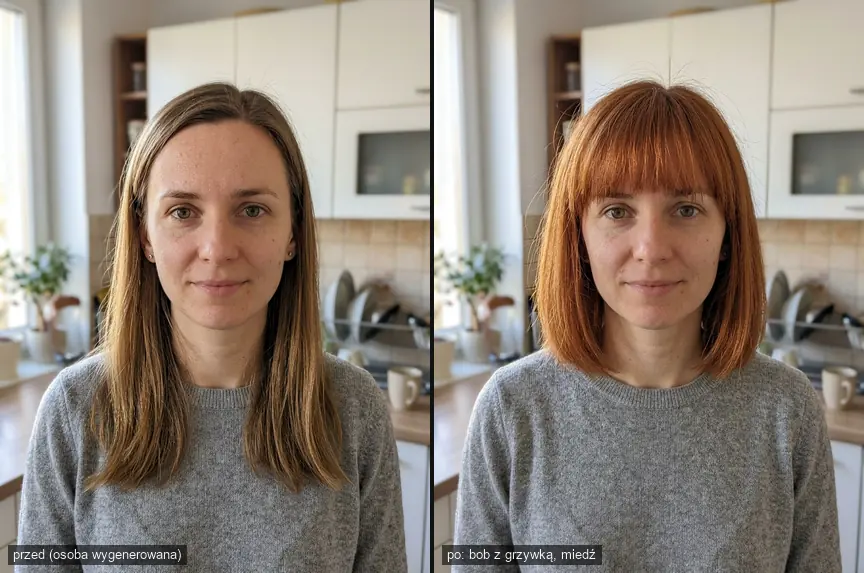
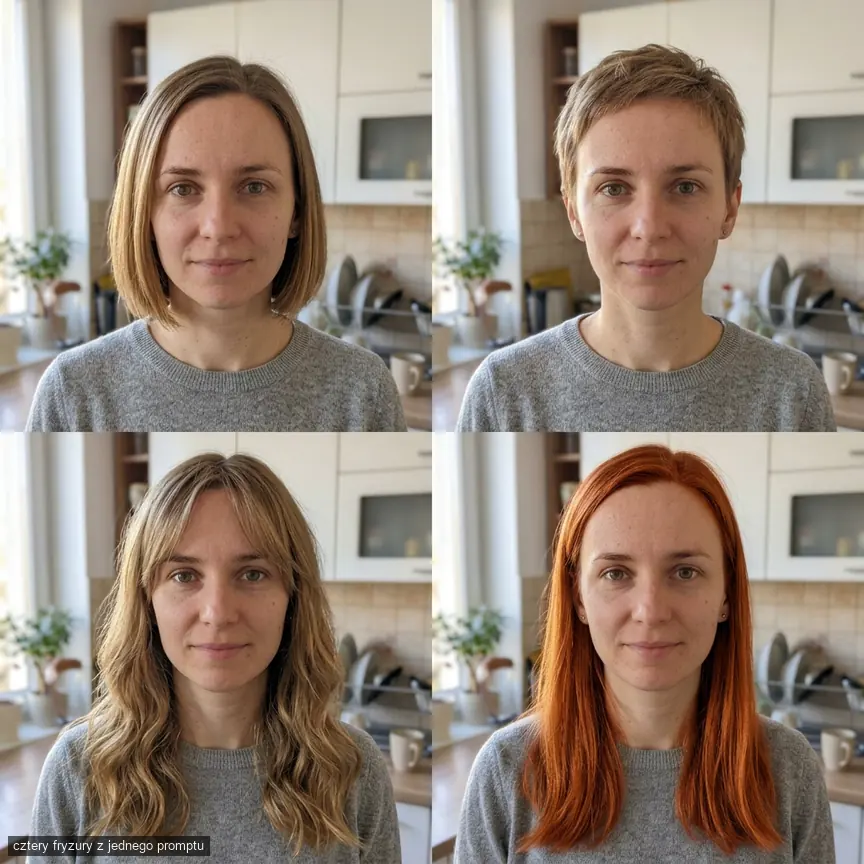
The bob with bangs came out exactly as we described: length to the jawline, bangs covering the eyebrows, individual strands sticking out. The color, however, is stronger than “natural copper,” closer to intense redness from dye. The same happened in the 2×2 grid below, and the copper variant also got noticeably longer hair, even though we asked for the current length.
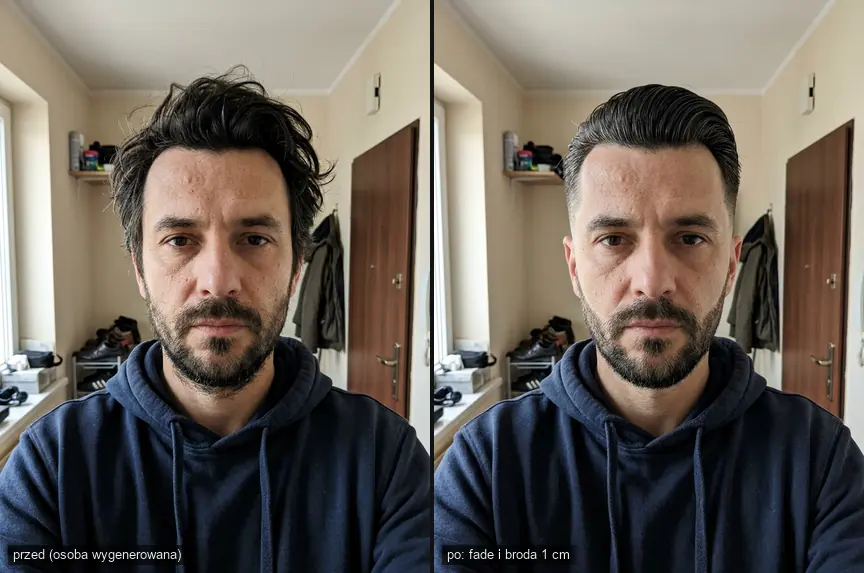
For the man, the model created a fade on the sides and trimmed the beard with a defined line on the cheeks. The head shifted slightly to the right, and the skin came out a bit smoother than the original, so when comparing, look at the hair, not the complexion.
Hairstyle Try-On Prompts (Copy and Paste)
Paste each prompt along with your photo in Gemini or ChatGPT. Only edit your own photos or photos of someone who has given consent.
1. One Specific Hairstyle
What it’s for: testing one hairstyle you’re taking to the salon. What to watch for: always specify what should remain unchanged, otherwise the model might “improve” your face.
Prompt to copy:
In the attached photo, change only the hairstyle: bob to the jawline with bangs covering the eyebrows, natural copper red color. Face, features, skin, clothing, background, and lighting must remain identical. Hair should look realistic, with individual strands sticking out, not like a wig.
2. Four Hairstyles in One Image
What it’s for: quick comparison within the free limit. What to watch for: in a grid, each face is small, so check details later with prompt 1.
Prompt to copy:
Create a 2x2 grid with the same person from the attached photo in four hairstyles: 1) bob to the jawline, 2) short pixie, 3) long waves with curtain bangs, 4) current length but copper color. Keep face, features, eye color, makeup, clothing, background, and lighting unchanged. Change only the hair. Realistic photo, no text or labeled frames.
3. Hair Color Only
What it’s for: blonde, copper, gray hair, or returning to natural color. What to watch for: models oversaturate colors, so add “like salon coloring, not a filter.”
Prompt to copy:
Change only my hair color to cool light blonde with darker roots at 1 cm. Hairstyle, length, face, eyebrows, clothing, and background unchanged. Color should look like salon coloring with natural highlights, not a filter effect.
4. Men’s Hairstyle and Beard
What it’s for: fade, undercut, short beard. What to watch for: give lengths in millimeters and centimeters, because each model understands “short” differently.
Prompt to copy:
In the attached photo, change only hair and facial hair: short fade on the sides (1 to 3 mm), 4-5 cm on top combed back, beard trimmed to 1 cm with a defined line on the cheeks. Keep face, features, clothing, background, and lighting unchanged. Realistic photo, no wig effect.
5. Face Shape Analysis and 3 Suggestions
What it’s for: when you don’t know where to start. What to watch for: this is the model’s opinion, not a measurement, as we discuss below.
Prompt to copy:
Based on this photo, assess my face shape (oval, round, square, oblong, heart-shaped). Explain what you see, suggest 3 hairstyles that should suit me, and 2 to avoid. My hair is straight and medium density. Answer briefly, in bullet points, and note what cannot be assessed from one photo.
6. Description for a Hairstylist
What it’s for: turning an image into words a hairstylist will understand. What to watch for: paste the image with your chosen hairstyle here, not the original.
Prompt to copy:
Describe the hairstyle in this photo as a hairstylist would: length in front and back in centimeters, type of cut (blunt, layered, razored), bangs, part, color in hair dye terminology. Add 3 questions to ask a hairstylist before cutting.
If you want to write similar instructions yourself, we covered the principles in our guide to creating your own photo transformation prompts.
Hairstyle for Face Shape: What AI Answered
We sent prompt 5 with the woman’s portrait from the first image to the Gemini 3.8 Flash model (cost $0.007 USD). Answer: face “oval with oblong tendency,” recommended lob to the collarbone, curtain bangs and layering around the face, and to avoid long straight hair with a center part - exactly the current hairstyle in the portrait. The model added on its own that close-up selfies distort proportions and cowlicks aren’t visible from one photo.
Treat this as a suggestion, not a diagnosis, because the entire assessment is based on proportions. Our opinion: the best approach combines prompt 5 with prompt 2 - first 3 suggestions, then a grid with those three hairstyles.
Hairstyle Apps vs. AI Chat
We checked the prices of two popular apps in the US App Store.
| Tool | Price | What’s Free | Photos |
|---|---|---|---|
| Gemini (Nano Banana 2) | $0 on free plan | image generation and editing, limit not given numerically | depends on Google account activity settings |
| ChatGPT Free | $0 | according to 2026 reports, about 2-3 images per day | depends on ChatGPT data settings |
| YouCam Makeup | Premium $5.99-$9.99/month or $31.99-$39.99/year | some hairstyles and daily free uses | App Store: photos linked to identity, identifiers used for tracking |
| Hairstyle AI: Hairstyle Try On | $3.99/week or $29.99/year | 33 hairstyles | App Store: photos linked to identity, identifiers for tracking |
Apps have ready-made catalogs (YouCam lists over 250 hairstyles), while chat wins on price and description flexibility. Watch out for weekly plans: $3.99 USD per week is over $207 USD annually.
Taking an Image to a Hairstylist: How Not to Be Disappointed at the Salon
The image alone isn’t enough, because the hairstylist sees the result, not the cut. Show three things: your “before” photo, the AI image, and the description from prompt 6. Ask directly whether your hair (density, curl, cowlicks) will allow this styling without a straightener and how much time daily styling will take.
What a Hairstyle Simulator Won’t Show
- Hair density. The model draws “beautiful and full” hair. Thin hair after a bob cut looks flatter than in the image.
- Natural curl. Curls and waves after washing will settle their own way, while AI shows the styled state.
- Regrowth. Pixie and fade look different after 4-6 weeks, but the image shows day zero.
- True color. Choose hair dye color from a swatch book at the salon.
Frequently Asked Questions
Does free AI hairstyle try-on really work?
Yes, in Gemini and ChatGPT you can upload a photo for free and change the hairstyle with a prompt. In our test, face and background were preserved in 4 out of 4 variants.
What’s the best hairstyle change app?
For testing a few ideas, a free AI chat is enough. Paid apps like YouCam Makeup have ready-made catalogs but cost from around $30 to $40 USD annually.
Can I try hairstyles on someone else’s photo?
Only with their consent. The photo goes to the chat provider’s servers, so the decision belongs to the person in the photo.
Will AI choose a hairstyle for my face shape?
It will provide suggestions and reasoning, but it’s an opinion based on one photo, and close-up selfies distort proportions. Treat it as a starting point for conversation with a hairstylist.
Sources and Verification Date
Gemini limits
- Google Gemini help, limits and plans. ChatGPT Free limit: ChatGPT image generation limits 2026 (OpenAI doesn’t publish the number). Prices and privacy: YouCam Makeup in App Store
- Hairstyle AI in App Store. Images: Gemini 3.1 Flash Image via OpenRouter
- face analysis: Gemini 3.8 Flash. Verified September 28
- 2026


More on this from QUANTSLANT



 guides·n8n Use Cases: Automations You Can Build in One Afternoonn8n delivers the most value when someone is manually copying data, monitoring inboxes, or compiling weekly reports. Here are automations you can build quickly.