ACE-Step 1.5 Review: Local AI Song Generator with Vocals
ACE-Step 1.5 generates complete stereo songs with vocals directly on your GPU under an MIT license. Here are real test results on an RTX 4090 compared against YuE2, MiniMax Music 3, and DiffRhythm 2.
👁 126 reads
ACE-Step 1.5 is an open-source, local AI music generator that produces complete stereo songs with full vocals directly on your GPU under a permissive MIT license. In my tests on an Nvidia GeForce RTX 4090, the turbo variant generated full two-minute tracks in just 8 to 91 seconds, delivering consistent pronunciation and strict timing controls. You can explore how it fits alongside other text, audio, and visual engines in my comprehensive guide to local AI models.
As of 17 October 2026
- ACE-Step 1.5 (developed by ACE Studio and StepFun; weights released January 2026, licensed under MIT for commercial use): a 2B diffusion architecture available in turbo, base, and SFT variants, with an XL 4B release added on 2 April 2026.
- Language planner (based on Qwen3) is available in three sizes: 0.6B, 1.7B, and 4B parameters.
- Integrated directly into ComfyUI via templates using weights published by the Comfy-Org repository.
- Benchmark setup on 17 October 2026: Windows 11, RTX 4090 24 GB, ComfyUI 0.41, ACE-Step 1.5 turbo with the 1.7B planner, evaluated using Whisper large-v3 for lyrical word recall.
What Is ACE-Step 1.5?
ACE-Step 1.5 transforms a plain text style prompt and structured lyrics into an arrangement featuring instrumentation and vocal tracks. The architecture divides the generation task into two distinct components: a small language planner based on Qwen3 that organizes musical structure and phonetic timing codes, and a 2B diffusion model that synthesizes the actual stereo audio. The developers report support for songs ranging from short loops up to 10 minutes, coverage for over 50 lyrical languages, and execution on consumer graphics cards with less than 4 GB of VRAM through offloading.
Beyond end-to-end generation from scratch, the system accommodates cover generation, section repainting, and adding instrumental arrangements beneath pre-recorded vocal tracks. Crucially, the model is published under the MIT license, allowing unrestricted commercial use. This distinguishes it from competing open weights such as YuE2 (restricted under CC BY-NC 4.0) or MiniMax Music 3, which requires special terms for commercial deployment.
How to Run ACE-Step 1.5 in ComfyUI Step by Step
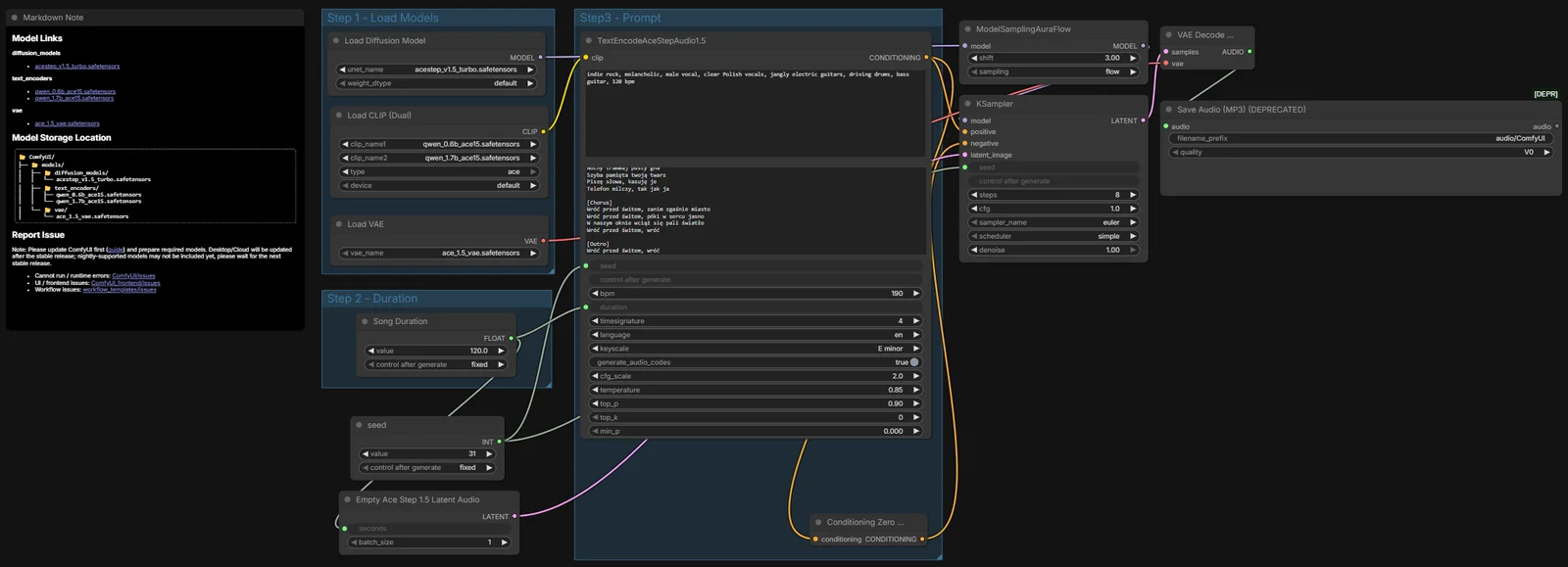
To run the model manually inside ComfyUI without third-party wrappers, follow this setup sequence using the official split nodes:
- Update ComfyUI to version 0.41 or newer.
- Open the Templates menu inside ComfyUI, search for “ACE-Step 1.5”, and load the template with split files.
- Download the required model weights from the official Comfy-Org repository (
Comfy-Org/ace_step_1.5_ComfyUI_files) and distribute them into your ComfyUI directory structure (around 10 GB total):acestep_v1.5_turbo.safetensors(4.8 GB) placed intomodels/diffusion_modelsqwen_0.6b_ace15.safetensors(1.2 GB) andqwen_1.7b_ace15.safetensors(3.7 GB) placed intomodels/text_encodersace_1.5_vae.safetensors(0.3 GB) placed intomodels/vae
- In the TextEncodeAceStepAudio1.5 node, enter your style tags (such as genre, instrumentation, and vocal timbre), format your lyrics with
[verse]and[chorus]tags, and specify tempo, key, and target language. - Define your track duration in the text encoder block and match it in the EmptyAceStep1.5LatentAudio node (seconds). In the template, both parameters are tied through a unified “Song Duration” node.
- Click Queue Prompt (Run). The rendered stereo track will appear in
ComfyUI/output/audio.
The heavier XL edition (4B) weighs 10 GB for the turbo model in bf16, with its 4B planner adding another 8.4 GB. While manageable on a 24 GB card, running XL on a 12 GB card requires offloading to system RAM. I focused my hardware benchmarks strictly on the fast turbo 2B edition.
ACE-Step 1.5 Benchmark: English and Multilingual Results
To test synthesis accuracy, I ran four local music models through identical tests on an RTX 4090: ACE-Step 1.5 turbo, YuE2 (3B), MiniMax Music 3, and DiffRhythm 2. I evaluated word retention by feeding the generated audio outputs into Whisper large-v3 and measuring the percentage of original lyrical words correctly rendered in sequence.
English Vocals Test
For the English test, each model received lyrics for an 80s synthpop track with male vocals. Both YuE2 and DiffRhythm 2 delivered flawless lyrical accuracy, but ACE-Step 1.5 proved drastically faster once loaded into video memory.
| Model | Words Recognized | Track Length | RTX 4090 Total Time |
|---|---|---|---|
| YuE2 (bf16) | 100% | 1:57 min | 32 s |
| DiffRhythm 2 | 100% | 1:58 min | approx. 60 s |
| ACE-Step 1.5 turbo | 96.1% | 2:00 min | 8 s |
| MiniMax Music 3 | 92.1% | 2:30 min | 305 s |
With weights already cached in memory, ACE-Step rendered the full two-minute English synthpop arrangement in just 8 seconds at 8 sampling steps, capturing 96.1% (73 of 76) of the words cleanly. By contrast, MiniMax Music 3 took over 5 minutes and saturated the entire VRAM buffer.
Multilingual Test: Polish-Language Lyrics
To evaluate phonetic capability outside English, I fed all four models identical Polish-language lyrics (an 83-word pop ballad containing specific characters and diacritics) across three distinct seeds (11, 22, 33). This serves as a demanding test for local architectures.
| Model | 3-Run Polish Recall | Average Recall | License |
|---|---|---|---|
| ACE-Step 1.5 turbo | 94.0% / 94.0% / 98.8% | 95.6% | MIT (commercial) |
| YuE2 (bf16) | 98.8% / 90.4% / 84.3% | 91.2% | CC BY-NC 4.0 (non-commercial) |
| MiniMax Music 3 | 91.6% / 88.0% / 88.0% | 89.2% | Custom Community (conditional) |
| DiffRhythm 2 | 4.8% (single run) | 4.8% | Apache 2.0 (English/Chinese only) |
Across the three multilingual runs, ACE-Step 1.5 achieved the highest consistency. YuE2 hit a peak single run of 98.8% but drifted between runs, occasionally skipping lines or looping phrases. MiniMax Music 3 truncated song lengths prematurely (finishing at 73 s, 111 s, and 92 s against a 150 s ceiling) and scrambled section orders. DiffRhythm 2 failed on the non-English lyrics (4.8% recall) because its phonetic training is restricted to English and Chinese.
Execution Times and VRAM Usage on RTX 4090
Hardware consumption varied significantly across the four tested engines. For ACE-Step 1.5, total wall-clock times span between 34 and 91 seconds when accounting for model switching inside ComfyUI, but drop down to 8 seconds once weights reside in VRAM.
| Model | Generation Time (PL Song) | VRAM Peak | Target Duration Handling |
|---|---|---|---|
| ACE-Step 1.5 turbo | 34-91 s (8 s cached) | 10.7-20.0 GB | Exact (locks to target 120 s) |
| YuE2 (bf16) | 61-108 s | 13.3-16.3 GB | Dynamic (stops on lyrics end) |
| MiniMax Music 3 | 113-178 s | 18.4-24.1 GB | Unstable (cuts off early) |
| DiffRhythm 2 | approx. 60 s | Not measured | Dynamic |
VRAM consumption for ACE-Step peaked between 10.7 GB and 20.0 GB on my RTX 4090, as ComfyUI keeps supporting components in memory. MiniMax Music 3 maxed out the entire 24 GB card, causing performance degradation during generation.
Which Local AI Music Model Should You Choose?
- For commercial tracks, jingles, and fast iterations: Pick ACE-Step 1.5. It carries an unencumbered MIT license, fixes exact track durations reliably, and renders in seconds via 8-step turbo diffusion.
- For pristine English lyrical diction (non-commercial): Choose YuE2. It achieved a 100% word recognition score on English synthpop, though its CC BY-NC 4.0 license prevents monetization.
- For purely instrumental beds: Dedicated background generators like Stable Audio 3 are better suited when vocals are unnecessary.
- Avoid DiffRhythm 2 for non-English lyrics: Its acoustic vocoder handles English cleanly, but multilingual phonetic support is absent.
Frequently Asked Questions
Does ACE-Step 1.5 support commercial use?
Yes, ACE-Step 1.5 is released under the permissive MIT license, which permits commercial deployment of both the code and output. Note that platforms like Spotify maintain their own disclosure policies regarding automated music, and purely machine-generated audio files may carry specific copyright limitations depending on your jurisdiction.
How much VRAM does ACE-Step 1.5 require to run?
On an RTX 4090, peak memory usage ranged from 10.7 GB to 20.0 GB inside ComfyUI depending on background model caching. According to the developers, the 2B turbo model can operate on cards with less than 6 GB of VRAM using int8 quantization and CPU offloading, while cards with 8 GB to 16 GB handle the standard 2B weights comfortably.
What is the difference between ACE-Step 1.5 turbo, base, and SFT?
The turbo variant generates audio in just 8 sampling steps, prioritizing generation speed for rapid drafting and iteration. The base and SFT (supervised fine-tuned) editions require 50 sampling steps, producing higher acoustic fidelity at the expense of longer rendering times. The XL model increases parameters to 4B for richer arrangements.
How do you format lyrics for the best vocal output in ACE-Step?
Structure your text using clean tags such as [verse] and [chorus] on separate lines, keeping syllable counts balanced across matching meters. Ensure you explicitly set the language parameter inside the ComfyUI text encoder node to match your lyrics, preventing the acoustic model from defaulting to English pronunciation rules.
Can ACE-Step 1.5 run without an Nvidia graphics card?
Yes, the official repository provides execution support for Apple Silicon via MPS, AMD GPUs through ROCm, and Intel hardware using XPU, alongside pure CPU fallback. However, processing tracks entirely on a system processor without hardware acceleration results in substantially longer generation times.
Sources
- ACE-Step 1.5 Repository on GitHub (MIT License).
- ACE-Step/Ace-Step1.5 Model Card on Hugging Face.
- Comfy-Org/ace_step_1.5_ComfyUI_files on Hugging Face.
- m-a-p/YuE2-3B on Hugging Face (CC BY-NC 4.0 License).
- MiniMaxAI/MiniMax-Music3 on Hugging Face (MiniMax-Music3 Community License).
- DiffRhythm 2 Repository on GitHub (Apache 2.0 License).
- Hardware benchmarks conducted on RTX 4090, 17 October 2026, ComfyUI 0.41, evaluated via Whisper large-v3.
Checked on 17 October 2026.