Ideogram 4.5 vs 7 Models: 10 Edits in a Row Without Drift
We tested whether Ideogram 4.5 can handle 10 consecutive edits without degrading the image. SSIM and ΔE measurements for 8 models show the results.
👁 201 reads
Yes, in our test Ideogram 4.5 survived ten consecutive edits without degrading the image. After the tenth correction, areas untouched by any instruction remained nearly identical to the original (SSIM 0.95, color change ΔE 2.5). In seven competitors, those same areas drifted significantly: from SSIM 0.58 in Seedream 5 Pro to 0.22 in Grok Imagine 2, while Nano Banana Pro and Nano Banana 2 tinted the entire photo pink. GPT Image 2.5 Sunburst came closest, but it too redraws the entire frame at each step.
When Ideogram launched version 4.5 (September 30, 2026), they claimed that competitors, including GPT Image 2.5 Sunburst, Nano Banana Pro, and Nano Banana 2, produce unusable images after several edits, while 4.5 stays clean. That’s testable, so we tested it ourselves: one photo, ten instructions one after another, eight models, and measurements of the parts of the frame that nobody should have touched.
How We Tested
- Starting photo: a bakery with a sign reading “PIEKARNIA” (Polish for bakery), red doors, a bicycle, a red car, a woman in a gray coat, a sign reading “CHLEB 6,90 zł” (bread, with price in Polish currency), and a trash can. Resolution 2528×1696. We generated it in Nano Banana Pro, not in Ideogram, to avoid giving it a “home advantage” with its own image.
- Ten instructions in English, each ending with the sentence “Change nothing else.” The full list is in the step browsers below.
- Chain: each model always edits its own output from the previous step. An error from step 2 therefore carries into step 3 and beyond, just like in real work on a client photo.
- Models and settings: Ideogram 4.5 (edit_precision high, quality high), GPT Image 2.5 Sunburst (quality high), Nano Banana Pro (2K), Nano Banana 2 (2K), Seedream 5.0 Pro, FLUX.2 Max, Qwen Image 3 (without prompt expansion), Grok Imagine Image 2.0 (2k, medium).
- Everything through fal.ai API, October 1, 2026, one run per model, no retries and no cherry-picking better results.
- Measurement: we selected four areas not affected by any instruction: the wall on the right, the wall with gutter on the left, the bread shelves behind the glass, and the sidewalk on the right. After each step we compared them to the original.
- SSIM measures structural similarity, meaning texture, edges, and detail. 1 means identical image, 0.9 is minor differences, below 0.6 the same area already looks noticeably different.
- ΔE (CIEDE2000) is the average color change. Around 2 means a change barely visible to the eye, above 10 the color is clearly different.
- Assessment of whether the instruction was executed was done manually, examining each of the 80 images at full resolution.
One caveat about the measurement: some small jumps in the charts are new objects that landed on the edge of the measured area, for example the lavender planter in step 6 stands on the right sidewalk in some models. That’s why we mainly look at the trend after ten steps, not individual values.
Results Summary
SSIM and ΔE tell two different stories here. GPT Image 2.5 Sunburst has low SSIM (0.43) because it redraws the plaster texture each time, but holds color best after Ideogram (ΔE 9.5). Nano Banana Pro and Nano Banana 2 are the opposite: they hold texture somewhat better, but color drifts most strongly of the entire group (ΔE over 18), as the photo becomes increasingly pink with each step.
| Model | SSIM after 10 steps | ΔE after 10 steps | Instructions executed | Time per step | Price per edit (fal.ai) |
|---|---|---|---|---|---|
| Ideogram 4.5 (high) | 0.95 | 2.5 | 10/10 | 54 s | $0.22 |
| GPT Image 2.5 Sunburst (high) | 0.43 | 9.5 | 9/10 (cat behind glass) | 45 s | approx. $0.05-0.10 (depending on size) |
| Seedream 5.0 Pro | 0.58 | 12.6 | 10/10 (different door) | 104 s | $0.135 |
| Nano Banana 2 (2K) | 0.57 | 18.1 | 10/10 | 24 s | $0.12 |
| Nano Banana Pro (2K) | 0.54 | 18.4 | 10/10 (+ green frame) | 30 s | $0.15 |
| Qwen Image 3 | 0.48 | 12.5 | 9/10 (planter in wrong place) | 109 s | $0.075 |
| FLUX.2 Max | 0.32 | 16.2 | 8/10 (cat behind glass, added text) | 54 s | approx. $0.29 (per megapixel) |
| Grok Imagine 2 (2k, medium) | 0.22 | 18.2 | 10/10 (+ green frame) | 24 s | $0.09 |
Time is the average of ten steps measured from sending the request to the finished result in the fal.ai queue. Qwen Image 3 ranged from 48 to 285 seconds per step. Prices are from fal.ai pricing as of October 1, 2026: Seedream charges $0.135 per image up to 2048×2048 (our result was slightly larger), FLUX.2 Max $0.07 for the first megapixel and $0.03 for each additional one, including the input image, and Grok $0.08 plus $0.01 for the input image. GPT Image 2.5 depends on size and prompt length: in high quality from $0.053 for 1024×1024 to $0.10 for 3840×2160.
Step by Step: All Eight Chains
Below each model is a browser. Button 0 shows the original, 1-10 show successive edits, keyboard arrows also work. Best to compare the wall on the right and the woman’s face between step 0 and 10.
Ideogram 4.5
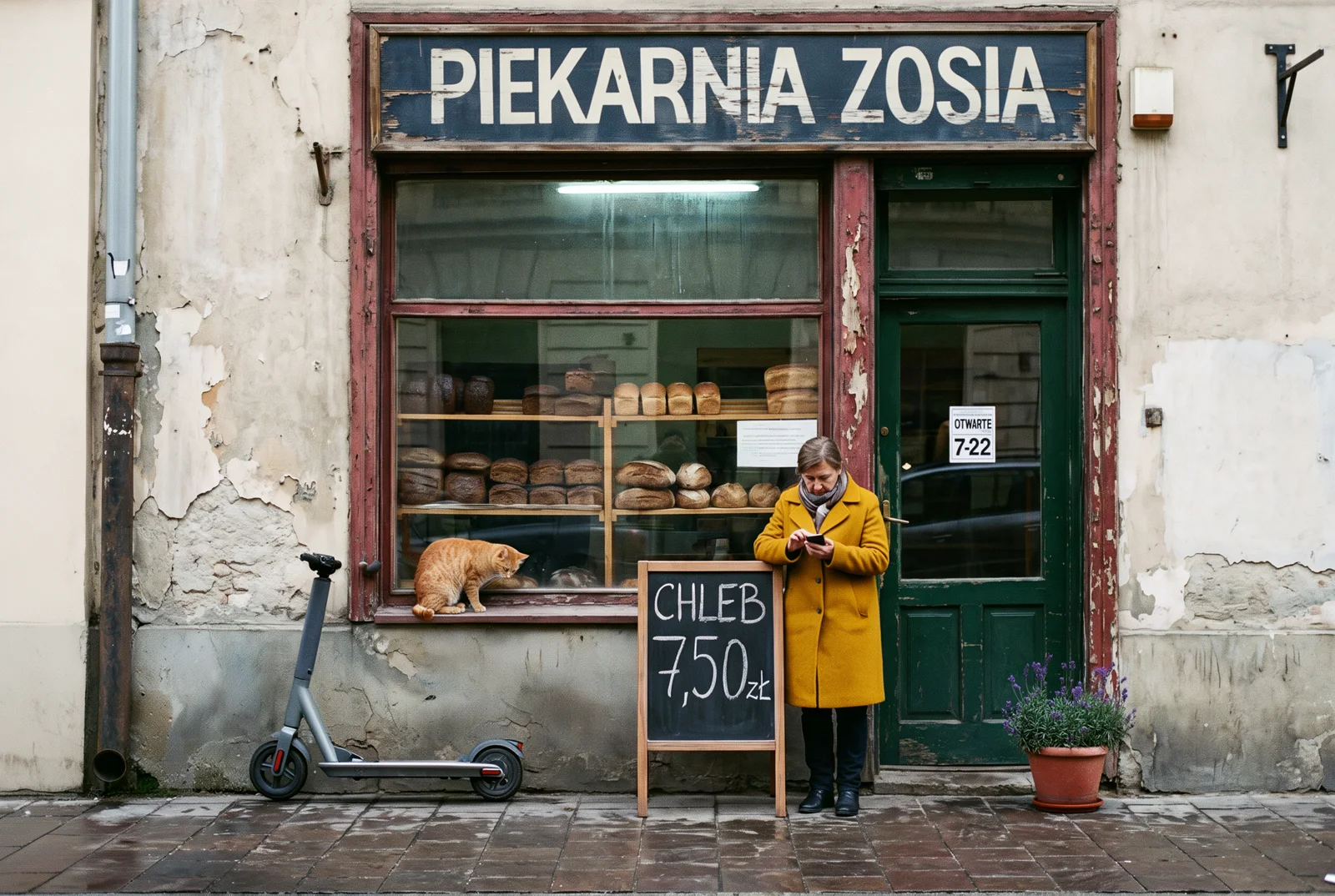
All ten instructions executed and each in its proper place. It repainted only the door panel, while the red display frame stayed red. The cat sits on the exterior windowsill, the planter stands by the door, the trash can disappeared and the gutter behind it remained. Plaster texture, bread on shelves, wet sidewalk and the woman’s face after ten steps look like the original. Only the edited fragments change. Two minor notes: when changing the sign, the letters became narrower to fit the longer text, and the output is 2480×1664 pixels, slightly less than the original (2528×1696).
GPT Image 2.5 Sunburst
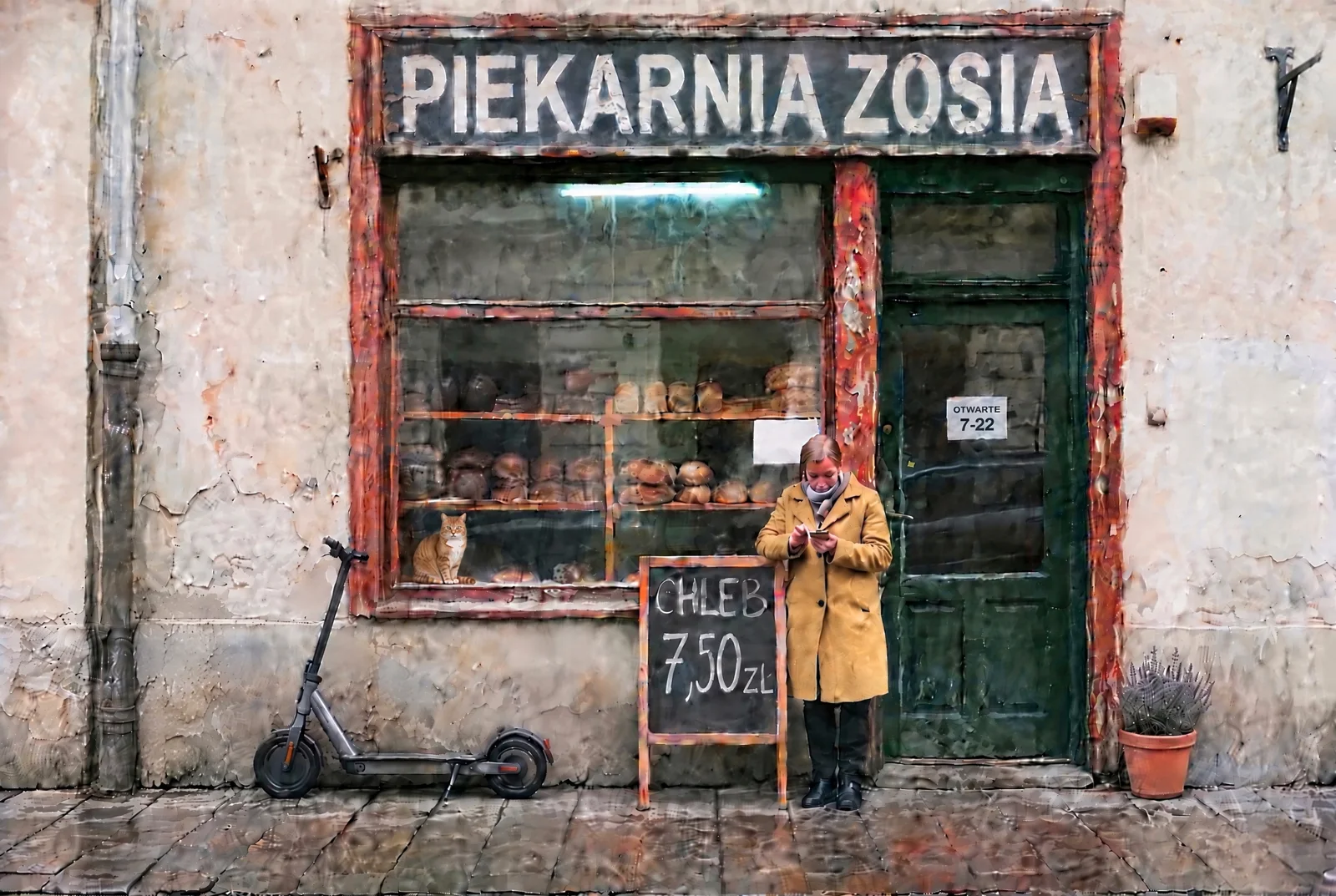
The edits themselves come out well: sticker legible, sign and board correct, scooter and coat flawless. The problem is elsewhere. Each pass renders the entire image anew, so the wall becomes warmer and more sharpened step by step, and the plaster texture changes pattern. The woman’s face after ten steps is noticeably younger. It executed one instruction incorrectly: the cat doesn’t sit on the exterior windowsill but inside, behind the glass, among the bread. GPT is the only one besides Ideogram that keeps color within reasonable limits (ΔE 9.5) and preserves the exact input size.
Nano Banana Pro
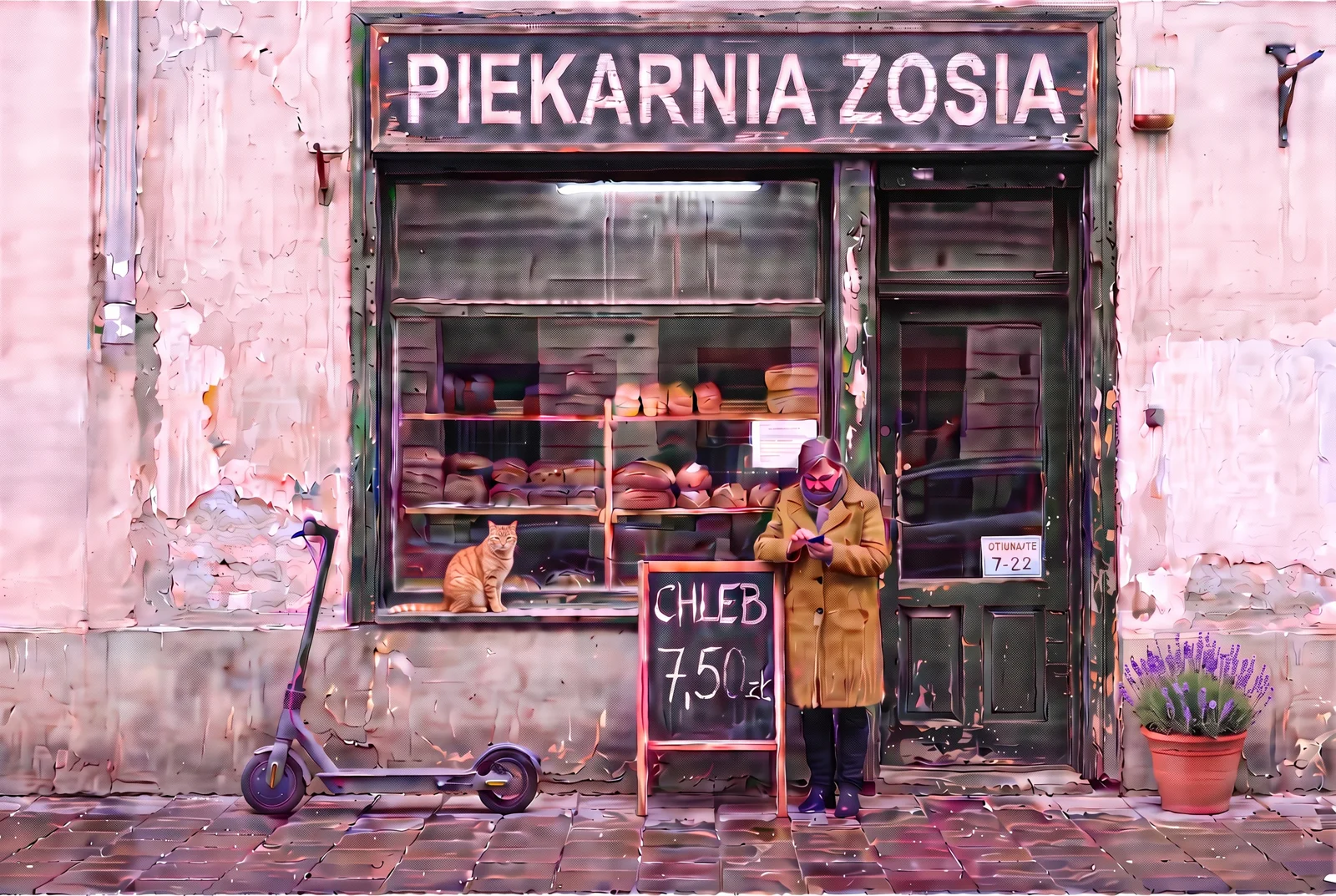
Already in step 1 it did more than we asked: besides the door it repainted the entire display frame green. Then it executed instructions correctly, but with each step the entire photo shifts toward pink: from halfway through the chain you can see it with the naked eye, and in step 10 the wall is clearly pink. The coat came out brown-mustard, the woman’s face at the end has a magenta tint and artifacts, and the door sticker, correct in step 2, in step 10 shifted down and reads like “OTIUNARTE”.
Nano Banana 2
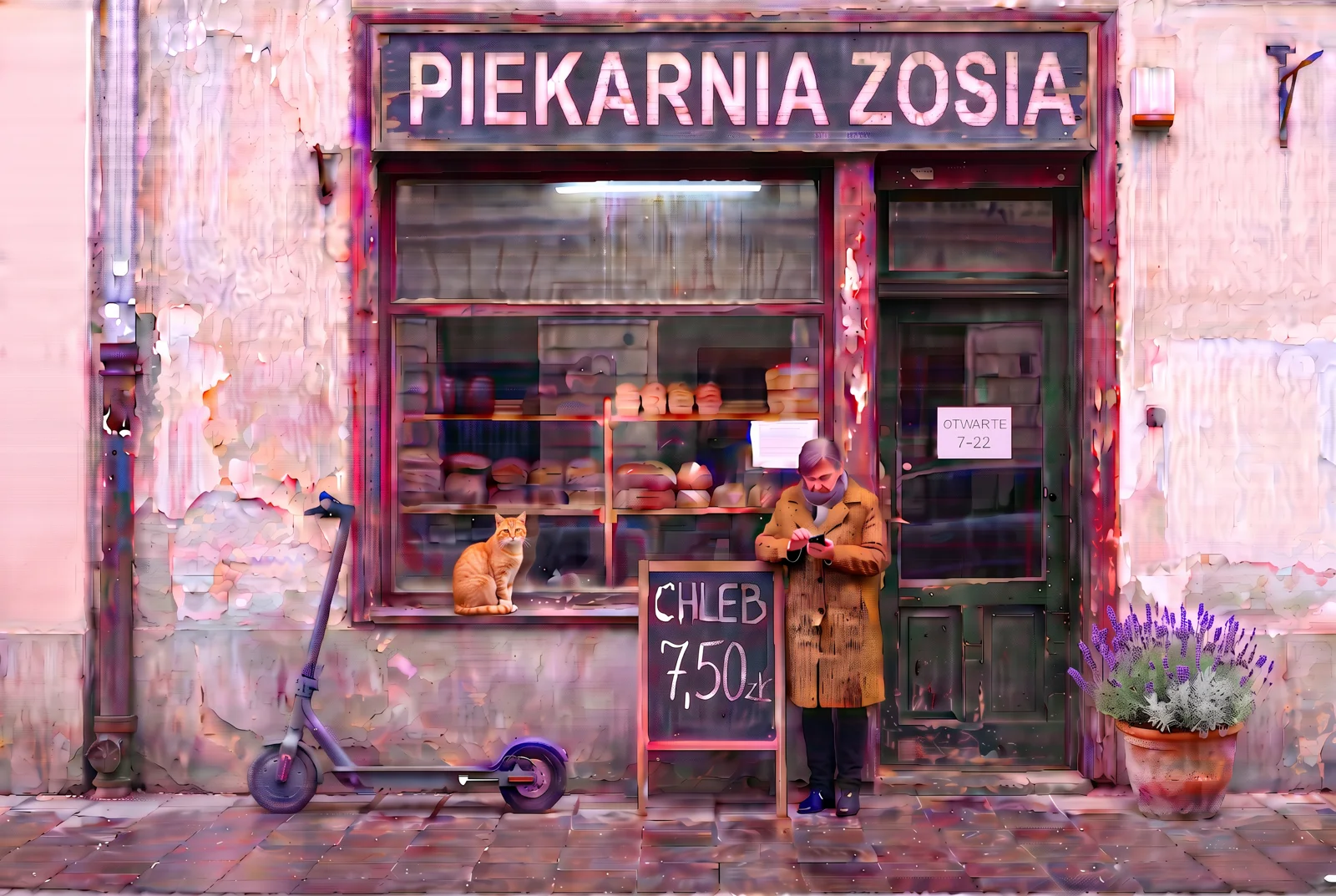
Pro’s cheaper sibling was more precise in step 1: it repainted only the door, the frame stayed red. It executed all instructions, but the color drift is the same as Pro’s, and even stronger in perception: in step 10 the wall, sidewalk and scooter are pink. The coat again came out brown-mustard, and the face at the end is blurred and discolored.
Seedream 5.0 Pro
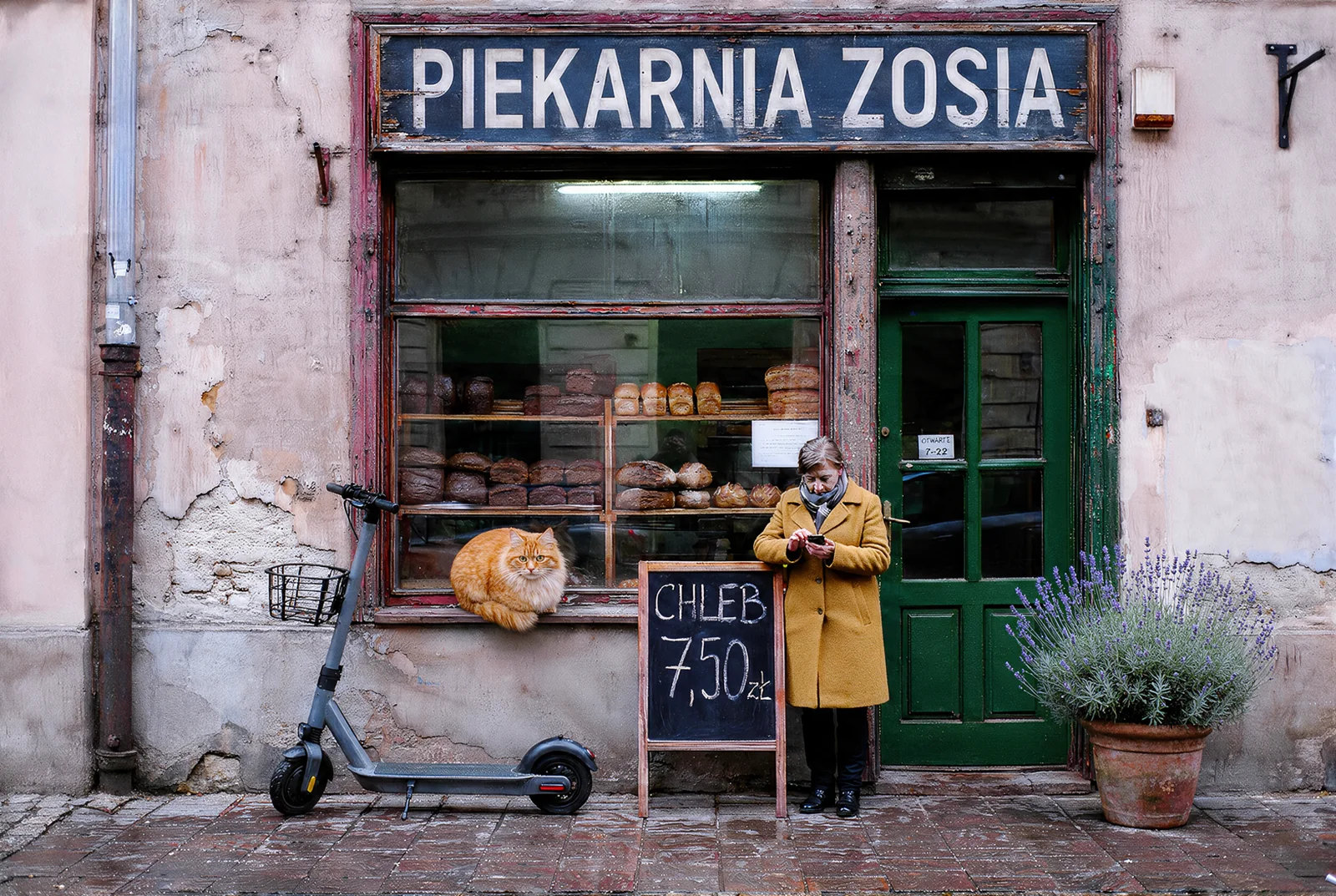
Best of the competitors in terms of SSIM, but with a clear flaw at the start: instead of repainting the door, it inserted a different light green door with glass panes. Through step 5 the rest of the frame holds up well, from step 6 a pink cast appears that grows to the end. The scooter got the bicycle’s basket, and the cat is large and fluffy, but sits where it should, on the exterior windowsill. It preserved the woman’s face best among the competition.
Qwen Image 3
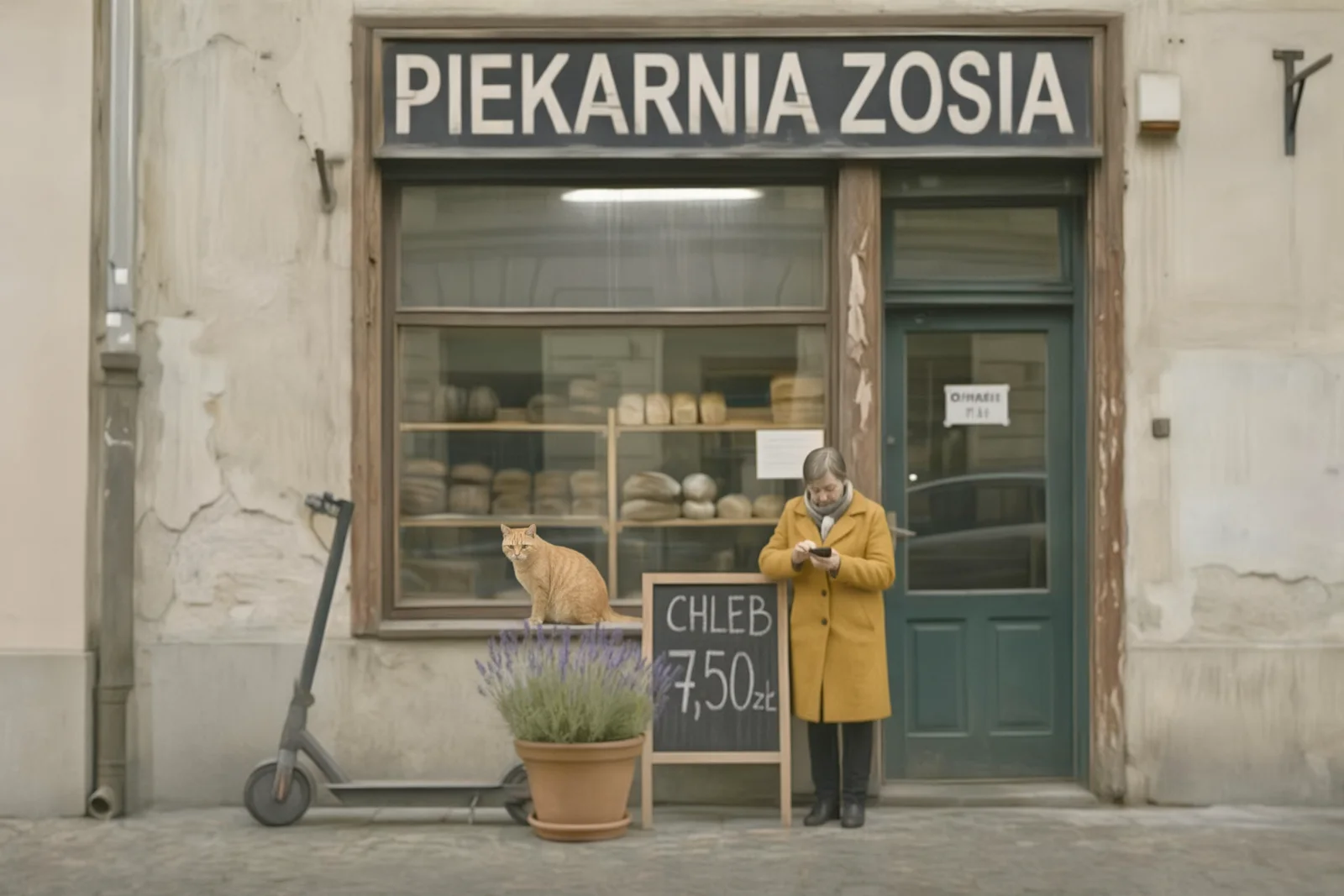
Slowest in the test: from 48 to 285 seconds per step. The image fades and loses saturation with each pass, and in step 10 looks like it’s been run through fog. It placed the lavender planter not by the door but in front of the sign, so it obscures part of the price. The “OTWARTE 7-22” sticker in step 2 was legible, but in step 10 is already a blurred smear of letters.
FLUX.2 Max
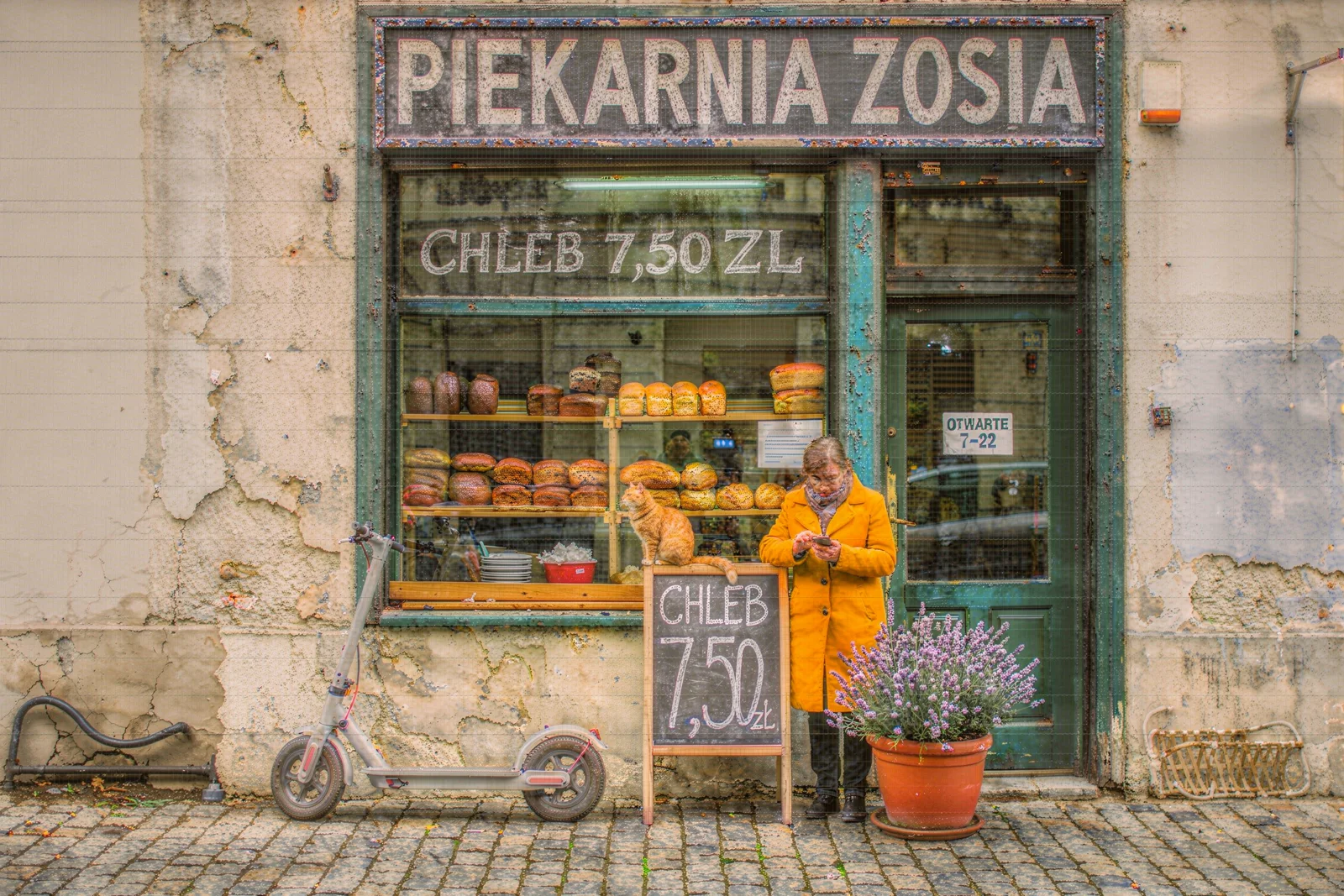
In step 1 it repainted the entire display frame turquoise-green and incidentally changed the wet sidewalk to dry pavers. When removing the car it drew a rusty post by the wall, with the planter a wicker basket under the right wall. It placed the cat inside the display, behind the glass, along with new red bowls. In step 9 it changed the sign but additionally painted “CHLEB 7,50 ZL” on the upper display glass, which nobody ordered. In step 10 the trash can disappeared, but in its place remained a strange object resembling a garden hose. On the face and door at the end you can see a mesh pattern.
Grok Imagine 2
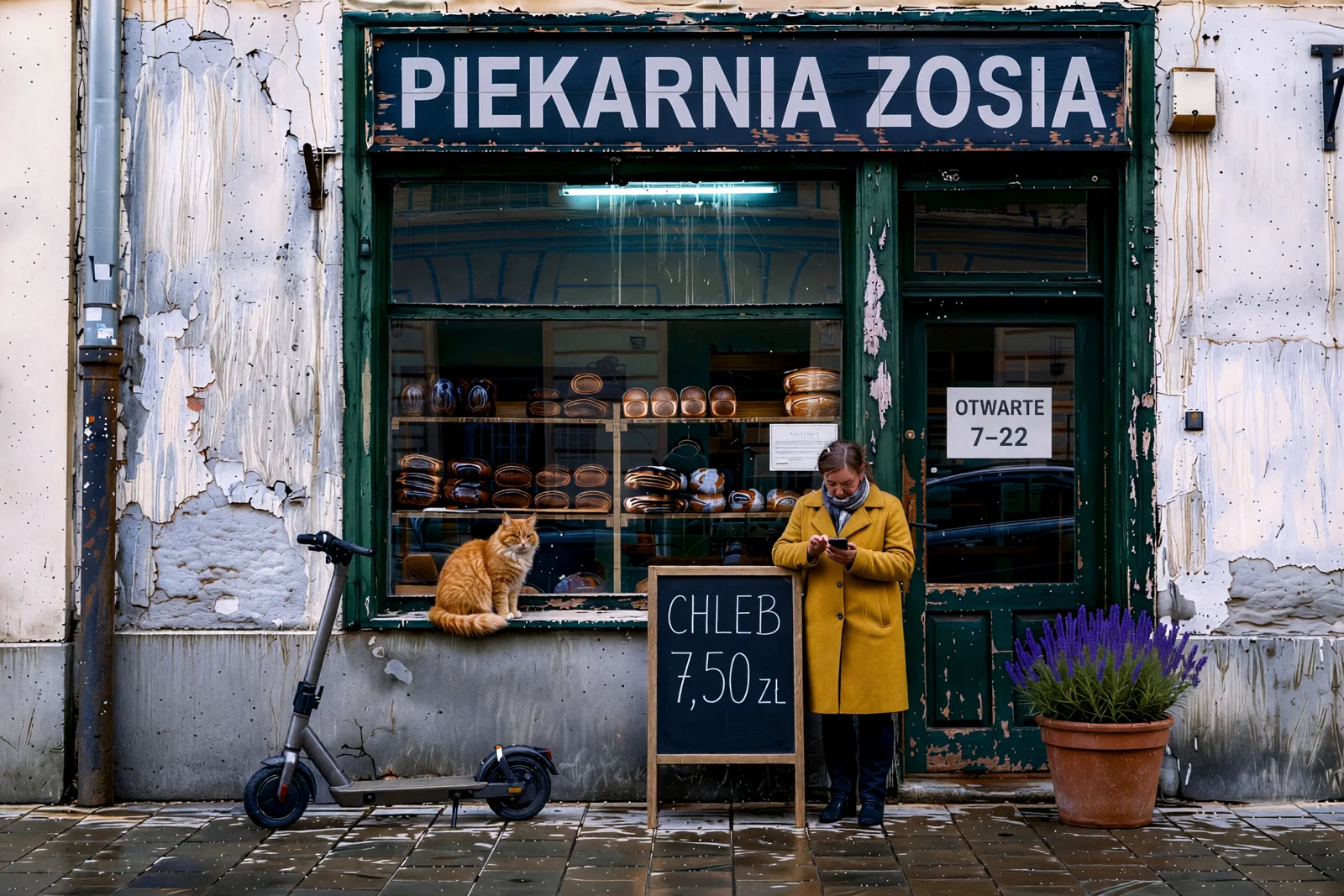
All instructions executed, and the sticker and sign came out legibly. But already in step 1 it repainted the entire display frame green, redrew the wall (SSIM 0.46 after the first edit) and gave the woman glasses she didn’t have before. With each step the plaster becomes colder, more gray-blue and more heavily peeling. This is the fastest model in the test along with Nano Banana 2, but also the one that deviates most from the original.
First Edit vs Tenth
This chart shows where the difference comes from. Most models lose a lot already at the first correction, then the error accumulates. Ideogram loses 0.02 at the start and almost nothing later.
Full series, step by step. First number is SSIM, second is ΔE.
| Model | 1 | 2 | 3 | 4 | 5 | 6 | 7 | 8 | 9 | 10 |
|---|---|---|---|---|---|---|---|---|---|---|
| Ideogram 4.5 | 0.97 / 1.7 | 0.97 / 1.7 | 0.97 / 1.7 | 0.97 / 1.7 | 0.97 / 1.8 | 0.96 / 2.4 | 0.96 / 2.5 | 0.96 / 2.5 | 0.96 / 2.5 | 0.95 / 2.5 |
| GPT Image 2.5 Sunburst | 0.83 / 2.8 | 0.74 / 3.7 | 0.68 / 4.3 | 0.63 / 5.1 | 0.59 / 5.7 | 0.55 / 7.0 | 0.51 / 7.7 | 0.48 / 8.2 | 0.46 / 8.9 | 0.43 / 9.5 |
| Seedream 5 Pro | 0.91 / 2.8 | 0.88 / 3.6 | 0.85 / 4.4 | 0.82 / 5.2 | 0.79 / 6.5 | 0.69 / 9.6 | 0.66 / 10.4 | 0.61 / 11.5 | 0.59 / 11.9 | 0.58 / 12.6 |
| Nano Banana 2 | 0.82 / 3.2 | 0.79 / 5.0 | 0.76 / 6.8 | 0.74 / 8.5 | 0.72 / 10.1 | 0.65 / 12.5 | 0.63 / 14.1 | 0.61 / 15.5 | 0.59 / 16.7 | 0.57 / 18.1 |
| Nano Banana Pro | 0.83 / 3.4 | 0.76 / 5.0 | 0.69 / 6.9 | 0.77 / 8.3 | 0.74 / 9.8 | 0.67 / 12.3 | 0.64 / 14.0 | 0.60 / 15.4 | 0.56 / 16.9 | 0.54 / 18.4 |
| Qwen Image 3 | 0.74 / 3.6 | 0.64 / 4.6 | 0.56 / 5.8 | 0.51 / 7.3 | 0.51 / 8.2 | 0.51 / 8.9 | 0.50 / 9.8 | 0.50 / 10.6 | 0.49 / 11.8 | 0.48 / 12.5 |
| FLUX.2 Max | 0.73 / 8.7 | 0.60 / 10.3 | 0.54 / 11.9 | 0.50 / 11.5 | 0.48 / 12.5 | 0.43 / 13.7 | 0.41 / 14.4 | 0.39 / 15.1 | 0.34 / 16.1 | 0.32 / 16.2 |
| Grok Imagine 2 | 0.46 / 6.8 | 0.41 / 8.0 | 0.35 / 9.7 | 0.30 / 11.2 | 0.28 / 12.5 | 0.27 / 14.1 | 0.27 / 14.8 | 0.25 / 16.1 | 0.24 / 17.0 | 0.22 / 18.2 |
In Ideogram, in steps 1-4 the values stay in place to the third decimal place. This means successive edits don’t touch those areas at all, and the model doesn’t regenerate the frame from scratch. The starting 0.97 instead of 1 is largely the effect of the smaller output size, which we scaled to the original dimensions for comparison. The slight drop in step 6 is largely the lavender planter itself, which stood on the edge of the measured sidewalk.
Where Ideogram 4.5 Doesn’t Win
The claim from the launch materials holds up in our test, but it’s not that Ideogram is best at everything.
- Price. Editing in high quality costs $0.22. Nano Banana 2 in 2K is $0.12, Nano Banana Pro $0.15, Grok $0.09, and GPT Image 2.5 in high, depending on size, from $0.05 to $0.10. Ideogram has cheaper modes (medium $0.06, low $0.03, very_low $0.008), but we didn’t test those in the chain.
- Output size. Input 2528×1696, output 2480×1664. The difference is small, but if the photo goes to print or to a template with fixed format, you need to scale it.
- Speed. About 54 seconds per step. Nano Banana 2 and Grok were over twice as fast.
- Font after sign change. With the longer text “PIEKARNIA ZOSIA” the letters became narrower. Other models also changed fonts, but “same font” wasn’t executed literally.
- Edit quality itself. GPT Image 2.5 Sunburst executed text edits just as cleanly, and its sticker and sign look natural. When you need one large change, not a series, GPT is equivalent and cheaper.
Which Model for What
- Series of corrections on a client photo (change price, then sign, then color): Ideogram 4.5 in edit_precision high and quality high mode. Only it left untouched what we didn’t touch after ten steps.
- Product and materials localization (different text, different currency, same packshot in multiple versions): Ideogram 4.5 high, because each version stays faithful to the original. Details in our test of 10 before-and-after edits.
- One creative change (different mood, different time of day, style rework): GPT Image 2.5 Sunburst, Nano Banana Pro or Seedream 5 Pro. Redrawing the entire frame in one step isn’t a flaw here.
- Quick sketches and trial variants: Nano Banana 2 or Grok Imagine 2, because they’re fastest and cheap, but treat the result as a starting point, not as a base for further corrections.
- If you must do a series in another model: always edit the original with one combined instruction or return to the original every 2-3 steps. Accumulation is the main source of drift.
Full comparison of generators is in the AI image generator ranking, and we write about the main competitor on the GPT Image 2.5 page.
FAQ
Does Ideogram 4.5 really not degrade photos with multiple edits?
Not in our test. After ten consecutive edits, areas not affected by any instruction had SSIM 0.95 and average color change ΔE 2.5, meaning at the threshold of what the eye can notice. Seven other models finished between 0.58 and 0.22 SSIM. This is one test on one photo, but the difference is very large.
Why does Nano Banana tint photos pink?
Each edit in Nano Banana Pro and Nano Banana 2 generates the entire image anew, not just the changed fragment. A small color shift in one step is invisible, but after ten steps it sums to ΔE over 18. The same mechanism, to a lesser degree, is visible in GPT Image 2.5 and Seedream 5 Pro.
How much do ten edits in Ideogram 4.5 cost?
In high quality $0.22 per edit, so $2.20 for the entire chain. In medium it would be $0.60, and in low $0.30, but we didn’t test those modes in the chain test.
What is edit_precision high?
It’s a precise editing mode in the Ideogram 4.5 API that’s supposed to leave unchanged pixels untouched. We compared high mode and regular mode on ten different edits in the article with before-and-after examples.
Is Ideogram 4.5 also good for generating from scratch?
Yes, and it does well in graphics and typography. We tested this on 15 graphic styles, 12 photographic frames, 10 rebranding concepts and 10 social media and print projects.
Google · Your sourcesQuantslant higher in your Google - one clickAdd to preferred sources →More About Ideogram 4.5
- Photo Editing in Ideogram 4.5: 10 Before-and-After Examples
- Ideogram 4.5: 15 Graphic Styles with Prompts
- Ideogram 4.5 in Photography: 12 Frames with Prompts
- Brand Rebranding in Ideogram 4.5: 10 Concepts
- Ideogram 4.5 for Social Media and Print: 10 Projects

More on this from QUANTSLANT

 news·Ideogram 4.5: Multi-Edit Model That Doesn’t Break PhotosIdeogram 4.5 launched Sept 30, 2026 with drift-free multi-step editing, 24 Mpx support, and $0.008-0.22 per image. We tested the producer's claim on 8 models.