Qwen-Image 2.1 Turbo: 4-Second Image Generation on RTX 4090
Qwen-Image 2.1 Turbo generated images in 3-4 seconds on an RTX 4090. Here are the speed, VRAM and image-quality results from a Polish-language test.
👁 113 reads
Qwen-Image 2.1 Turbo is a faster version of Qwen-Image 2.1, released by Alibaba on October 9, 2026. It uses 8 steps instead of 25. I ran it locally in ComfyUI on an RTX 4090 and gave it the same four prompts as the standard 2.1 model. Turbo generated a 1024×1536 image in 4 seconds; standard 2.1 took 20. Image quality was very close, and Turbo even did better on two of the tests involving Polish text. The test itself was conducted in Polish; any prompts or text shown below in English are translations of the original Polish test material, not new English-language tests.
Status as of October 17, 2026
- RTX 4090 generation time: 3-4 seconds per image (standard 2.1: 13-20 seconds), or 4-5 times faster.
- Memory: peak use of 16.8-18.6 GB of VRAM across the whole card, with the int8 version.
- Model file: 7.26 GB. The text encoder and VAE are the same as for 2.1, so if you already have 2.1, you only need to download this one file.
- License: Qwen Research, which does not allow commercial use.
- ComfyUI: native support from version 0.41, with a ready-made template in the template browser.
Series: Local AI on RTX 4090, tests from October 17, 2026
- Roundup: new local AI models (October 2026)
- An AI influencer without the plastic look: 5 characters on 5 models
- A talking AI influencer: video with Polish speech
- FLUX 3 Image Klein: 7.5 GB VRAM, 6 seconds per image
- Qwen-Image 2.1 Turbo: 4 seconds per image (you are reading this now)
- Kandinsky 6.0: video with sound and Polish speech
- YuE2 and 3 other models: generating Polish songs locally
What is Qwen-Image 2.1 Turbo?
It is the same 7B model as Qwen-Image 2.1, which ranked as the top open image model in Artificial Analysis’s ranking in early October, but distilled. Distillation teaches a model to produce a finished image in fewer steps. The Qwen team published the weights on Hugging Face on October 9, and Comfy-Org added a ComfyUI-ready package the following day, with int8 and bf16 versions.
Turbo uses a fixed schedule: 8 steps with manually set sigma values, the Euler sampler and CFG 1. You do not set the number of steps as you would in a standard KSampler, because the ComfyUI template supplies a preset list.
My test: Turbo vs. standard 2.1
Hardware and software: RTX 4090 24 GB, 64 GB RAM, Windows 11, ComfyUI 0.41.0, and int8 models on a USB-connected SSD. Both versions received the same four prompts and the same seed (7). Turbo used 8 steps and CFG 1; standard 2.1 used 25 steps and CFG 3. I measured time from submitting a job to saving the file, and checked VRAM usage with nvidia-smi every half-second. The prompts were originally written in Polish; the English descriptions and quoted text below are translations of that test material.
| Prompt | Resolution | Turbo | Standard 2.1 |
|---|---|---|---|
| Poster with Polish text | 1024×1536 | 45.4 s* | 38.1 s* |
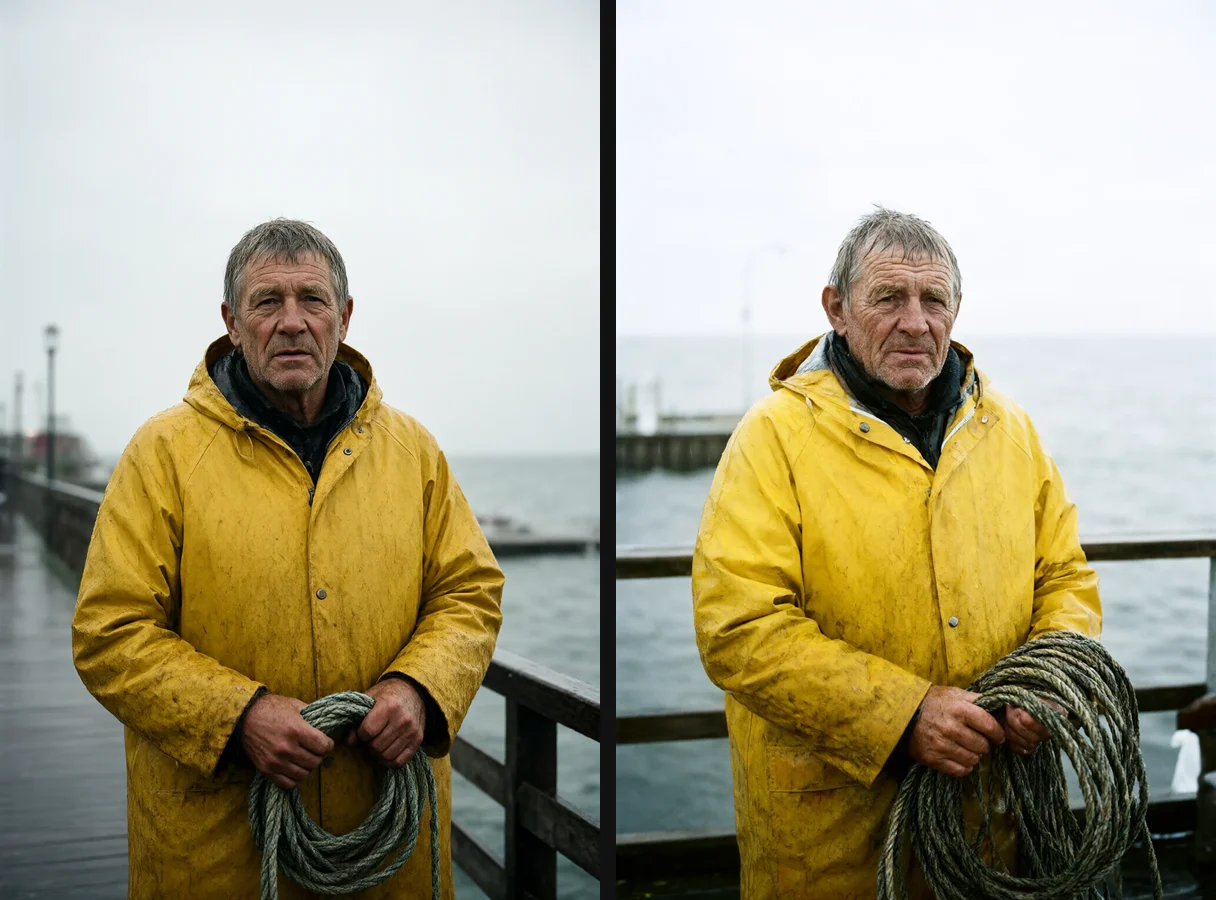
| Fisherman portrait | 1024×1536 | 4.0 s | 20.1 s |
| 1980s shop | 1536×1024 | 4.0 s | 20.1 s |
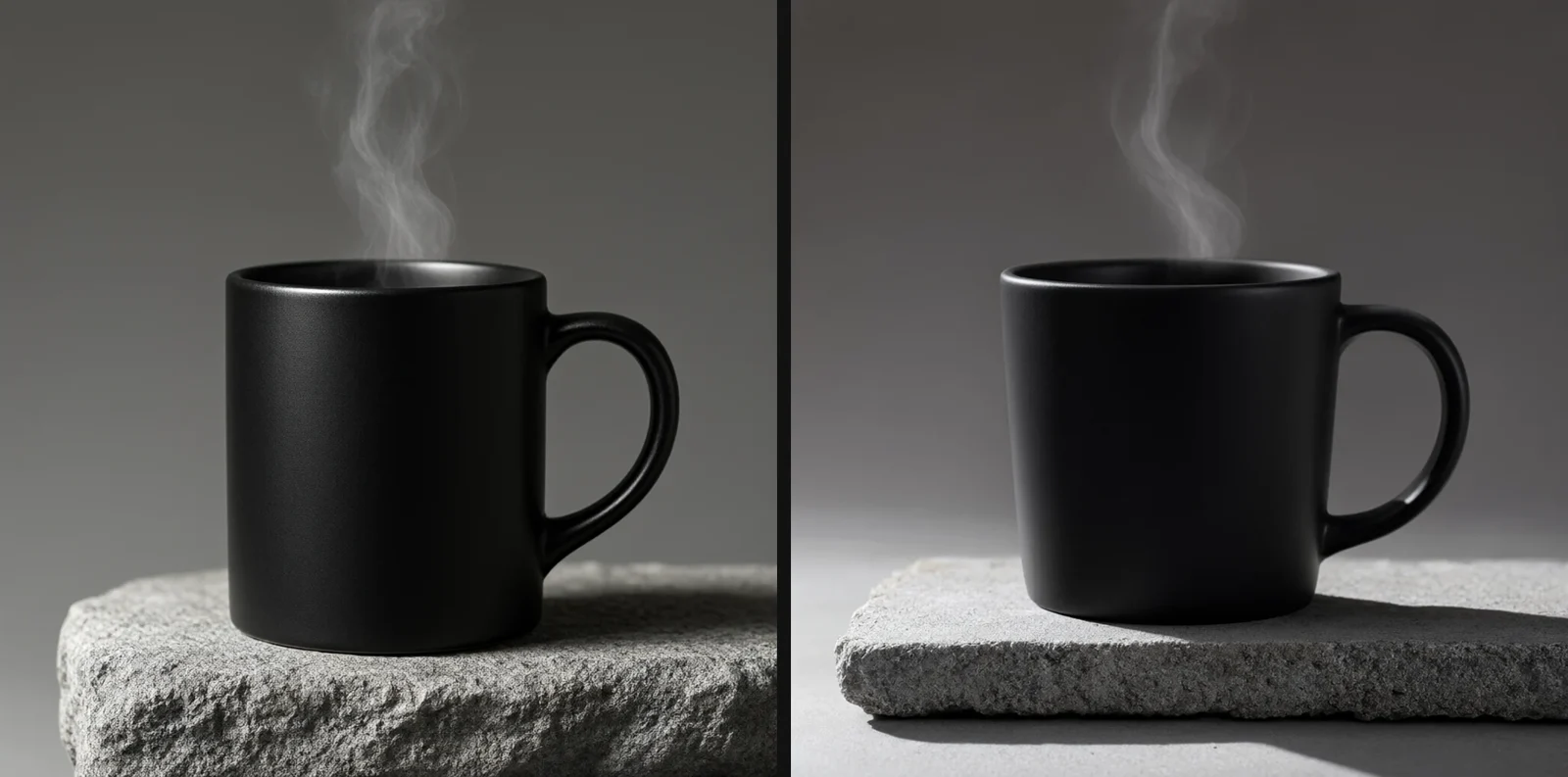
| Product photo | 1024×1024 | 3.0 s | 13.0 s |
* The first image in the series includes loading the model from disk into the GPU’s memory. Turbo’s actual generation time was the same 4 seconds as for subsequent images.
Poster with Polish text
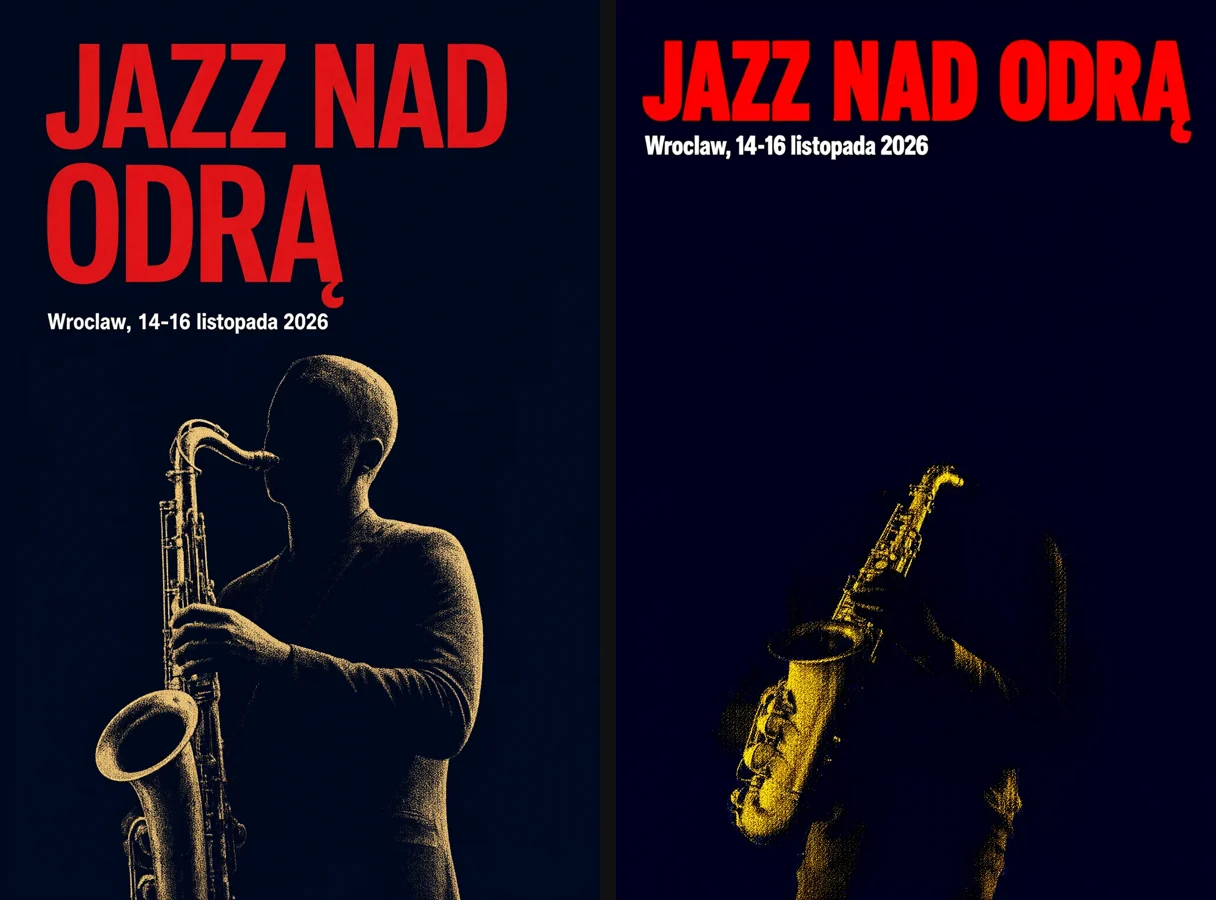
The original Polish prompt asked for a red headline, “JAZZ OVER THE ODER,” and a caption, “Wrocław, November 14-16, 2026.” These are translations of the Polish test text, not prompts tested in English. Both models rendered the Polish word for the Oder River correctly, including its Polish diacritic. Both, however, dropped a Polish character with a stroke from the place name Wrocław, producing “Wroclaw.” Turbo made the headline larger and showed the full silhouette of a saxophonist, while 2.1 left a lot of empty navy space.
1980s shop and price sign
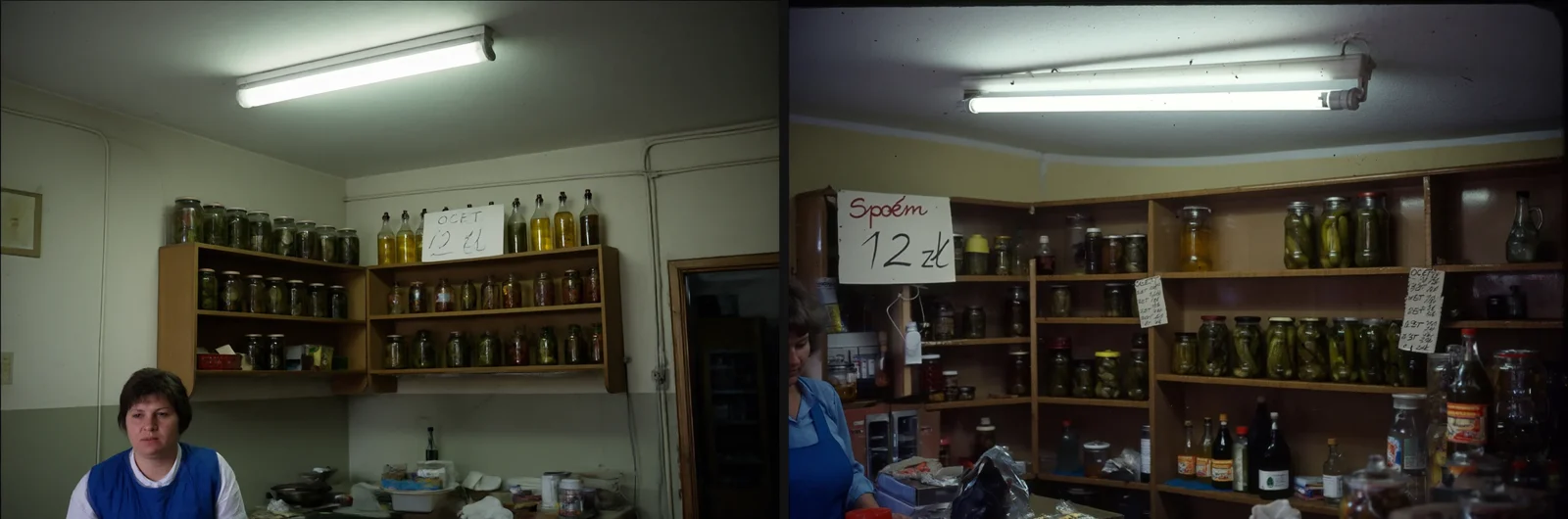
The original Polish test asked for the “Together” cooperative sign (translated from the Polish original) and a card reading “VINEGAR 12” in translation; the original card showed a price of 12 in original Polish currency units. Turbo rendered the card correctly but omitted the shop sign. Standard 2.1 produced [corrupted lettering in the original Polish test] instead of the original Polish cooperative sign, and the card showed “12” without the word “VINEGAR.” Both images captured the feel of a communist-era shop, but standard 2.1 had fuller shelves.
Portrait and product photo
The fisherman on the pier looks like a film still in both versions: wrinkles, a wet jacket and grey light. Turbo has slightly stronger contrast and a more advertising-like look. Without comparing them side by side, I would not be able to tell which image came from 8 steps and which from 25.
How to run Turbo in ComfyUI
- Update ComfyUI to version 0.41 or later. The Turbo template is not available in the older 0.37 version.
- Download
diffusion_models/qwen_image_2.1_turbo_int8_convrot.safetensors(7.26 GB) from the Comfy-Org/Qwen-Image-2.1 repository toComfyUI/models/diffusion_models. - If you do not have standard 2.1, also download the encoder
qwen3vl_8b_int8_convrot.safetensors(9.35 GB, totext_encoders) and VAEqwen_image_2.1_vae_bf16.safetensors(0.68 GB, tovae). - In ComfyUI, open Workflow, then Browse Templates, and choose “Qwen Image 2.1 Turbo.”
- The template has the prompt expander disabled by default. It is a separate Qwen 3.5 9B model (9.5 GB). Without it, write a full scene description in English. A short prompt such as “a cat on a sofa” will produce a correct but dull image.
For a general guide to installing ComfyUI on Windows, see ComfyUI from scratch. For a full list of models that run locally on my system, see the Local AI guide.
License: what can you use it for?
Turbo has the same license as Qwen-Image 2.1: Qwen Research. You can run, test and study the model, but commercial use - such as client covers, advertising or products - requires separate permission from Alibaba. If you need a local model for commercial work, consider Z-Image Turbo, which uses the Apache 2.0 license and generates images in a similar amount of time.
Who is Turbo for?
- Quickly exploring ideas: At 4 seconds per image, you can change a prompt and see the result right away. Standard 2.1 makes you wait five times longer.
- Generating batches: 100 images at 1024×1536 take about 7 minutes instead of 33.
- Keep standard 2.1 for individual, carefully refined shots with dense scenes and lots of background detail.
The easiest option: Hangar
Turbo is listed in Hangar, my free local model manager for Windows, which requires no account or subscription and uses the ComfyUI engine. The int8 setup totals 17.3 GB: the 7.26 GB Turbo model, plus the same Qwen3-VL-8B int8 encoder (9.35 GB) and VAE (0.68 GB) as standard 2.1. It has the same license as 2.1: Qwen Research, with no commercial use. Standard 2.1 has already been tested in Hangar (52 seconds per image including loading); I have not yet tested Turbo’s settings.
- Download the installer (14 MB) from the Hangar page. It is not digitally signed yet, so Windows SmartScreen will show a warning: click “More info,” then “Run anyway.”
- Hangar detects your GPU (Nvidia with CUDA, from 8 GB VRAM; 12 GB or more is recommended) and shows whether the model will fit.
- Find Qwen Image 2.1 Turbo in the catalogue to see the file sizes, license and whether the model is permitted for use in the EU.
- For now, generate images in ComfyUI using the instructions above. Hangar can set up portable ComfyUI from scratch (it took 231 seconds on my system) or connect to an existing ComfyUI installation.
Hangar lists the model, but generation through Hangar is not yet available (as of October 17, 2026). For now, use ComfyUI as described above. Read more about the tool on the Hangar page.
Frequently asked questions
How much VRAM does Qwen-Image 2.1 Turbo need?
Peak usage across the whole card was 16.8-18.6 GB with the int8 version. On 16 GB cards, ComfyUI will move some weights to RAM and run more slowly. The bf16 version (14.2 GB for the model alone) is an option only for cards with 24 GB or more.
Can Turbo render Polish text?
Partly. The text for the Oder River (translated from the Polish original) and the translated test card’s price rendered correctly, but the city name Wrocław appeared with [corrupted lettering in the original Polish test], and the “Together” cooperative sign (translated from the Polish original) disappeared. That is better than standard 2.1 in the same Polish-language test, but I would not use longer Polish text without checking it.
Can Turbo edit photos?
ComfyUI has a separate “Qwen Image 2.1 Turbo Image Edit” template. I have not tested editing; this test measured text-to-image generation only.
Can you run it without ComfyUI?
Yes, through the Diffusers library or interfaces that package the model in a standard program. Kokon, an open-source editor based on stable-diffusion.cpp, has been available since October 14. ComfyUI is still the easiest option if you already have an NVIDIA card and want a ready-made template.
Turbo or Z-Image Turbo?
In my earlier test, Z-Image Turbo generated an image in 4.2 seconds. Qwen Turbo is just as fast and performed better on Polish text and scene meaning. Z-Image has the advantage of the Apache 2.0 license, which allows commercial use.
Google · Your sourcesQuantslant higher in your Google - one clickAdd to preferred sources →Sources
- Qwen/Qwen-Image-2.1-Turbo on Hugging Face (model card and license, checked October 17, 2026)
- Comfy-Org/Qwen-Image-2.1 (ComfyUI files)
- ComfyUI changelog (Turbo added October 13, 2026)
- My own measurements on an RTX 4090, October 17, 2026.