How to Create a Realistic AI Influencer: 5 Models Tested
I generated 125 images with five local models. Specific details about the person and setting mattered more than prompts packed with realism keywords.
👁 138 reads
A typical AI influencer has a flawless face, golden-hour lighting and a neon background - all giveaways that the image is artificial. I tested whether local models could do better. I came up with five very different characters and generated two images of each with five models on my RTX 4090, for 125 images in total. The main takeaway: specific details about the person and setting matter more than a list of keywords such as “realistic, 8k”. FLUX.2 Klein 4B produced the most phone-like photos, while Qwen-Image 2.1 followed prompts most consistently.
At a glance, October 17, 2026
- Five characters: a 34-year-old runner from Gdańsk, a 27-year-old food blogger from Wrocław, a 62-year-old allotment gardener from Łódź, a 29-year-old tech reviewer from Kraków and a 24-year-old mountain guide from Zakopane.
- Five models: FLUX 3 Klein, Qwen-Image 2.1 Turbo, Qwen-Image 2.1, Z-Image Turbo and FLUX.2 Klein 4B. I used the same prompt and seed for each.
- Time on an RTX 4090: 7-20 seconds per 1024×1280 image (series median).
- Only Z-Image Turbo and FLUX.2 Klein 4B (Apache 2.0) can be used commercially. Qwen is licensed for research only.
Series: Local AI on an RTX 4090, tests from October 17, 2026
- Roundup: New local AI models (October 2026)
- How to create a realistic AI influencer: five characters, five models (you are here)
- A talking AI influencer: video with a Polish voice
- FLUX 3 Image Klein: 7.5 GB VRAM, 6 seconds per image
- Qwen-Image 2.1 Turbo: 4 seconds per image
- Kandinsky 6.0: video with sound and Polish speech
- YuE2 and three other models: generating Polish songs locally
AI slop versus an ordinary person: the same character
First, here’s what I mean by “AI slop”. The top row uses the sort of prompt you often see in tutorials: “beautiful hiking influencer girl in the mountains, perfect face, flawless skin, epic view, cinematic lighting, 8k, ultra detailed, masterpiece”. The bottom row uses my detailed description of the same mountain guide from Zakopane. The models, seeds and resolution are the same. The quoted prompts are English-language examples from the test.
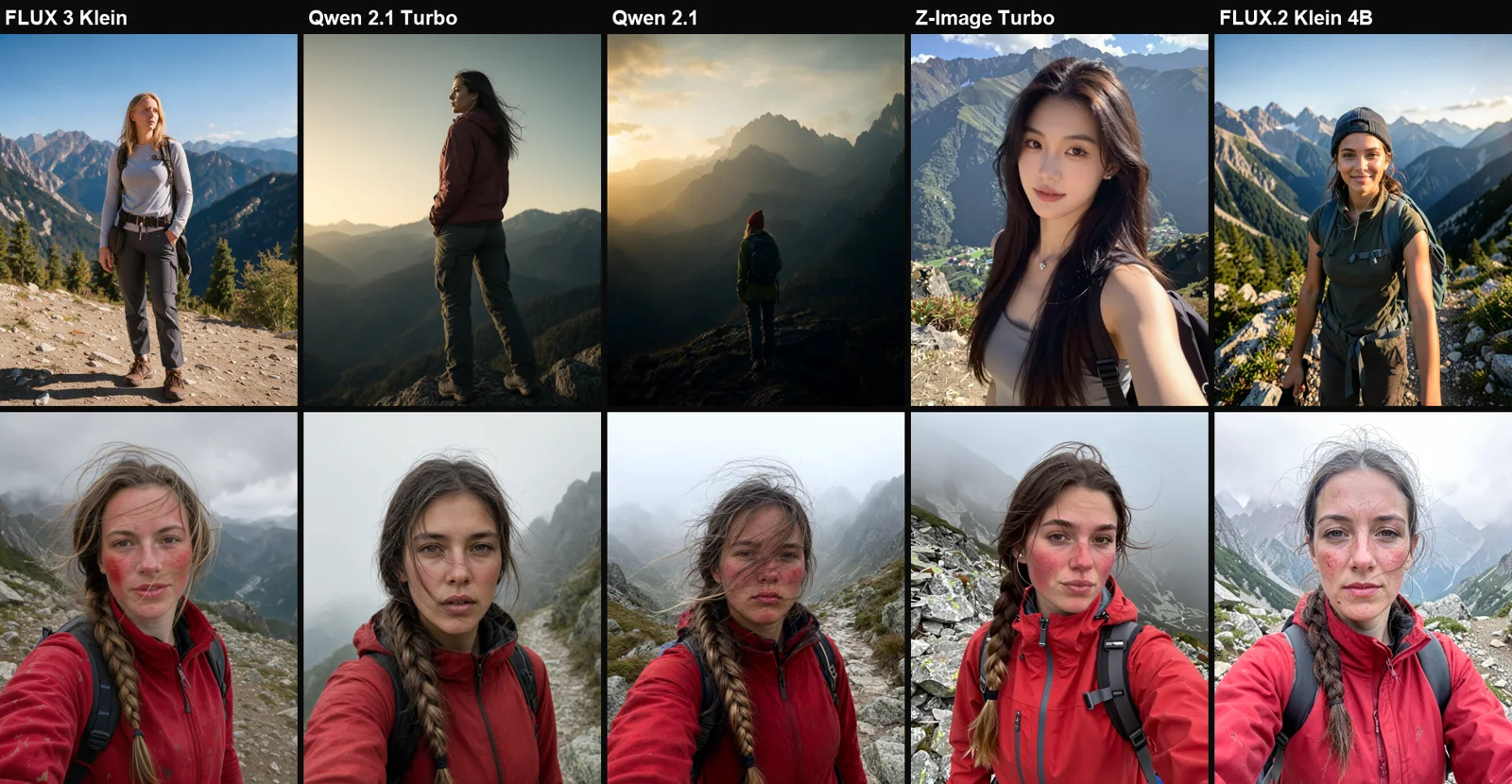
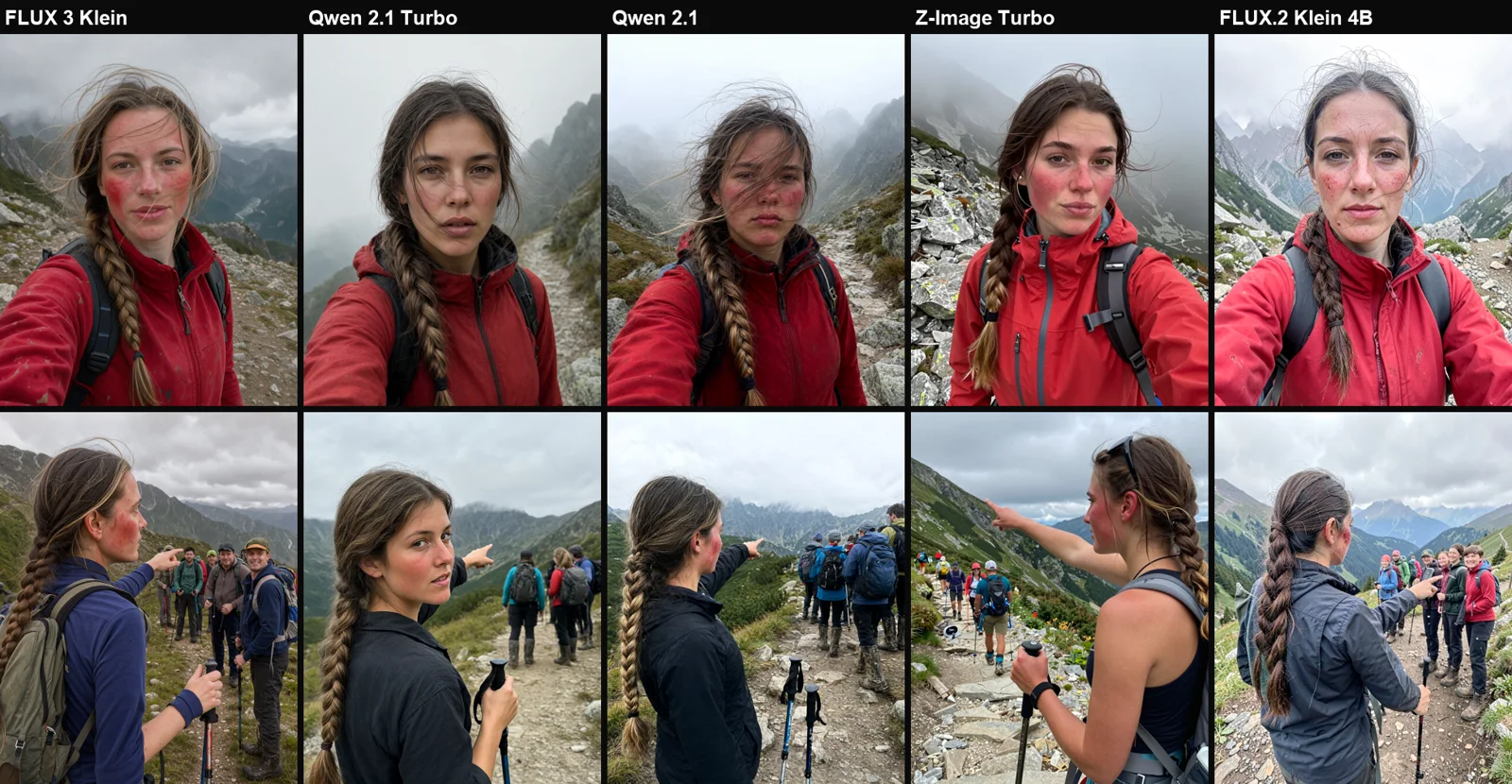
The “beautiful… 8k” prompt produces much the same result in every model: golden light, a cinematic figure against mountain peaks or a catalogue-style face. Z-Image turned “a girl in the mountains” into a model taking a selfie in a crop top. The bottom row looks more like photos someone might actually post after a hike: wind, chapped cheeks and fog.
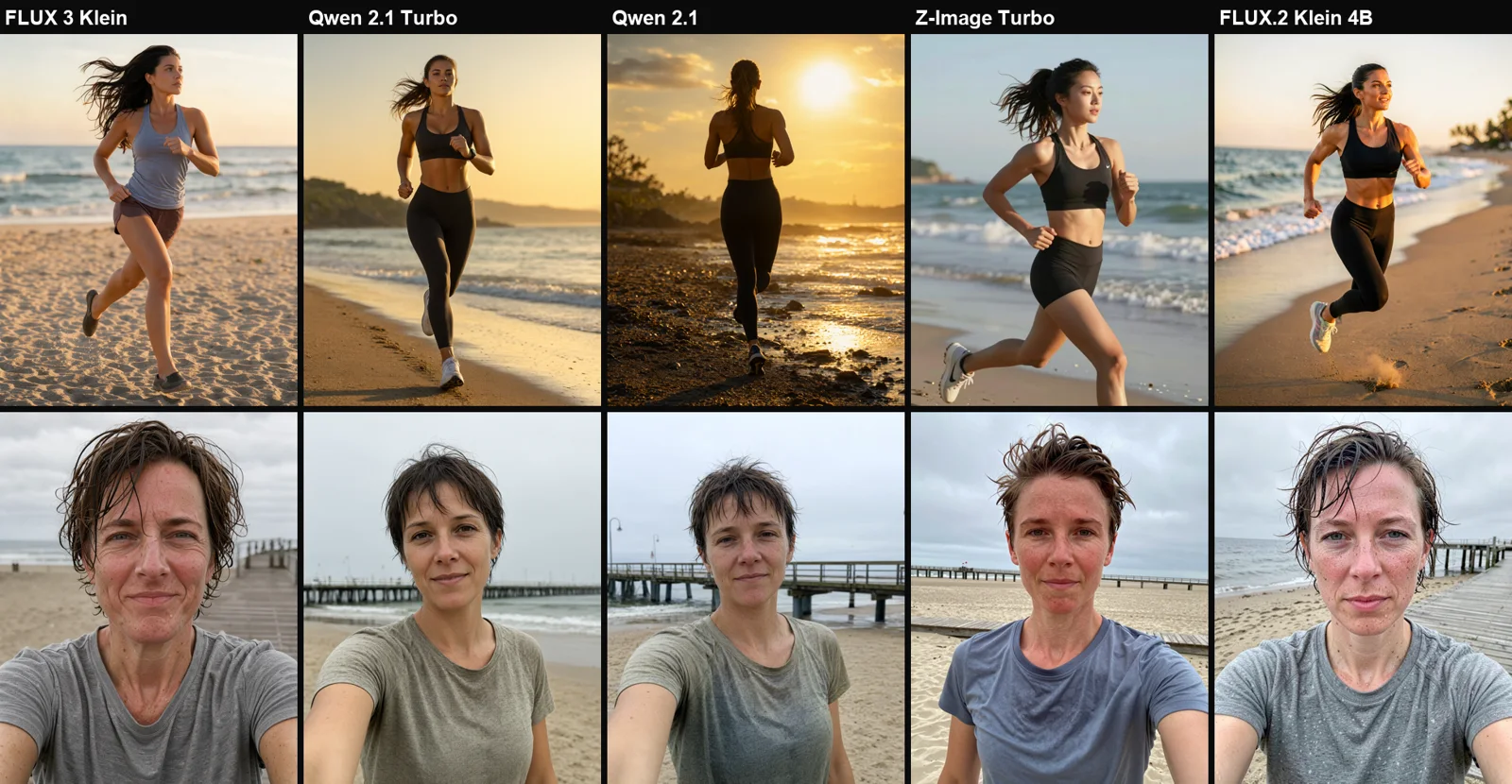
In the “slop” version, Z-Image turned Kasia from Gdańsk into an East Asian woman. Without a description of the person, the model defaults to its own idea of what she should look like.
How to write a prompt without AI slop
After 125 images, I came away with six rules that worked across all five models:
- Use a name, age and occupation instead of “beautiful woman”. “A 34-year-old amateur runner” produces a different face from “a beautiful woman in her twenties”.
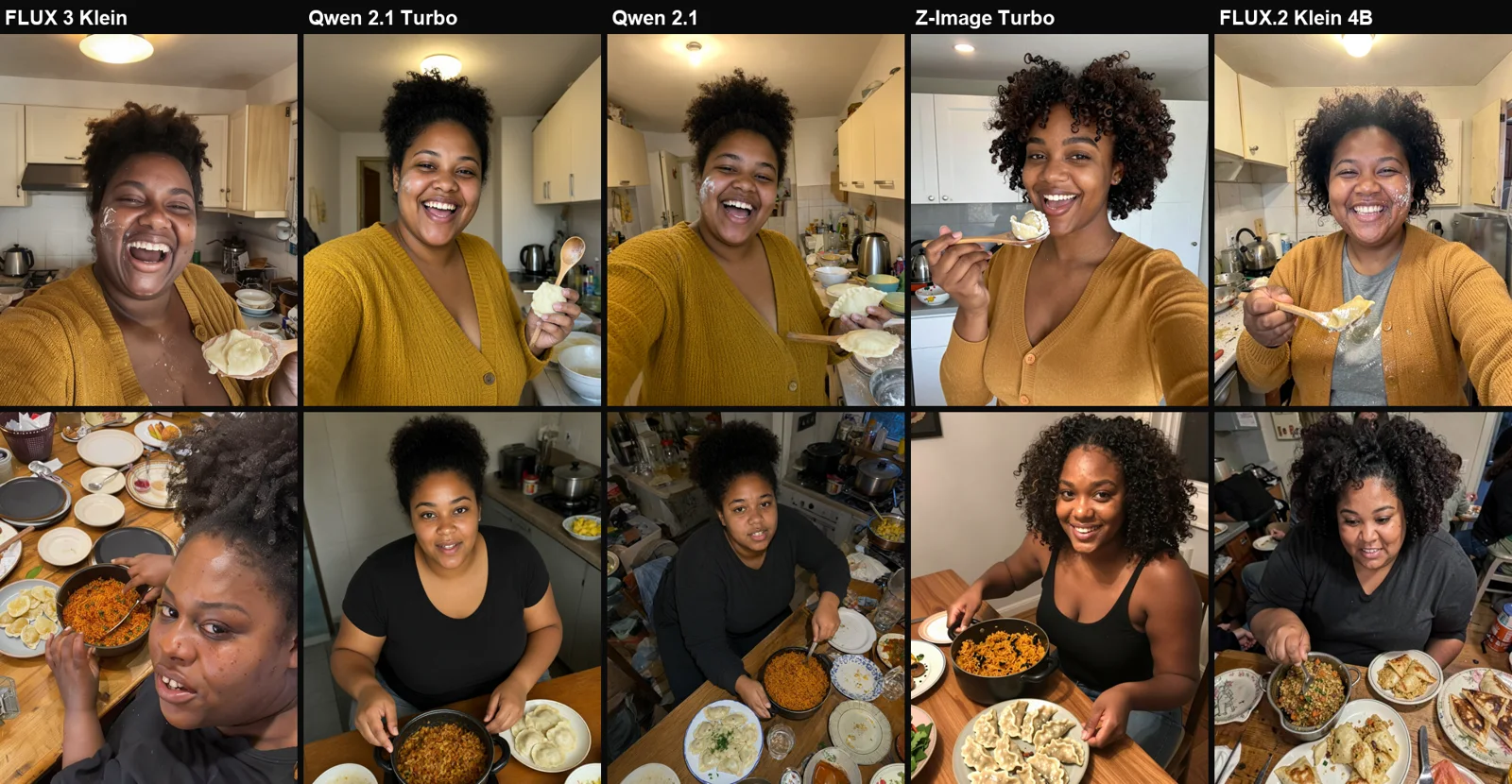
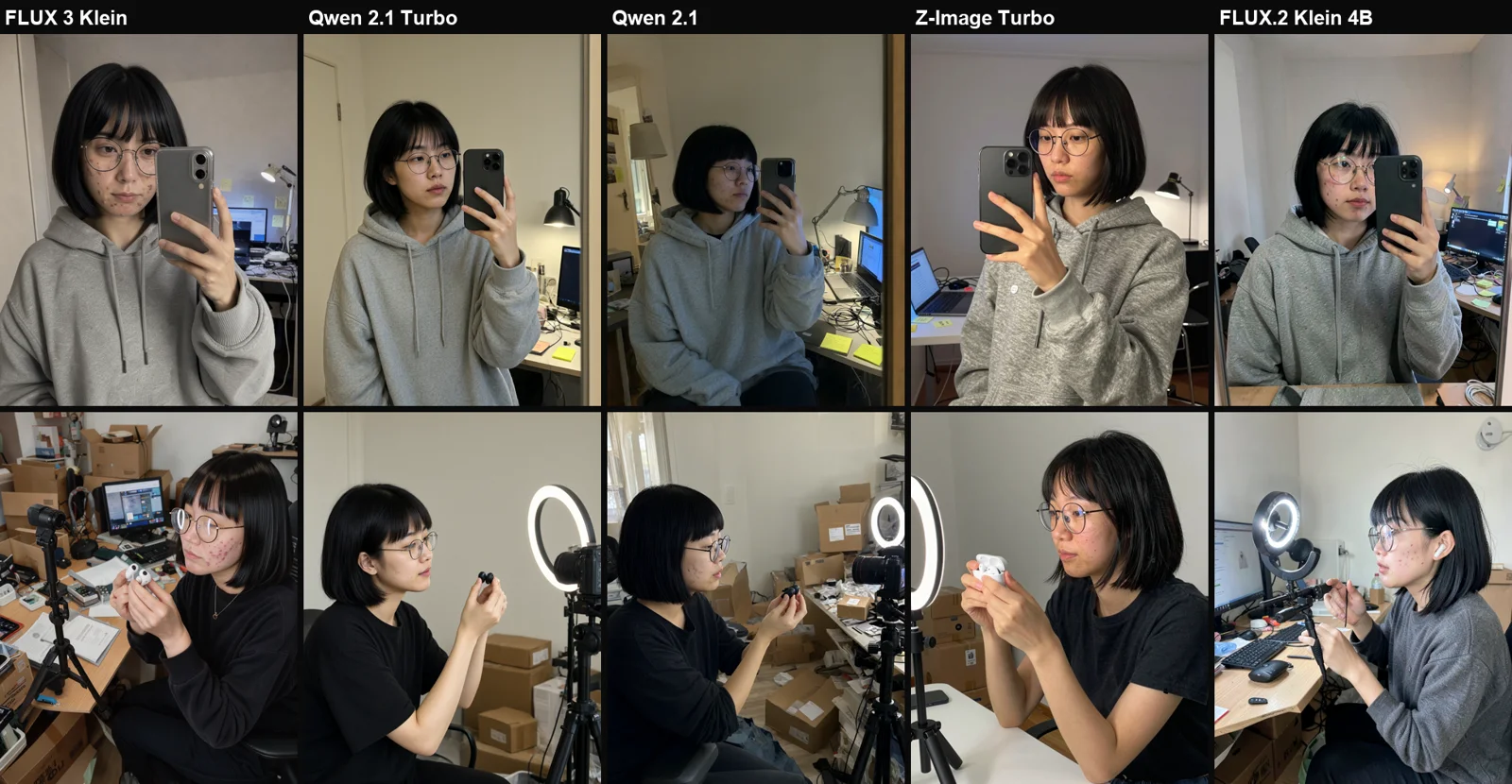
- Add two or three ordinary physical details. Freckles, a slightly crooked nose, a gap between the teeth, acne scars or glasses on a chain. The models really do render them.
- Describe a real place, including the clutter. “A rented kitchen in Wrocław, with dirty dishes and a kettle behind her” works better than “luxury kitchen”. Clutter in the background does more to reduce the artificial look than the word “realistic”.
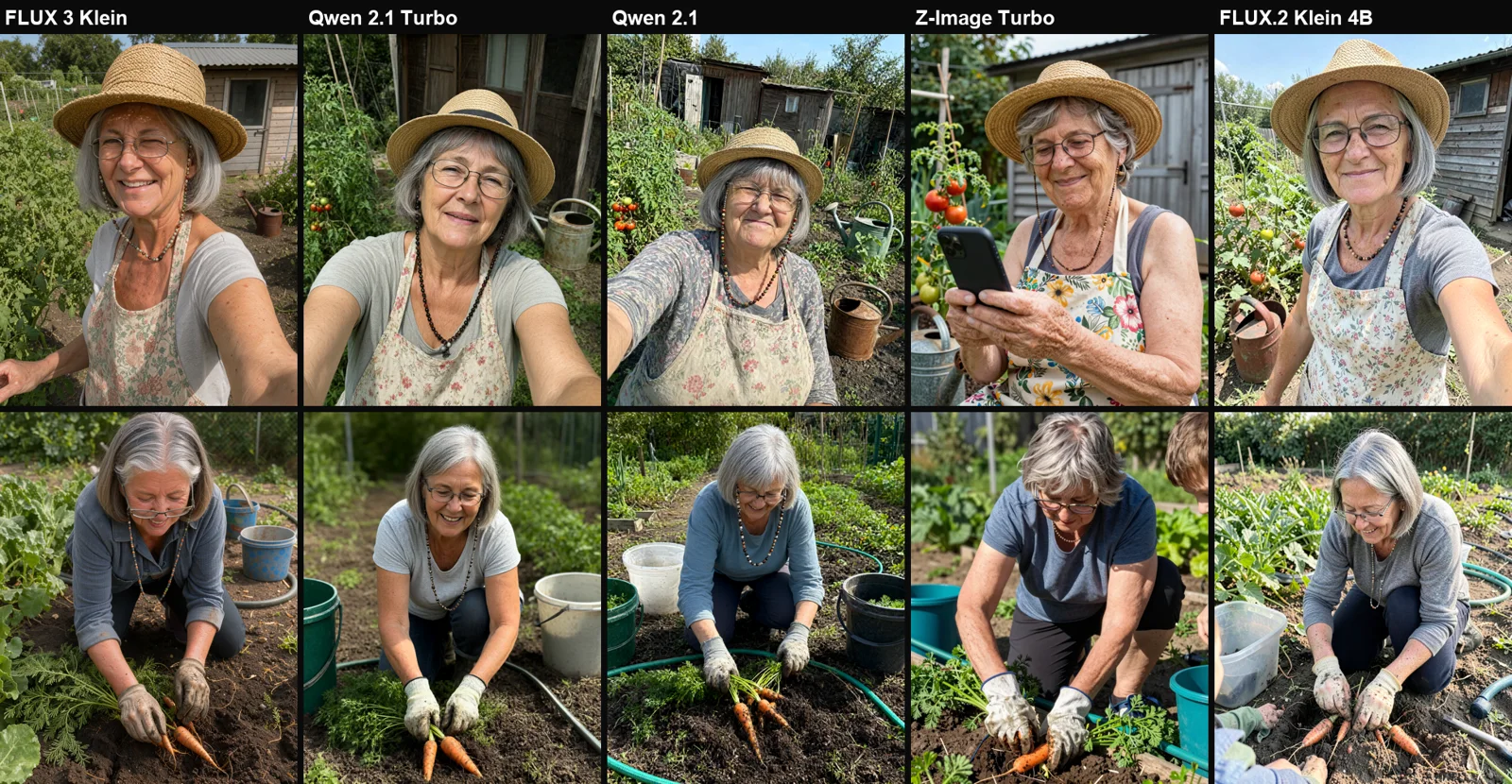
- Say who is taking the photo. “A phone’s front-camera selfie” or “a photo taken by her grandchild from a few metres away” sets the framing and perspective, and adds a little imperfection.
- Use ordinary lighting. Overcast skies, a ceiling light or light from a monitor. Golden hour and “cinematic lighting” are early warning signs of slop.
- Skip “8k”, “masterpiece”, “perfect” and “flawless”. Those words push models towards advertising-style images and smooth skin.
In the third round, I also added a paragraph about “natural, understated skin texture”, “an ordinary person, not a model” and “slight phone HDR”. It made less difference than I expected. It changed almost nothing in Qwen, while FLUX.2 Klein included a few fewer stray faces in the frame. The description of the person and the setting does about 90% of the work.
A ready-to-use prompt template
Here’s the full English-language prompt for one character. Change the name, age, features, place and situation. This is the template used in the test, not a newly tested prompt:
I wrote the prompts in English because all five models understood them best. I kept Polish place names such as Brzezno, Morskie Oko and Lodz because the models recognise them.
Gallery: five characters across five models
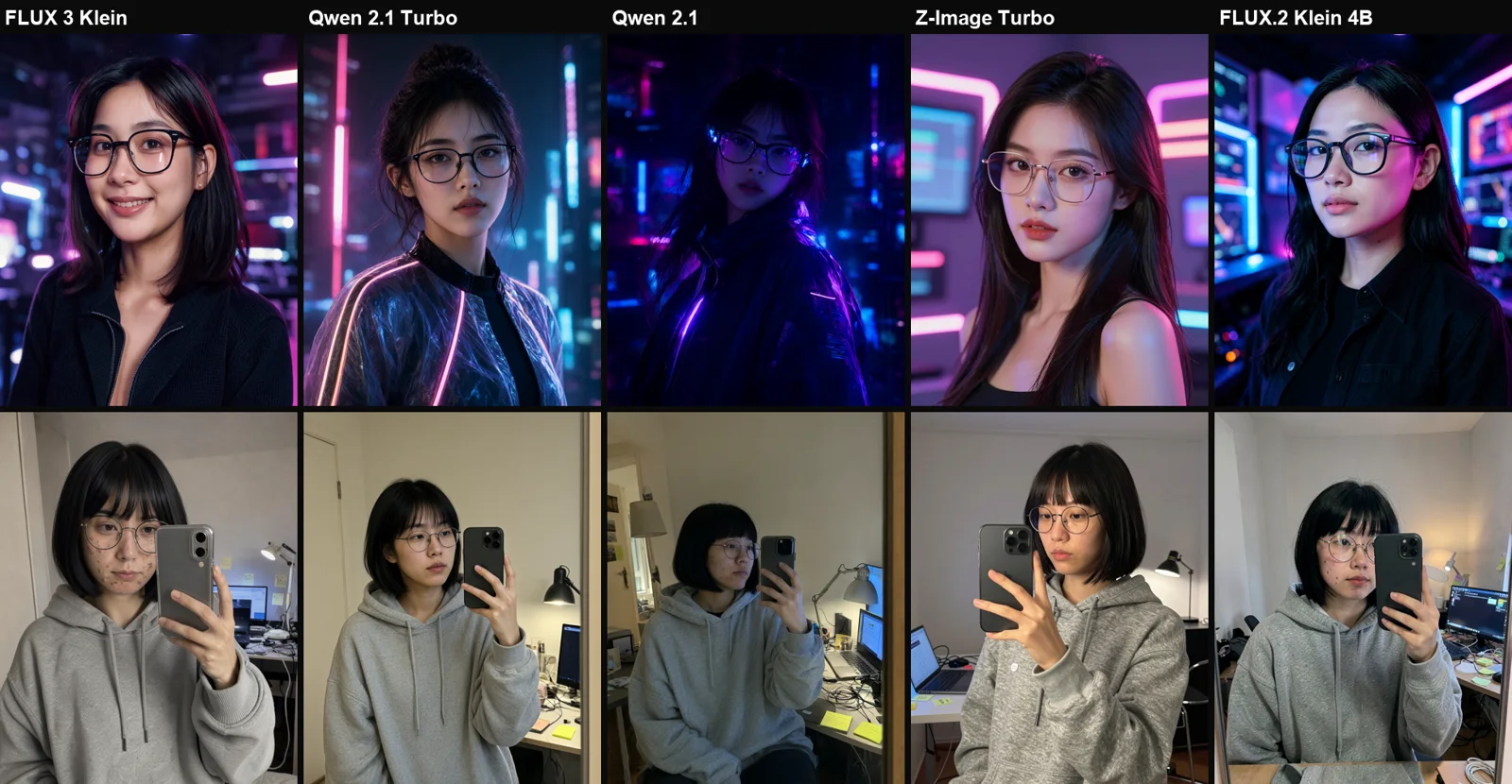
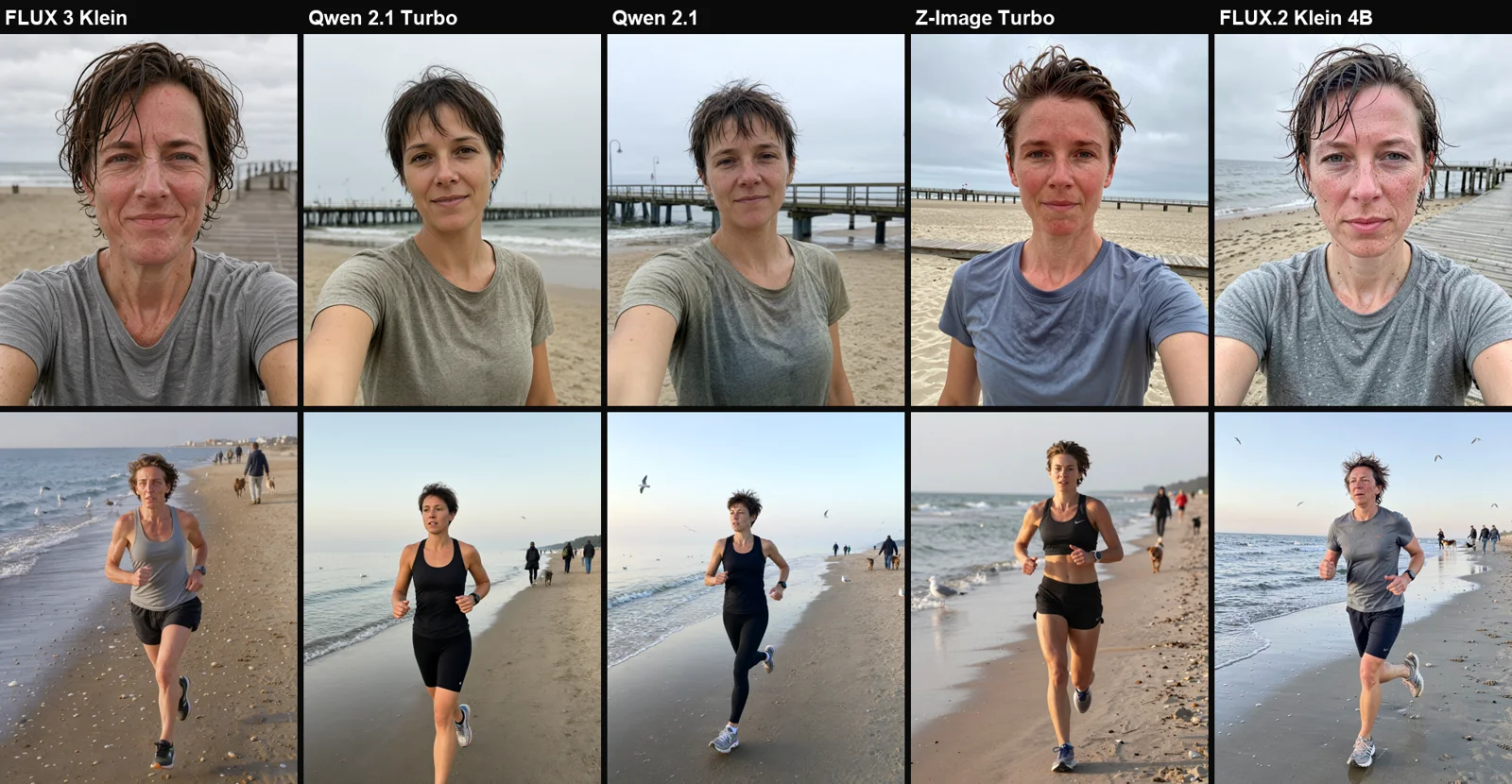
In each gallery, the top row is a selfie and the bottom row is an “in action” photo taken by someone else. The columns show the models in the same order as the table below.
Kasia, 34, runs on the beach in Gdańsk
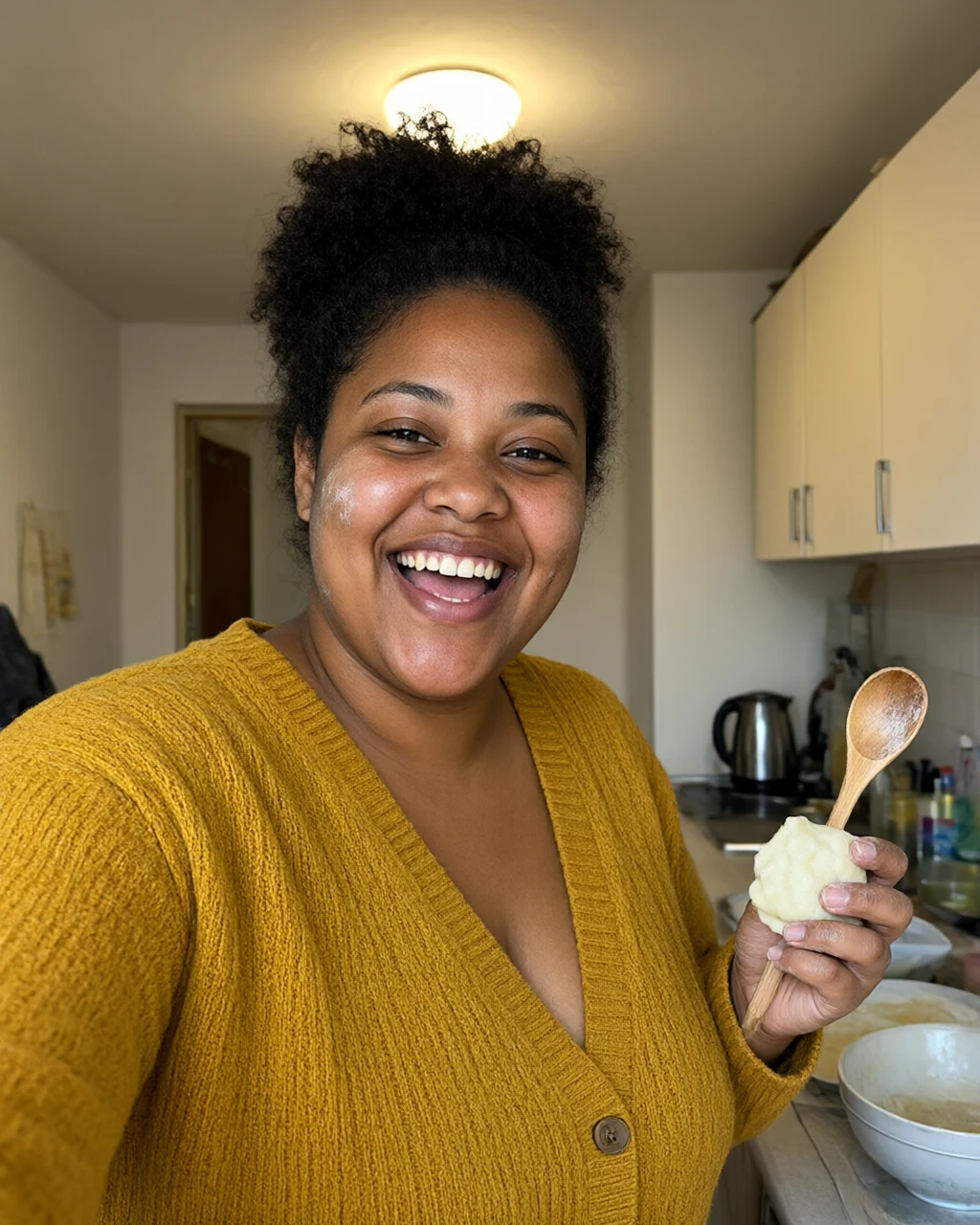
Amara, 27, cooks in Wrocław
Halina, 62, tends her allotment in Łódź
Mei, 29, reviews tech in Kraków
Zofia, 24, guides hikes in the Tatras
The best individual images
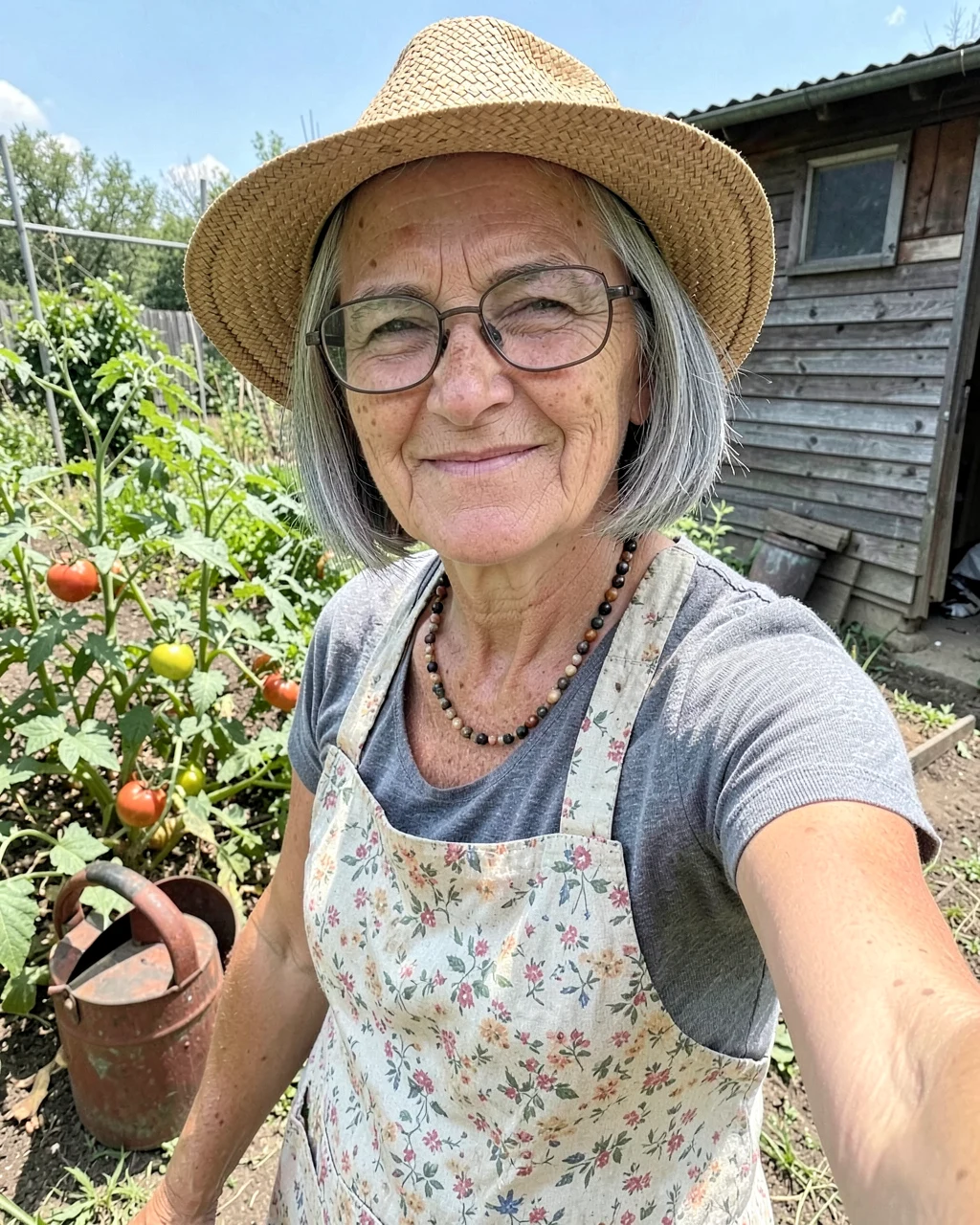
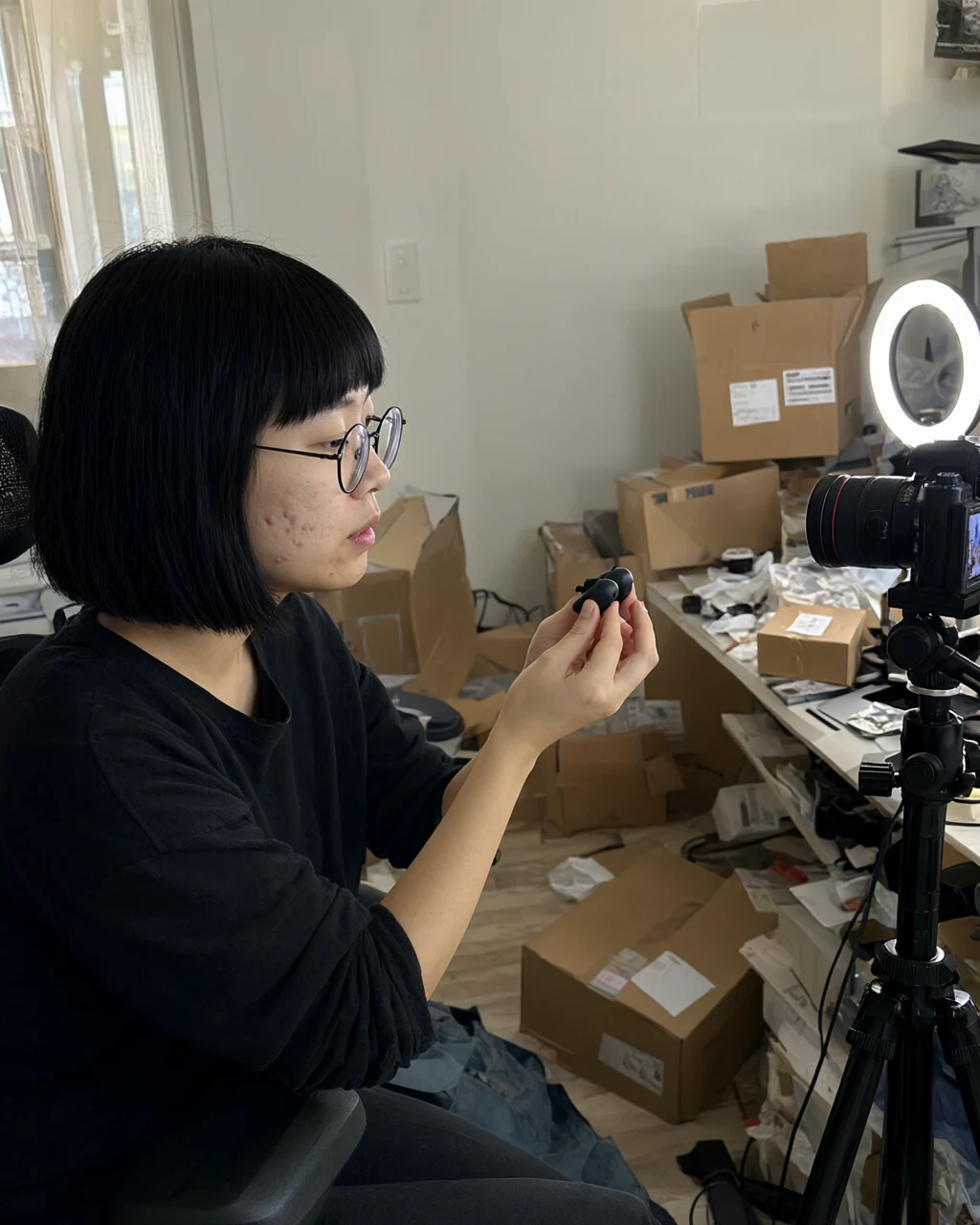
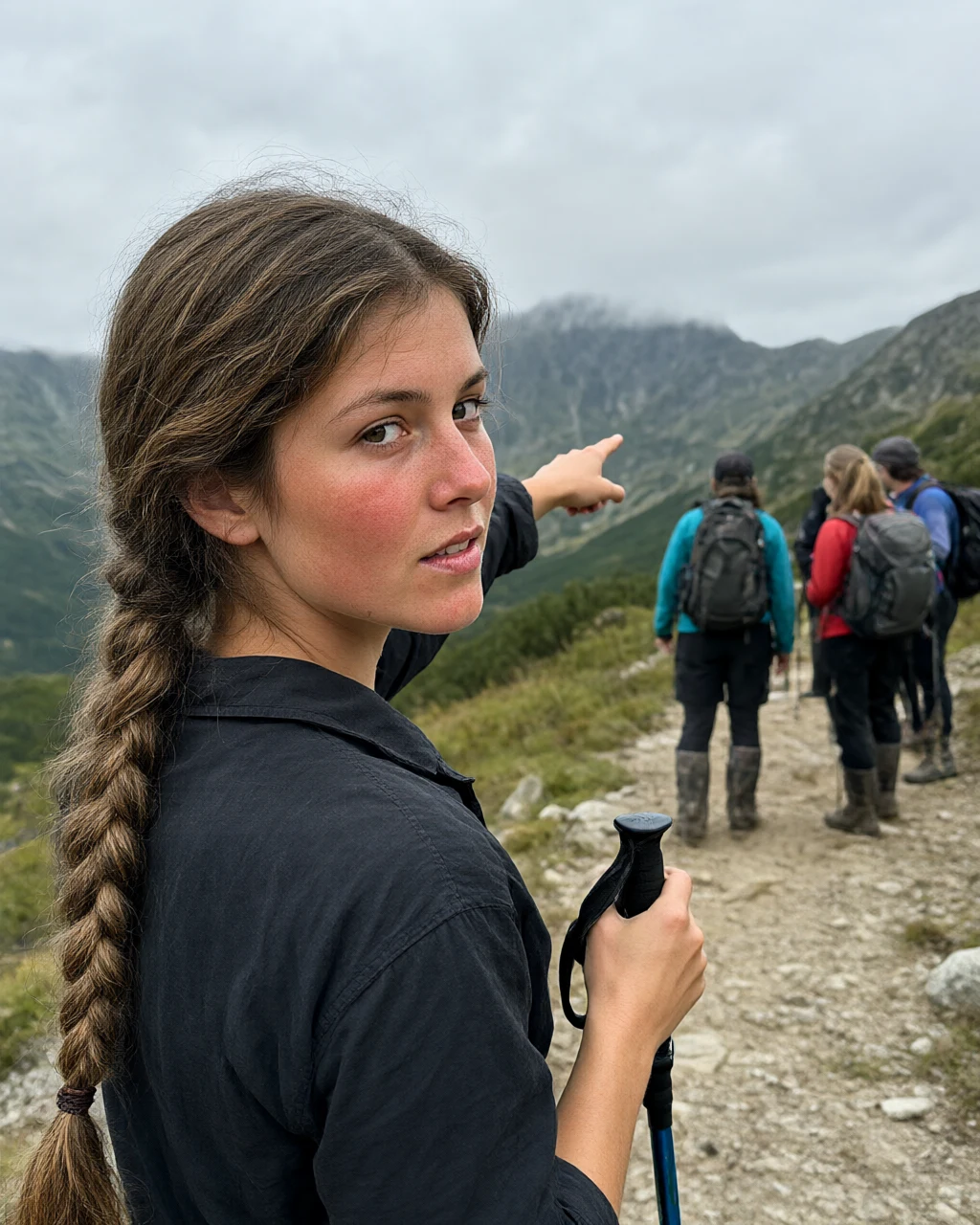
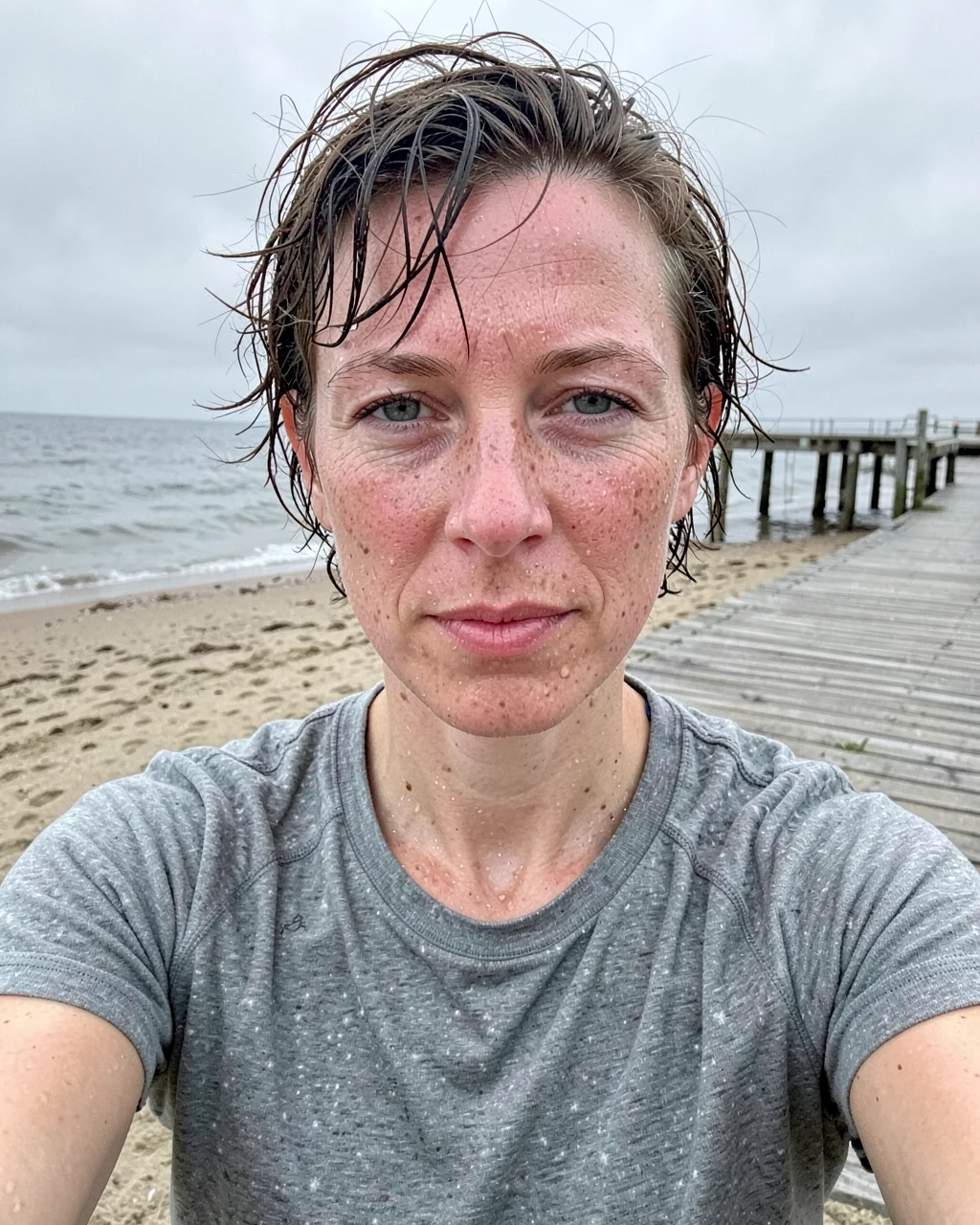
Which model should you use for an AI influencer?
| Model | Strengths | Weaknesses | Licence |
|---|---|---|---|
| FLUX.2 Klein 4B | The most phone-like photos, convincing sweat and redness, 8 seconds | Adds unfamiliar faces at the edges of the frame | Apache 2.0 |
| Qwen-Image 2.1 | Follows the description most consistently, handles cluttered backgrounds, correct anatomy | Faces come out slightly “prettier” than described, 20 seconds | Research only |
| Qwen-Image 2.1 Turbo | Almost the same as 2.1, in half the time | Same as above | Research only |
| FLUX 3 Klein | Strongest skin texture, lowest VRAM use | Overdoes the texture; the only serious anatomy error | FLUX Kommunity |
| Z-Image Turbo | Attractive lighting and sharp details | Tends to make people look like models and exposes their shoulders despite the prompt | Apache 2.0 |
My recommendation: if your influencer is meant to earn money, choose FLUX.2 Klein 4B. It has an Apache 2.0 licence and produces the most natural-looking photos. For tests and drafts, try Qwen-Image 2.1, which follows the description most faithfully.
Generation time and memory on an RTX 4090
| Model | Median per 1024×1280 image | Fastest | Peak VRAM |
|---|---|---|---|
| FLUX 3 Klein | 7.4 seconds | 7.0 seconds | 14.4 GB |
| FLUX.2 Klein 4B | 8.3 seconds | 6.0 seconds | 19.7 GB |
| Qwen-Image 2.1 Turbo | 11.0 seconds | 8.0 seconds | 18.7 GB |
| Z-Image Turbo | 18.0 seconds | 9.0 seconds | 23.6 GB |
| Qwen-Image 2.1 | 20.0 seconds | 18.0 seconds | 17.9 GB |
These are timings from the first round, with 10 images per model, including reloading the text encoder for every prompt (ComfyUI launched with --disable-smart-memory). Models run faster when you repeat a single prompt many times. In a separate test, Qwen Turbo took 3-4 seconds per image.
Keeping the same face across multiple images
Each image in this test was a separate generation, so Kasia has a different face in images made by different models. To run a profile for one character, you’ll want the same face across 20-30 images. Here’s how:
- Generate one good reference portrait.
- Use it as a reference image with an editing model (FLUX 3 Klein accepts up to 10 references, and Qwen-Image 2.1 also supports references), and describe only the new place and situation.
- For a longer-running profile, train a LoRA on your 20-30 best images. FLUX.2 Klein Base and FLUX 3 Klein Base are designed for this.
I covered reference-based editing with FLUX 3 Klein in my FLUX 3 Image Klein local test. You can read my test of the faster model in the same Qwen family here: Qwen-Image 2.1 Turbo.
Disclosure and transparency
- An invented character is not the same as impersonating a real person. Don’t generate images of celebrities or people you know without their consent.
- Article 50 of the AI Act requires disclosure for AI-generated content that could mislead people. Instagram has a label for AI-generated content.
- An AI influencer profile that pretends to be a real person while selling products can easily mislead consumers. Clearly labelling the profile description addresses the issue.
How to reproduce the test on your own machine
- Install ComfyUI 0.41 using the ComfyUI from scratch guide.
- Download FLUX.2 Klein 4B (Apache 2.0) or another model in the table. The model file list is in the new local AI models roundup.
- Set the image format to 4:5 (1024×1280), the format used for Instagram posts.
- Paste in the prompt template and change the character details. Generate 3-4 versions per seed and pick the best one: even the best model gets something wrong in one frame out of ten.
Frequently asked questions
How can you create an AI influencer for free?
Run the models locally on your own graphics card. Every model in the test is free to download, and FLUX.2 Klein 4B and Z-Image Turbo can be used commercially. You’ll need an NVIDIA card with 12-24 GB of VRAM and ComfyUI.
Why does my AI influencer look fake?
Common culprits include “beautiful”, “perfect skin”, “8k”, “cinematic” and golden-hour lighting. Replace them with an age, ordinary physical details, a real place with some clutter and information about who is taking the photo.
Which model makes the most realistic images of people?
In my test, FLUX.2 Klein 4B produced the most natural-looking phone photos, while Qwen-Image 2.1 followed the description most faithfully. FLUX 3 Klein produced the strongest skin texture, though it sometimes overdid it.
Can you make money with an AI influencer made using Qwen?
Not without Alibaba’s permission. Qwen-Image 2.1 and Turbo use the Qwen Research licence, which is for research and testing only.
How much electricity does it use?
With 7-20 seconds of GPU time per image, the electricity cost per image is a fraction of a cent. I’ve worked out the exact cost for a local GPU in my article Local model or API?.
Google · Your sourcesQuantslant higher in your Google - one clickAdd to preferred sources →Sources
- FLUX.2 Klein 4B on Hugging Face (Apache 2.0 licence)
- Z-Image Turbo on Hugging Face (Apache 2.0 licence)
- Qwen-Image 2.1 Turbo on Hugging Face (Qwen Research licence)
- FLUX 3 Image Klein on Hugging Face
- My RTX 4090 test, October 17, 2026: 125 images across three rounds.
More on this from QUANTSLANT
 magazine·Maka Kids: What Does an AI-Slop-Free Streaming Service Cost?Maka offers ad-free kids’ streaming without autoplay or endless scrolling. Here’s what its $15 monthly plan buys - and what parents can do instead.