Local AI Influencer: 5 Characters on 5 Image Models
A typical AI influencer looks like smooth plastic under cinematic lighting. I tested 5 distinct characters across 5 local open-source image models on my RTX 4090 to see if prompt structure alone can eliminate AI slop.
👁 115 reads
A typical AI influencer features unnaturally smooth skin, golden-hour rim light, and a neon haze, immediately signaling artificial plastic slop. Building a local AI influencer on your own hardware without these flaws comes down to specific human descriptions, imperfect framing, and choosing the right weights. I generated 125 images across 5 distinct characters on 5 local image models using my RTX 4090, proving that everyday mess and granular prompts beat generic quality buzzwords every time.
As of 17 October 2026
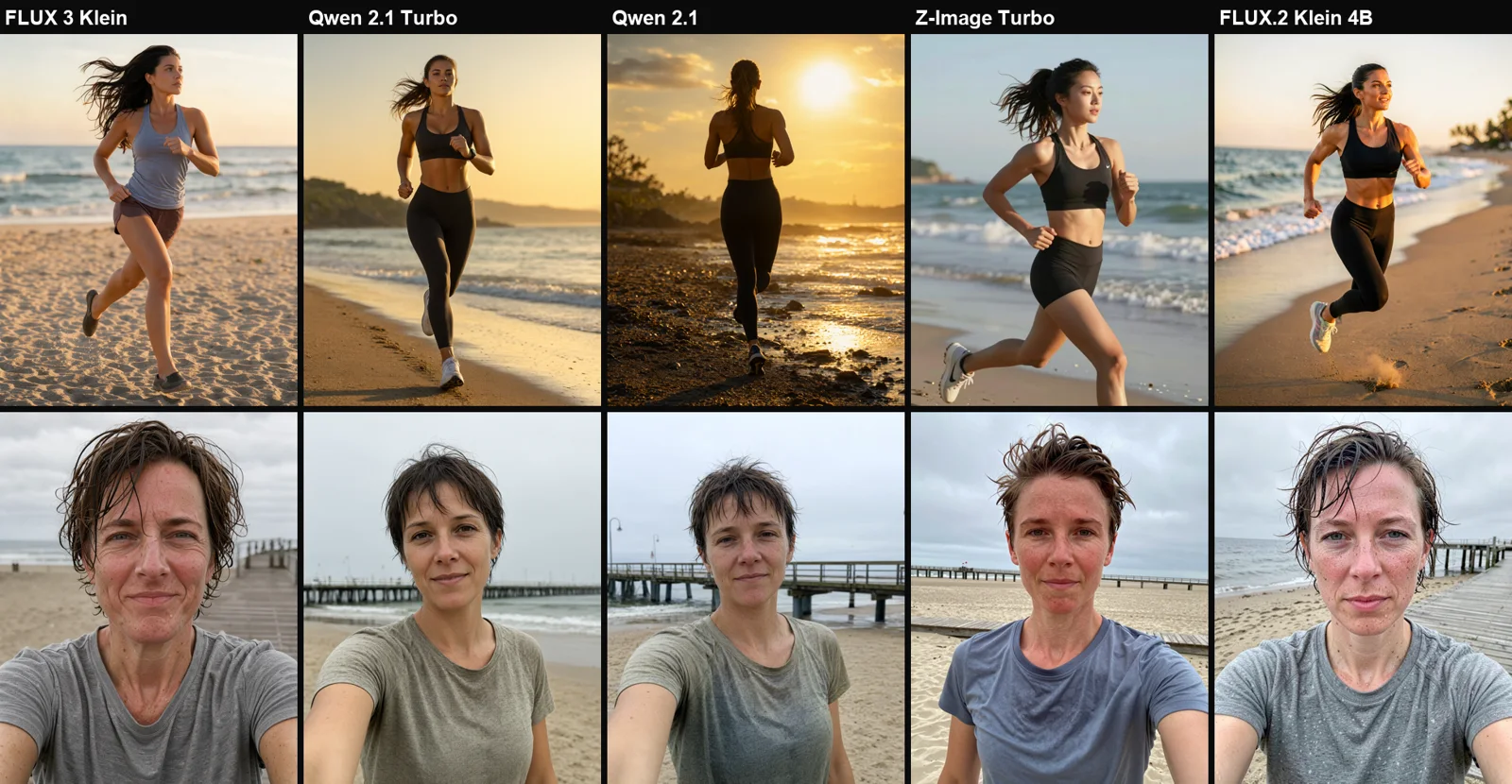
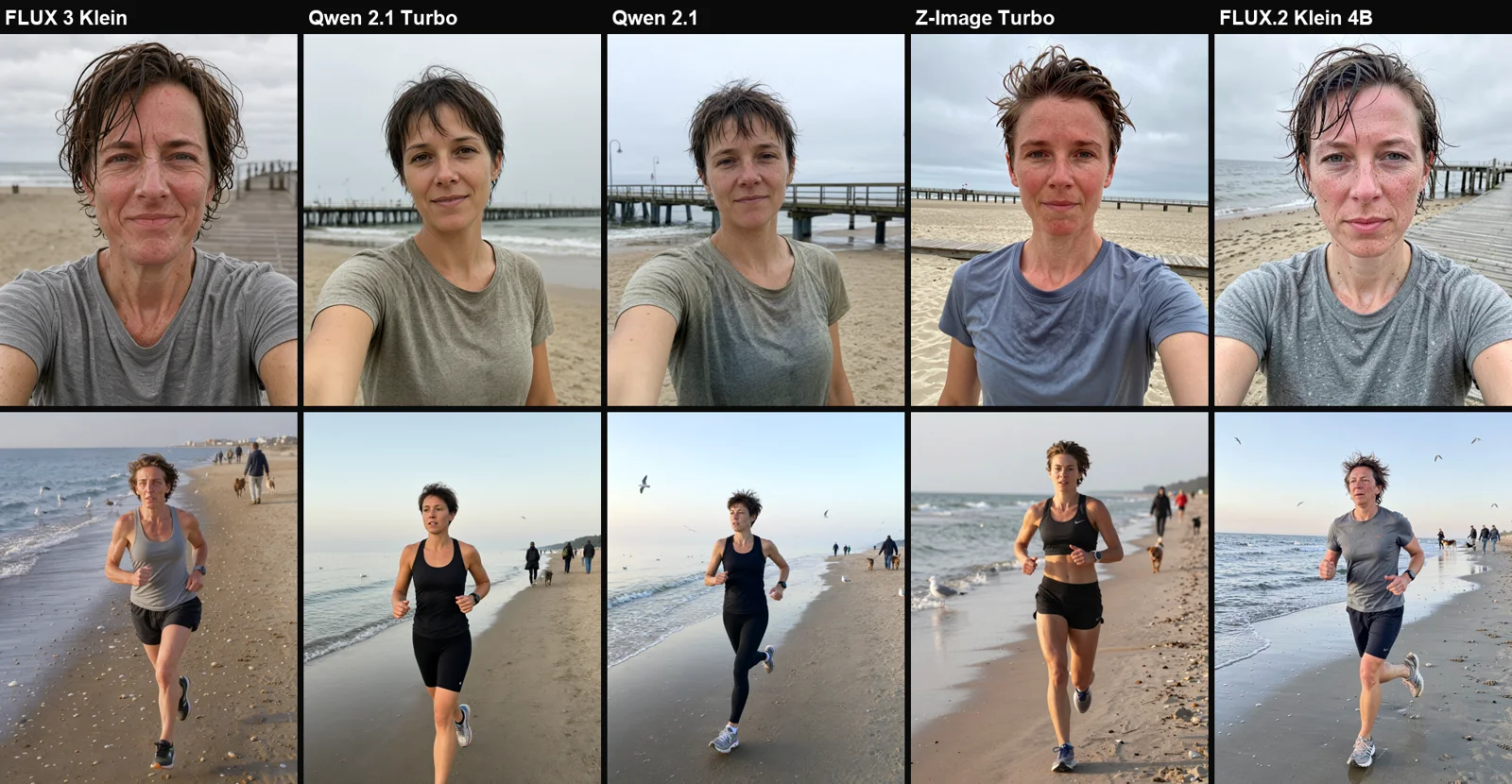
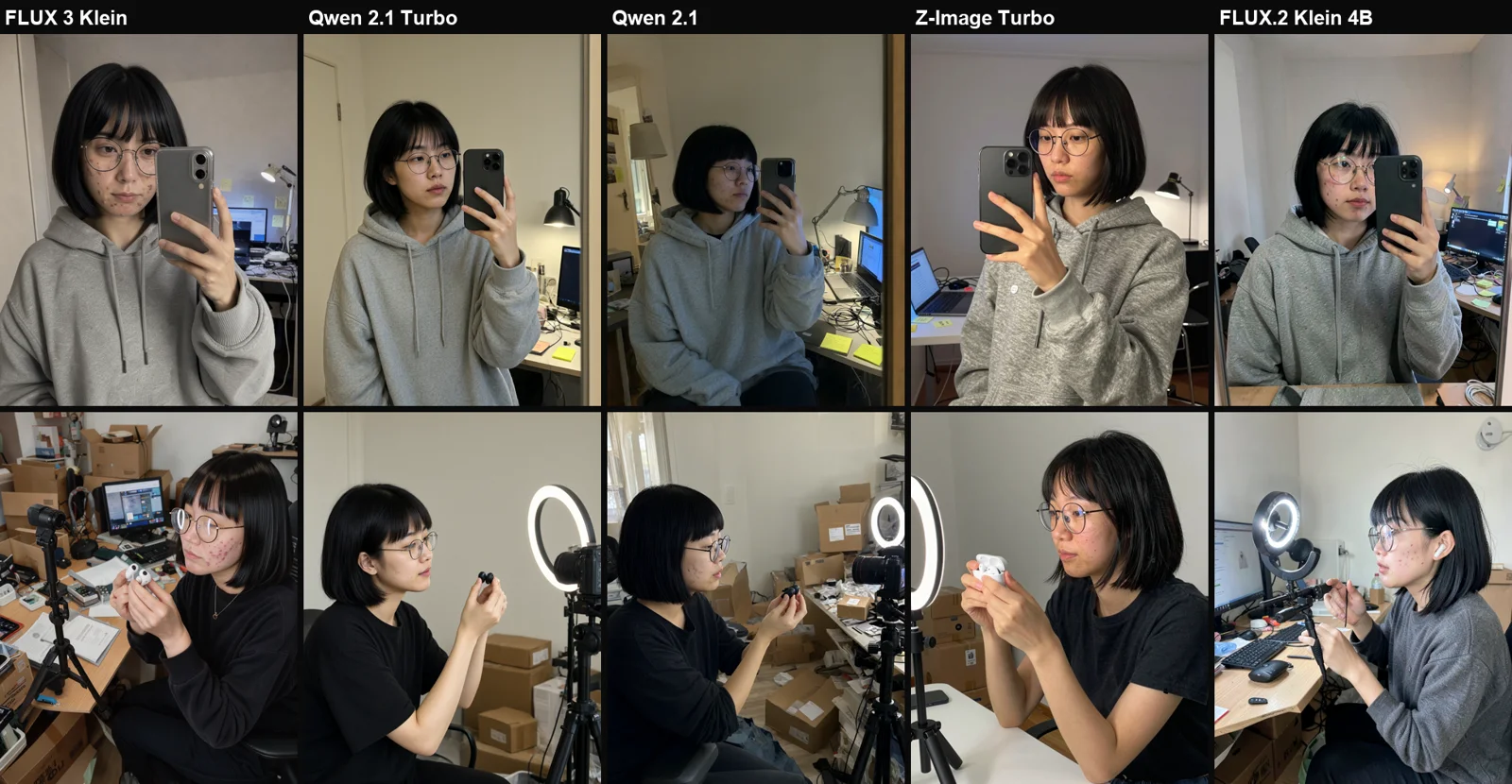
- 5 fictional characters tested: a runner in Gdansk (age 34), a food blogger in Wroclaw (27), an allotment gardener in Lodz (62), a tech reviewer in Krakow (29), and a mountain guide in Zakopane (24).
- 5 open models benchmarked: FLUX 3 Klein, Qwen-Image 2.1 Turbo, Qwen-Image 2.1, Z-Image Turbo, and FLUX.2 Klein 4B using matching seeds and prompts.
- Generation time on RTX 4090: 7-20 seconds median per 1024×1280 image.
- Commercial rights: only Z-Image Turbo and FLUX.2 Klein 4B carry the permissive Apache 2.0 license. The Qwen models are restricted to research.
Slop vs a Real Person: Testing the Same Character
To understand where AI slop comes from, look at what traditional tutorials recommend. The generic prompt approach relies on filler terms: “beautiful hiking influencer girl in the mountains, perfect face, flawless skin, epic view, cinematic lighting, 8k, ultra detailed, masterpiece”. The realistic approach gives the model specific, grounded human traits for the Zakopane mountain guide under identical seeds, models, and 1024×1280 resolution.
The generic prompt produced identical corporate brochure aesthetics across all architectures: golden backlight, studio makeup on a mountain ridge, and catalog poses. Z-Image Turbo turned an outdoor guide prompt into a fitness model posing in a crop top. The grounded prompt produced believable trail photos showing windblown hair, red cheeks, and thick mountain fog. Furthermore, without a specific identity in the prompt, Z-Image Turbo turned Kasia from Gdansk into an East Asian influencer, falling back on default internal model biases.
Writing Prompts for a Realistic AI Influencer
Across 125 generations, six specific prompting rules consistently prevented the synthetic sheen across all five engines:
- Name, age, and occupation over generic adjectives: A “34-year-old amateur runner” produces a completely different bone structure and expression than a “beautiful woman in her 20s”.
- Two to three distinct physical flaws: Freckles, a slightly crooked nose, a tooth gap, mild acne scarring, or reading glasses on a beaded chain give the diffusion model concrete textures to render.
- A tangible setting with realistic clutter: Specifying “a rented kitchen in Wroclaw with dirty dishes and an electric kettle behind her” immediately grounds the composition compared to “luxury modern kitchen”.
- Who holds the camera: Framing the shot as a “smartphone front-camera selfie” or “photo taken by her grandson from several meters away” forces realistic focal lengths and handheld angles.
- Flat, everyday lighting: Overcast daylight, fluorescent ceiling tubes, or monitor glow prevent the model from applying dramatic high-contrast studio lights.
- Ban quality slop terms: Never include “8k”, “masterpiece”, “photorealistic”, “perfect”, or “flawless”. These tokens push models toward smoothed advertising renders.
In testing, I added a negative paragraph targeting exaggerated skin texture, asking for “unretouched smartphone photo, natural skin texture with pores, no beauty filter, no makeup glow, ordinary real person, slight phone HDR and JPEG softness”. On Qwen models, this modifier changed almost nothing. On FLUX.2 Klein 4B, it helped eliminate stray background faces. The foundational description of person and place accounts for 90% of the visual quality.
The Grounded Character Prompt Template
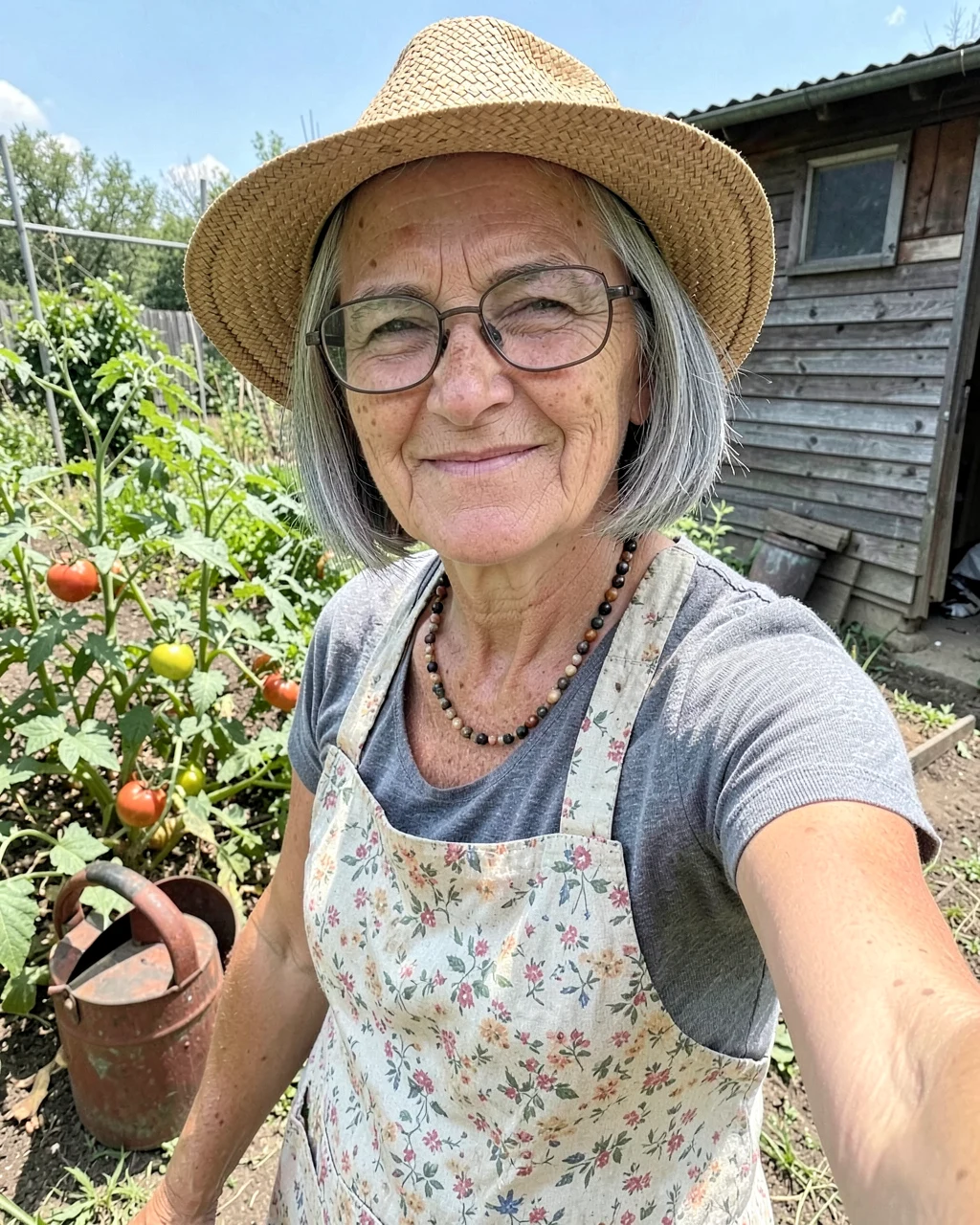
This is the full prompt template used for the allotment gardener character. You can adapt the identity, age, distinctive features, setting, and camera angle:
Photo of Halina, a 62-year-old Polish woman with a grey chin-length bob, reading glasses on a beaded chain, laugh lines and age spots on her hands. She takes a slightly awkward selfie from a low angle on her allotment garden in Łódź, squinting in the sun, wearing a straw hat and a faded floral apron, tomato plants, a rusty watering can and a wooden shed behind her, phone front camera. Unretouched smartphone photo: natural, not exaggerated skin texture with pores and small imperfections, no beauty filter, no makeup glow. She looks like an ordinary real person, not a model, wearing practical everyday clothes, nothing revealing. Slightly imperfect framing, a bit of phone HDR and JPEG softness, like a real Instagram post. Anatomically correct, one head per person.I write these prompts in English because all five models interpret English spatial tokens most accurately, while retaining local geographical names like Brzezno, Morskie Oko, or Lodz without issue.
Which AI Influencer Generator Model Performs Best?
Each model exhibits clear architectural tendencies when rendering human skin, background details, and clothing:
| Model | Key Strengths | Main Weaknesses | License |
|---|---|---|---|
| FLUX.2 Klein 4B | Authentic smartphone look, natural sweat and redness, fast (8s) | Can render stray phantom faces on frame edges | Apache 2.0 |
| Qwen-Image 2.1 | Best prompt adherence, realistic background mess, clean anatomy | Faces lean slightly prettier than described, slower (20s) | Research only |
| Qwen-Image 2.1 Turbo | Identical composition to 2.1 at roughly half generation time | Faces lean slightly prettier than described | Research only |
| FLUX 3 Klein | Aggressive skin texture, lowest baseline VRAM footprint | Can overdo epidermal roughness; had an anatomical glitch | FLUX Kommunity |
| Z-Image Turbo | Clean lighting, sharp micro-contrast | Pulls toward catalog model aesthetics, reveals shoulders | Apache 2.0 |
If you intend to monetize an account, FLUX.2 Klein 4B is the practical choice due to its Apache 2.0 license and authentic unpolished camera rendering. For research, storyboarding, or precise spatial direction, check our Qwen-Image 2.1 guide, as it handles complex background descriptions with exceptional fidelity.
Inference Speed and VRAM Consumption on RTX 4090
The following benchmarks represent the initial batch of 10 images per model at 1024×1280 resolution, executed in ComfyUI with the --disable-smart-memory flag (reloading the text encoder per run):
| Model | Median Time (1024×1280) | Fastest Step | Peak VRAM |
|---|---|---|---|
| FLUX 3 Klein | 7.4 s | 7.0 s | 14.4 GB |
| FLUX.2 Klein 4B | 8.3 s | 6.0 s | 19.7 GB |
| Qwen-Image 2.1 Turbo | 11.0 s | 8.0 s | 18.7 GB |
| Z-Image Turbo | 18.0 s | 9.0 s | 23.6 GB |
| Qwen-Image 2.1 | 20.0 s | 18.0 s | 17.9 GB |
When running a fixed prompt repeatedly without text encoder reloads, throughput increases considerably; Qwen-Image 2.1 Turbo reaches 3-4 seconds per image in isolated iteration runs. If you want to expand these characters into motion, explore our tests on local AI influencer video generation using Kandinsky and Wan.
Maintaining a Consistent Face Across Many Photos
In this baseline test, each run used independent random sampling, meaning the same persona had minor facial variations across architectures. To run an active virtual influencer profile, you must lock the facial features over dozens of scenes. Three workflows solve this:
- Seed Portrait: Generate a single, flawless reference portrait that matches your target age, bone structure, and facial marks.
- Image-to-Image / Reference Inpainting: Feed that seed portrait as an image reference into architectures supporting multi-reference inputs. FLUX 3 Klein natively accepts up to 10 visual reference frames, and Qwen-Image 2.1 supports image conditioning while updating background prompts.
- Custom LoRA: For long-term projects, curate 20 to 30 diverse, clean generations of your character and train a low-rank adaptation. Both FLUX.2 Klein Base and FLUX 3 Klein Base are structured directly for LoRA fine-tuning.
Labeling Requirements and Transparency
Operating a virtual persona requires clear legal and ethical boundaries:
- Never clone real living individuals or colleagues without explicit written consent. Fictional characters avoid likeness infringement.
- Article 50 of the EU AI Act mandates explicit labeling for synthetic media that could mislead the public. Social platforms like Instagram offer dedicated AI content tags.
- Selling physical products or sponsorship deals via an unlabelled avatar presenting as a human can trigger regulatory action for unfair commercial practices and misleading consumer claims. State clearly in the account biography that the persona is digitally generated.
How to Reproduce This Setup Locally
- Set up ComfyUI version 0.41 on Windows 11 with your NVIDIA CUDA drivers configured.
- Download the model weights: select FLUX.2 Klein 4B for commercial use, or grab Qwen-Image 2.1 for strict prompt following.
- Set your latent generation dimensions to 1024×1280 to match Instagram’s standard 4:5 portrait ratio.
- Paste the grounded prompt template, modify the character traits and setting, and batch 3 to 4 seeds per scene to filter out occasional structural flaws.
Frequently Asked Questions
How can I make an AI influencer for free?
You can run the entire pipeline for free on your own computer using open-source weights. Models like FLUX.2 Klein 4B and Z-Image Turbo are free to download under Apache 2.0, requiring only a modern graphics card with 12 to 24 GB of VRAM and ComfyUI.
Why does my AI influencer look fake and plastic?
The plastic look stems from generic keywords such as “flawless”, “cinematic lighting”, “8k”, and “masterpiece”. Replace those terms with specific ages, visible skin imperfections, asymmetrical details, everyday cluttered environments, and ordinary smartphone camera angles.
Which local model generates the most realistic human photos?
In my tests, FLUX.2 Klein 4B produced the most convincing smartphone captures with natural sweat and redness. Qwen-Image 2.1 proved best at following complex scene descriptions and background clutter without error.
Can I monetize an AI influencer created with Qwen models?
No, not without express licensing permission from Alibaba. Both Qwen-Image 2.1 and Qwen-Image 2.1 Turbo are released under the Qwen Research license, which strictly permits non-commercial research.
How much electricity does it cost to generate images locally?
Running an RTX 4090 for 7 to 20 seconds per generation uses negligible power, amounting to a fraction of a cent per image. It remains dramatically cheaper than hosted commercial subscription APIs.
Sources
- FLUX.2 Klein 4B on Hugging Face (Apache 2.0 License)
- Z-Image Turbo on Hugging Face (Apache 2.0 License)
- Qwen-Image 2.1 Turbo on Hugging Face (Qwen Research License)
- FLUX 3 Image Klein on Hugging Face (FLUX Kommunity License)
- Author test on RTX 4090, 17 October 2026: 125 images across 3 evaluation rounds.
Checked on 17 October 2026.



More on this from QUANTSLANT
 guides·Higgsfield Nano Banana Pro: Prompts, Limits and CostsDiscover how Higgsfield Nano Banana Pro handles complex typography, UI layouts, and consistent portraits.