AI Tattoo Generator: Design & Try On Your Body
Generate tattoo designs in free AI chat and preview them on your arm. We tested 4 styles, Polish text, and virtual try-on for $0.27 via API.
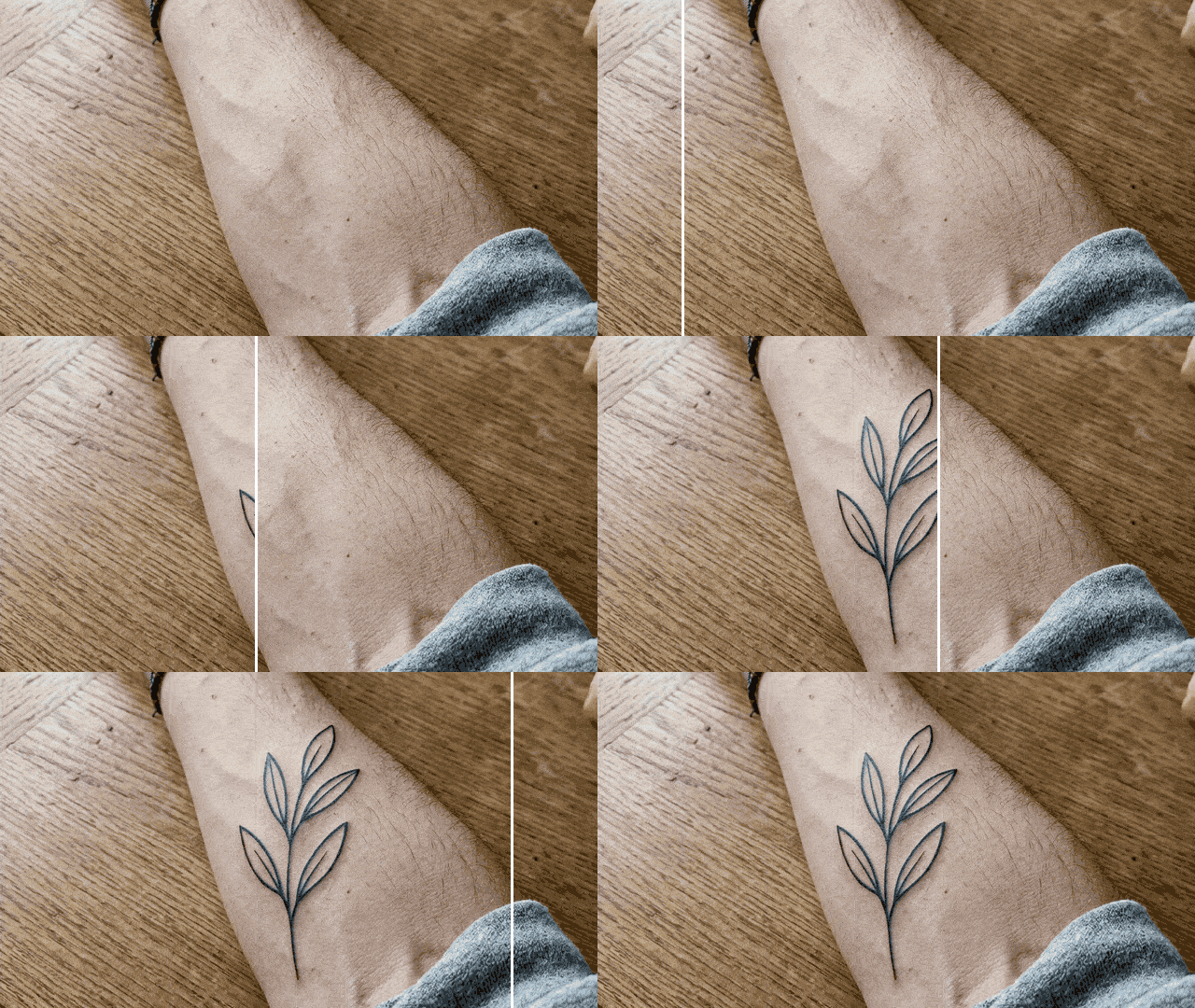
👁 119 reads
You can generate tattoo designs in a free AI chat and immediately try them on a photo of your own arm. We tested this with Gemini 3.1 Flash Image (Nano Banana 2): a sheet of 4 designs, an arm photo, and two virtual try-ons cost us $0.27 via API, and we prepared the outline for the tattoo artist ourselves using brightness thresholding at no API cost. Below you’ll find 7 prompts, before-and-after images, and a list of what tattoo generators don’t know about skin.
Summary
An AI tattoo generator works well as an idea sketchbook and size test on your arm. In our test, 4 out of 4 designs came out clean, and the Polish text “Dasz radę“ (You can do it) had correct Polish characters including “ę“. However, the model didn’t stick to numbers: instead of 3 leaves it drew 5, and a “7 cm” fox took up almost the entire width of the forearm. Dedicated generators cost around $15 per month according to their pricing pages when paid monthly, and on free plans your designs are sometimes public. The final design should still go through a tattoo artist’s hands.
How to Create an AI Tattoo: Design and Try-On Step by Step
The simplest approach is to split the work into two stages: first the design on a white background, then the try-on on a body photo. This way you have a separate design file that you can refine and bring to the studio.
- Generate a sheet of designs (prompt 1) in Gemini or ChatGPT. A sheet with 4 designs is one image, so you save your free limit.
- Crop your chosen design using simple cropping in your phone’s gallery.
- Take a photo of the tattoo location: daylight, skin without lotion, phone perpendicular to your arm.
- Upload both files at once (body photo first, design second) and use prompt 4.
- For the tattoo artist, prepare a clean outline (prompt 6) and save it as PNG.
The arm in the examples is AI-generated and doesn’t belong to a real person. Try designs on your own photos, and on others’ only with their consent. More about photo editing in our guide on how to edit photos with AI.
Our Test: Tattoo Designs from One Prompt
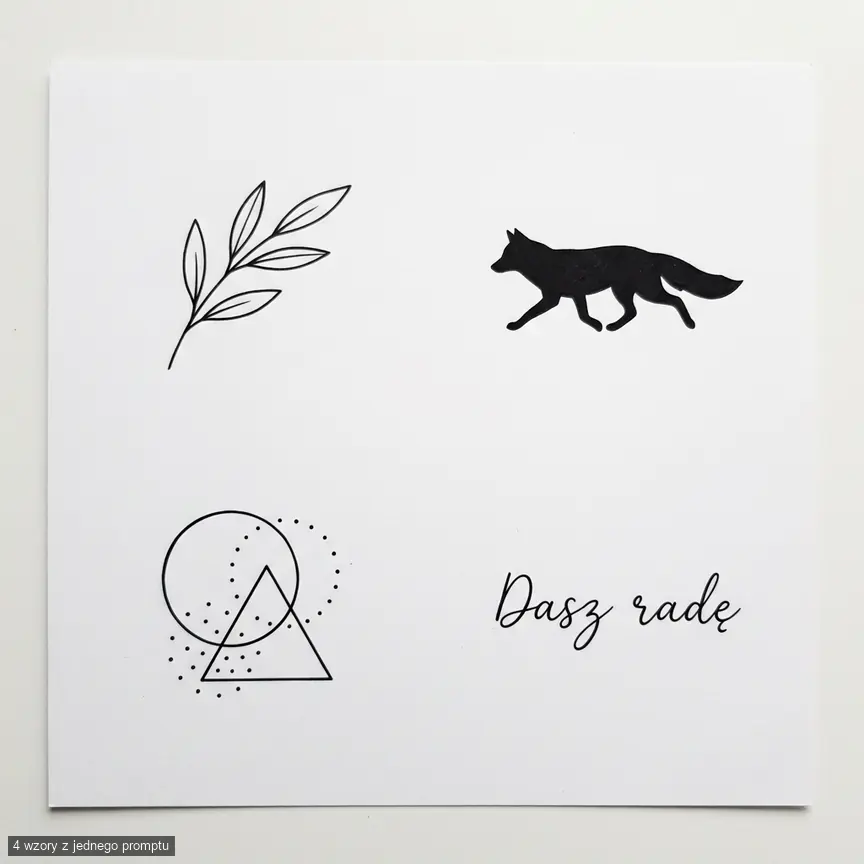
With the first prompt we asked for 4 designs: fineline, blackwork, geometry, and handwritten text (we tested it in Polish). All came out black, with clean lines and no gray, and the text has correct Polish characters. However, the model showed them like a photo of a sheet on a table, with a slight shadow, so before sending to the tattoo artist we had to clean the background.
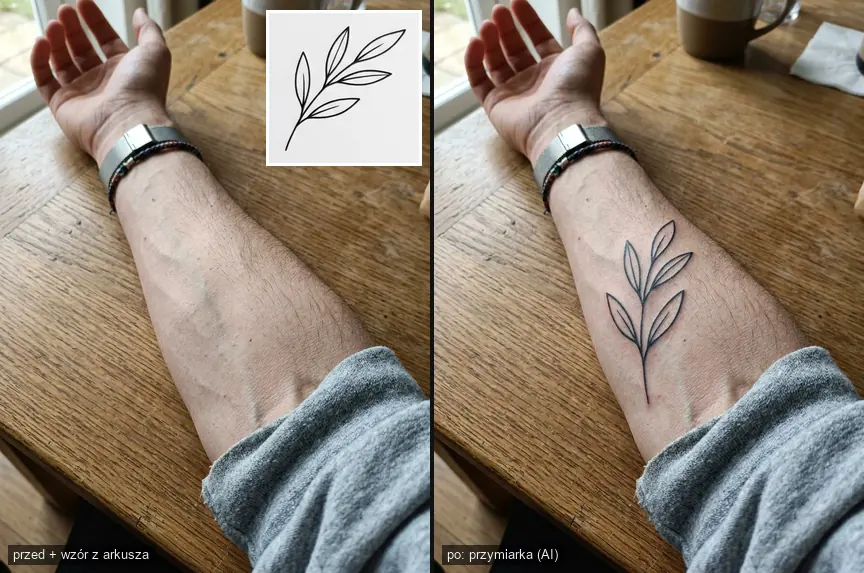
Then we cropped the branch from the sheet and sent it together with the forearm photo for try-on. The design curved along with the arm, and the skin retained hairs and veins. However, the model redrew the leaf arrangement, so the tattoo on the arm isn’t a 1:1 copy of the design.
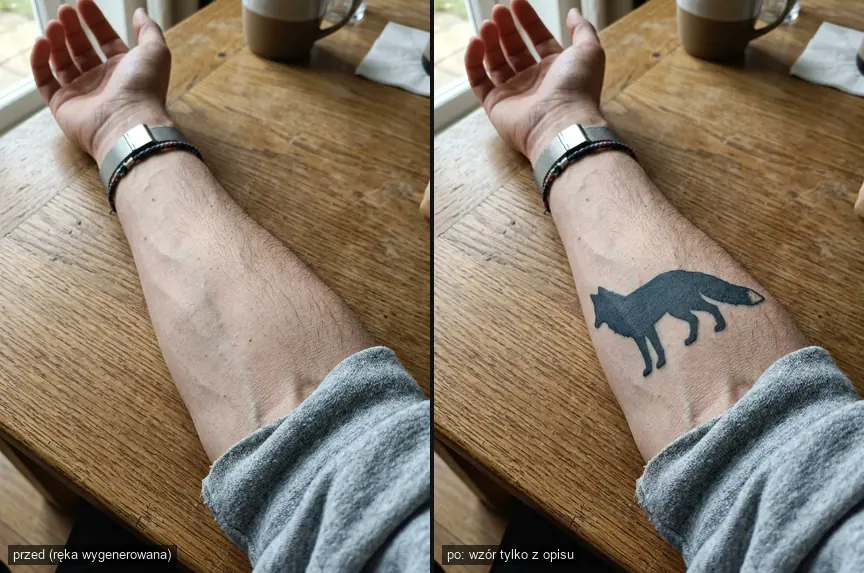
We did the second try-on without a file, using only description. The fox came out like healed ink, gray-navy, but was larger than the requested 7 cm, had a white tail tip despite “black fill” and a different silhouette than the fox from the sheet. Always provide a specific design in a file.
Tattoo Prompts (Copy-Paste Ready)
Paste them into Gemini or ChatGPT. We tested prompts 1, 4, and 5 on the Nano Banana 2 model, we didn’t test the others. Prompts 1-3 create designs, prompts 4-5 do try-ons, 6-7 help prepare files.
1. Sheet of 4 Designs
Purpose: quick style overview within free limit. Watch out for: the model treats numbers (leaves, dots) loosely.
Prompt to copy:
Sheet of 4 tattoo designs on white background, black ink, each design separate, even spacing, flat view like a sheet for tattoo artist: 1) fineline: thin olive branch with three leaves, 2) blackwork: fox silhouette with black fill, 3) geometry: composition of circle, triangle and dots, 4) handwritten text "You can do it" in thin line. Clean outlines, no gray shading, no background, no skin, no additional text.
2. Single Fineline Design with Symbol
Purpose: small, delicate tattoo for wrist or collarbone. Watch out for: lines thinner than in the image won’t survive years, which we discuss below.
Prompt to copy:
Design a small fineline tattoo: [your motif, e.g. swallow over wave]. One continuous, thin black line of even thickness, no shading, no fills, white background, centered design. Design should be readable at 5 cm size, so no fine details smaller than 1 mm.
3. Text Design
Purpose: name, date, short phrase. Watch out for: check letter by letter before anything goes on skin.
Prompt to copy:
Tattoo text: "[your text]". Show it in 3 fonts side by side: handwriting, thin serif, typewriter font. Black on white background, no ornaments. Keep exact letter case. Don't add anything below each version.
4. Design Try-On from File
Purpose: checking size and placement. Watch out for: upload body photo first, then design, and compare whether the model redrew details.
Prompt to copy:
Apply the design from the second image as a fresh tattoo on the forearm from the first photo. Size about 8 cm length, positioned along the arm. Design should curve with the skin and arm, ink should be slightly embedded in skin, preserving pores and hairs. Don't change the arm, background or lighting.
5. Try-On from Description Only
Purpose: when you don’t have a design yet and want to see just the idea. Watch out for: the model guesses size in centimeters, in our test it exaggerated.
Prompt to copy:
Add on the forearm from this photo a healed blackwork tattoo: fox silhouette with black fill, height about 7 cm, placed in the center of the forearm. Tattoo should look like it was done a year ago, no redness, fitted to the arm's curve and lighting. Don't change anything else.
6. Clean Outline for Tattoo Artist
Purpose: file for thermal transfer paper (stencil). Watch out for: the tattoo artist will refine the outline anyway, because they know what needle they’ll work with.
Prompt to copy:
Convert this design to a clean outline for tattoo stencil: only black lines of one thickness, no gray, no shadows, no paper texture, pure white background. Close all broken lines. Don't change the shape or proportions of the design.
7. Design from Pet Portrait
Purpose: memorial tattoo from your own photo of a dog or cat. Watch out for: show the result to a tattoo artist, because too much fine fur in a small size will blur into a blob.
Prompt to copy:
Based on the photo of my dog, create a tattoo design: dog's head in fineline style with a few fur lines, black ink, white background instead of photo background. Keep characteristic features: ear shape, patch layout, muzzle expression. Target size 6 cm.
More examples of prompts that produce useful graphics are collected in our article about 30 prompts for ChatGPT Images 2.0.
How to Prepare a File for the Tattoo Artist
From the sheet we cropped the branch and text, then converted them to pure black without gray (simple brightness thresholding, you can do the same in any editor). We mirrored the text because that’s how the stencil looks when the tattoo artist applies it to skin. However, send the studio the normal version unless the artist asks otherwise.
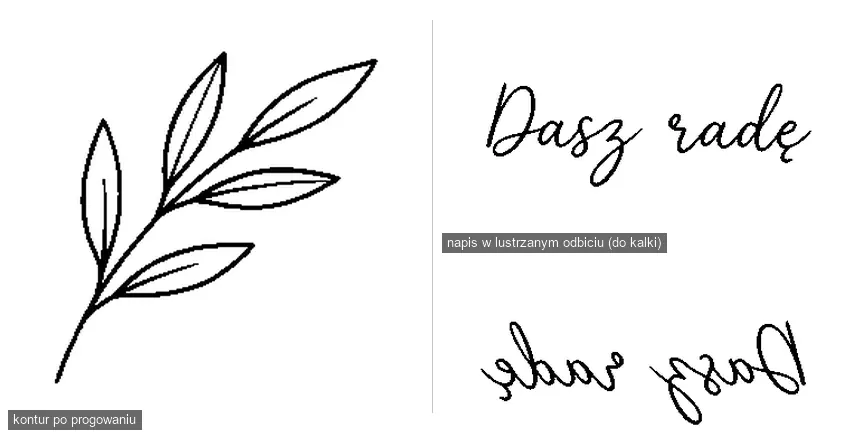
- Save the design in PNG, minimum 2000 px on the longer side (in chat ask for higher resolution or use upscaling).
- Provide target size in centimeters and location on body.
- Outline and simple corrections you can do in a free editor, for example in Canva (we write about the free plan in the article Canva for free).
Tattoo Generators: Prices and Limits
| Tool | Price | Free tier | Design privacy |
|---|---|---|---|
| Gemini / ChatGPT | $0 on free plan | daily limit not specified numerically | designs don’t go to public gallery; data use depends on account settings |
| BlackInk AI | $15/month, $39.99/quarter, $72/year | 3 credits, 1 body try-on | on free plan all designs are public and may disappear after 30 days |
| TattoosAI | $14.99/month or $4.99/month when paid annually ($59.88/year) | free trial | according to the service, designs on basic plan go to public gallery |
Dedicated generators have ready-made styles and templates by body location, but a free chat will also do the idea and try-on. This is our opinion: a paid generator makes sense only when you design regularly, for example as a tattoo artist.
What AI Doesn’t Know About Tattoos
- How ink behaves in skin. Pigment migrates over time and lines widen, and with too-deep insertion a blurred shadow forms (so-called blowout). This is also described in dermatological literature.
- How thin lines age. The AI image shows the day after the session. Due to ink migration, very fine details lose sharpness over time, so for a small design ask the tattoo artist about minimum sensible size.
Do You Own the AI-Generated Design?
The U.S. Copyright Office in a report from January 29, 2025 determined that the prompt alone doesn’t make the user an author, and protection covers only human contribution. In practice this means, in our view, that no one will forbid you from tattooing an AI design, but you also can’t forbid others from using a similar one. Don’t ask AI to copy specific tattoo artists’ work, because that’s their portfolio and their livelihood. Playing with photo style transfer is described in our prompts for 80s-style photos.
Frequently Asked Questions
Where can you generate tattoo designs for free?
In Gemini or ChatGPT on a free account. One prompt can produce a sheet with several designs, which saves your daily image limit.
How can you see a tattoo on your arm before getting it done?
Upload to chat a photo of your arm and the design file, then ask to apply the design with specified size. Compare the result with the file, because the model can change details.
Does AI correctly write text for tattoos?
In our test with Polish text it came out correctly, but check every letter. A mistake in text on skin is later removed with laser.
How much does an AI tattoo generator cost?
AI chat is free. Dedicated generators like BlackInk AI and TattoosAI cost around $15 per month according to their pricing pages.
Sources and verification date
Prices
- BlackInk AI pricing
- TattoosAI pricing. Copyright: U.S. Copyright Office, AI report, part 2 (Jan 29, 2025). Ink migration: case description in PubMed Central. Images: Gemini 3.1 Flash Image via OpenRouter. Verified September 28
- 2026
More on this from QUANTSLANT
 guides·Replit in Practice: Learning to Code, Prototypes & Business ToolsReplit works best when you need to go from idea to working app fast, without configuring computers or servers: learning to code, prototypes, internal tools.