What Will Our Baby Look Like? AI Prompts & Limits
AI can show you a baby picture in seconds, but it's a visual game, not genetics. We tested 6 prompts in Gemini and ChatGPT on two fictional faces.
👁 116 reads
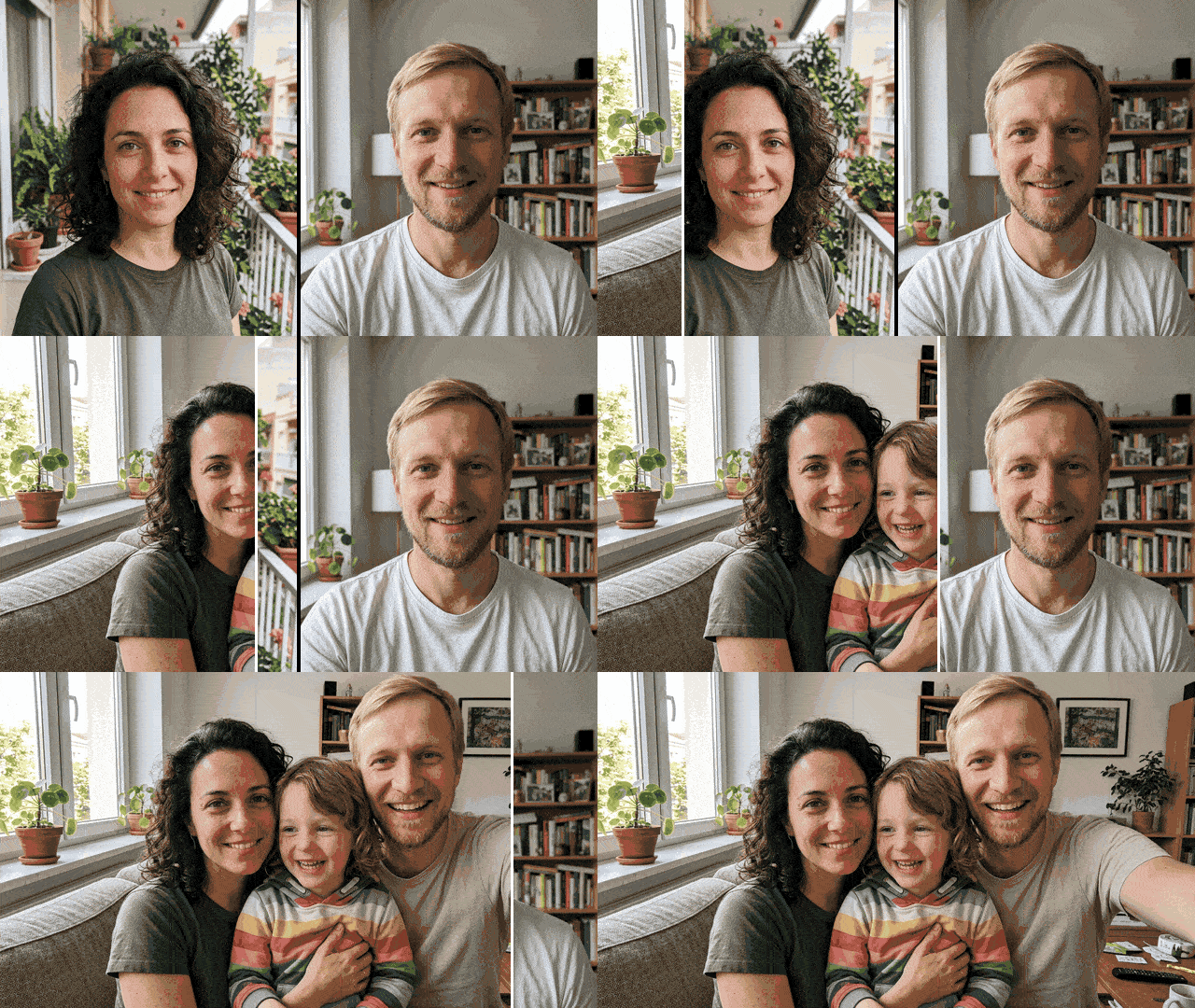
What will our baby look like? AI will answer that question with a picture in seconds, but it’s a game, not genetics. We tested it in Gemini 3.1 Flash Image (Nano Banana 2) on two fictional, AI-generated adults and paid 0.27 USD for 4 images through the API. Below you’ll find 6 prompts (we tested them in Polish), test results, and an explanation of why no generator can show you your real future child’s face.
Summary
Gemini (and similarly ChatGPT) will blend two adult photos into a believable child portrait, but it’s a visual averaging of two faces, not inheritance. It’s a game, not genetics. In our test, the “18 years” version looked almost like one parent, and the “12 years” frame showed someone noticeably older. One paid “baby generator” app costs 3.99 USD per week according to the App Store, and according to its privacy card, it collects photos linked to identity. For fun between two people, a free chat is more than enough. That’s our opinion. Only upload your own photo and your partner’s photo if that person agrees.
How to do it in Gemini and ChatGPT
You need two photos: yours and your partner’s, both taken straight-on, in daylight, without beautifying filters. Filters smooth out features, and the model builds the child’s face precisely from features, so results from filtered photos usually come out more “doll-like”.
- Open Gemini or ChatGPT and add both photos in one message.
- Paste one of the prompts below. Start with the grid (prompt 2), because one image shows four stages.
- If the result looks like a copy of one person, add: “more features from the second person: [hair color, nose]”.
Neither Google nor OpenAI publishes the daily image limit on free accounts. Reports from 2026 mention around 2-3 images per day on ChatGPT Free. We covered general photo editing principles in our guide on how to edit photos with AI.
Our test on two fictional people
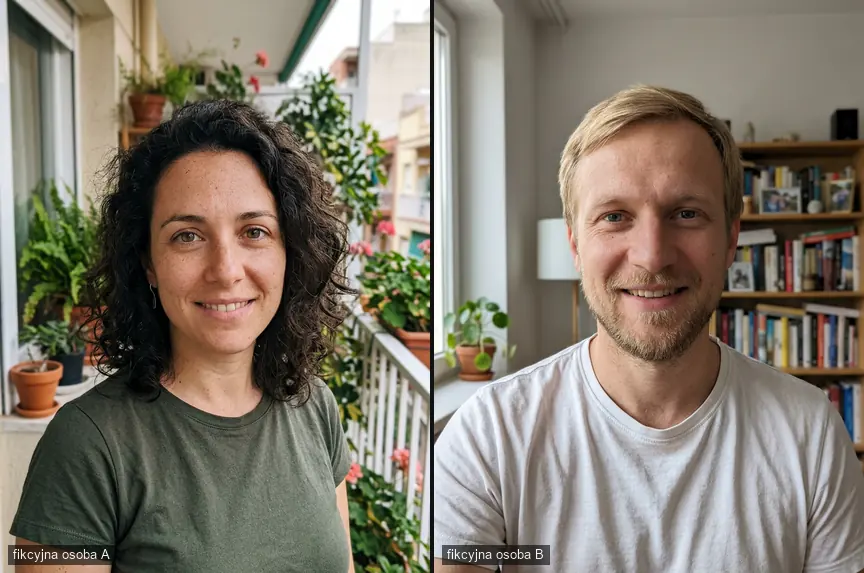
Both people in the photos below are AI-generated and do not exist. We did not use anyone’s real photos. We deliberately generated them to be clearly different: person A has dark curly hair, hazel eyes and freckles, person B has light straight hair, blue eyes and a wide nose.
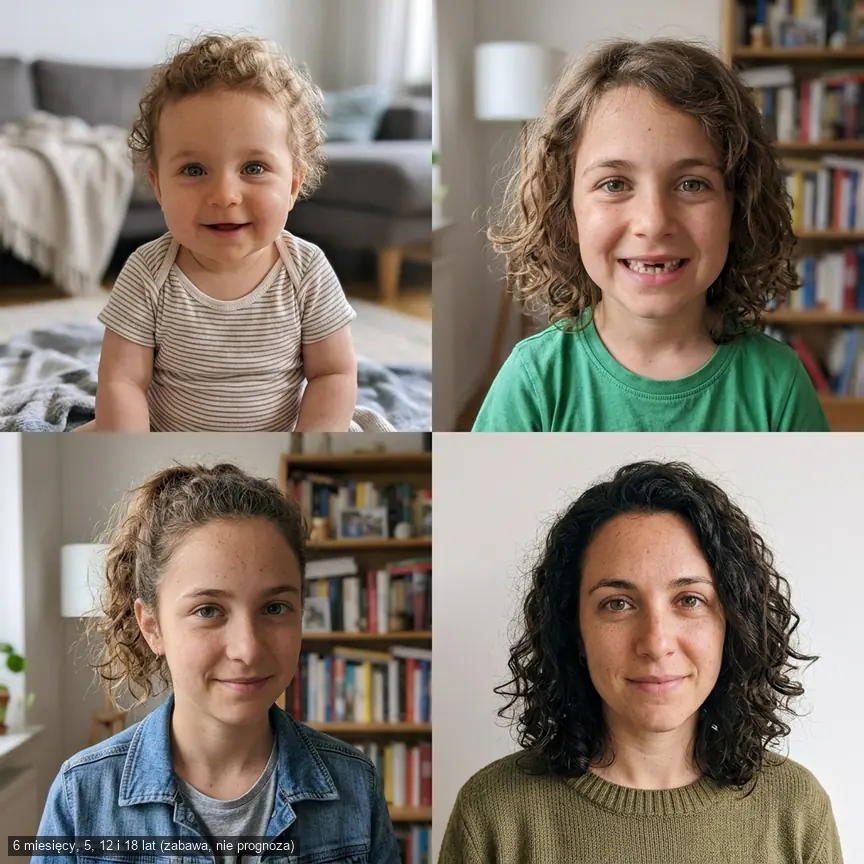
From both portraits we requested a grid of four life stages. We did not specify gender, and the model chose a girl on its own. The infant has light brown curls and light eyes, so it does indeed mix features from both people. With each successive frame the hair darkens, and the “18 years” version looks almost like person A, only younger. The “12 years” frame shows someone closer to twenty. So the model maintains neither a “fifty-fifty” proportion nor the age.
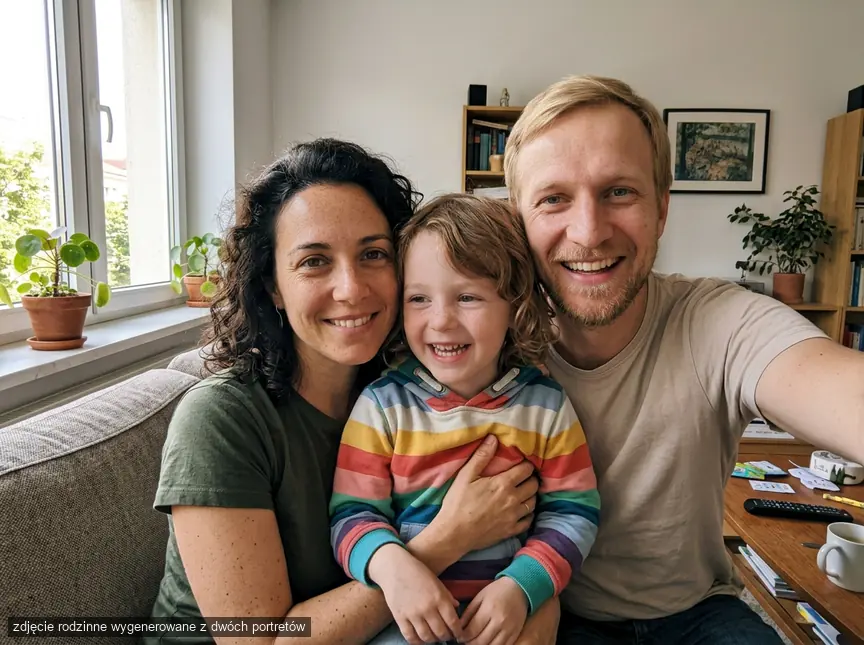
With prompt 3 from the list below, we made a regular family photo on a couch. The adults’ faces remained recognizable, but person B got a beige shirt instead of white, and the whole thing came out as a selfie, though we didn’t ask for that.
Prompts to copy
Send each prompt together with two adult photos, in Gemini or ChatGPT. We tested prompts 2 and 3 on the Nano Banana 2 model; we did not test the others - they are variants of the same instructions. Do not upload photos of children or faces of people who have not consented.
1. Infant
What for: simplest version of the game. Watch out: models like “advertising” babies, so ask for a regular phone photo.
Prompt to copy:
Based on the two attached photos of adults, show for fun what their shared child might look like at around 6 months old. Mix features from both: hair color and type, eyes, nose shape. Regular phone photo at home, daylight, ordinary onesie, no studio retouching. No text.
2. Four stages: 6 months, 5, 12 and 18 years
What for: one image instead of four, saves your free limit. Watch out: in our test, age and resemblance “went off” in the older frames.
Prompt to copy:
Based on the two attached photos of adults, show for fun what their shared child might look like, in a 2x2 grid: 1) infant around 6 months, 2) child around 5 years, 3) teenager around 12 years, 4) person around 18 years. Mix features from both equally: hair color and type, eyes, nose, freckles. Same character in each frame, ordinary clothing, neutral home background, natural photo like from a family album. No text.
3. Family photo
What for: keepsake picture for the two of you. Watch out: check whether the model changed your faces; in our case it changed clothing.
Prompt to copy:
Make a regular family phone photo: these two people from the attached photos are sitting on a couch in a living room, and between them sits their approximately five-year-old child with mixed features from both. Everyone is dressed casually and smiling, light from a window, no studio posing. Leave the adults' faces as they are in the photos. No text.
4. Siblings
What for: showing that the same two faces produce different results. Watch out: this is the best proof that the generator randomizes, not predicts.
Prompt to copy:
Based on the two attached photos of adults, show for fun two of their children aged around 4 and 7, standing next to each other in a garden. Each child should have a different set of features from the parents: one more from the first person, the other more from the second. Regular phone photo, no text.
5. Family photo in 1980s style
What for: playing with a period album. Watch out: the model sometimes ages the adults’ faces too; add that it should not change them.
Prompt to copy:
Make a family photo in 1980s style: these two people from the attached photos and their approximately five-year-old child with mixed features from both, wall unit in the background, period clothing, colors of a faded print with slight grain. Adults' faces unchanged. No text.
You’ll find more prompts in this aesthetic in our article about 1980s-style photos with AI.
6. More from one person
What for: correction when the result looks like a copy of one parent. Watch out: paste in the same chat so the model remembers the previous image.
Prompt to copy:
Correct the previous image: the child looks too much like the first person. Take from the second person hair color, eye color and nose shape, and from the first leave only curly hair and freckles. Age, clothing and background unchanged.
If you want to write such corrections yourself, our guide to creating your own photo transformation prompts will help.
Why this is not a genetic prediction
An image generator does not know your genes, only the pixels of two photos. It does the same thing as in our test: mixes visible features and draws the rest so the face looks believable. Image generation is random, so the same prompt sent a second time usually produces a different child.
Real inheritance is more complex. Even eye color depends on several genes: the American medical library MedlinePlus lists OCA2 and HERC2 on chromosome 15 as the main ones, and several other genes have a smaller influence, which is why results can be surprising. A child can have features that neither parent shows in a photo, for example from grandparents. A photo also won’t show how the face will change with age. Our opinion: the more realistic the image, the easier it is to forget it’s randomization, so it’s better to say that out loud.
Baby generator apps: prices and risks
| Tool | Price | What happens to photos |
|---|---|---|
| Gemini / ChatGPT | 0 USD on free plan | depends on activity and data settings in account |
| AI Baby Generator: Baby AI (App Store) | 3.99 USD/week or 29.99 USD/year | according to App Store: photos linked to identity, device identifiers used for tracking |
| FutureBaby.ai (website) | basic version free, advertises paid Deluxe plan | according to the service, uploaded photos are deleted after generation |
Some apps in Google Play (e.g. Future Baby AI) start with a 3-day trial that automatically converts to a paid weekly plan. A plan at 3.99 USD per week is over 207 USD per year if you forget to cancel it. You cancel it in App Store or Google Play subscription settings, not by deleting the app.
Privacy: whose photos you may upload
- Upload your own photo, and your partner’s photo only when that person knows about it and agrees. A face photo is sensitive data, and the app may store it.
- Do not upload photos of friends “as a joke”, ex-partners, or public figures.
- Do not post results online with a caption suggesting it’s a real child or a real prediction.
- If a couple is expecting a child or trying to conceive, ask whether they even want this kind of game. For some people it’s a sensitive topic.
Frequently asked questions
How to check what our baby will look like, for free?
Upload two photos to Gemini or ChatGPT and use a prompt from this article. Remember that the result is a game, not a prediction.
Is an AI baby generator accurate?
No. It averages visible features of two faces, and on the next run usually produces a different result. Inheritance of traits is much more complex.
What app will show our future baby?
One paid app from the App Store costs 3.99 USD per week. You’ll get a similar effect in a free AI chat, without creating another account.
Can I upload my partner’s photo without asking?
No. It’s another person’s image and facial data, and the app may store it. Ask for consent first.
Sources and verification date
Eye color genetics
- MedlinePlus Genetics. Prices and privacy: AI Baby Generator: Baby AI in App Store
- FutureBaby.ai
- Future Baby AI in Google Play. ChatGPT Free limit: ChatGPT image generation limits 2026. Images: Gemini 3.1 Flash Image via OpenRouter. Verified September 28
- 2026
More on this from QUANTSLANT


 guides·Halloween AI Trend: Ghost Selfie Step-by-Step + PromptsCreate a 2000s-style selfie with a ghost in the doorway behind you using Gemini or ChatGPT. We tested the viral Halloween AI trend with 8 prompts.